Helpline Tel.No. :U.K. 08700 100 076 R.O.I. 01289 8333
35
Answering System
Incoming/Memo Messages
Incoming messages and memo messages are stored in chronological order. New
messages cannot be recorded when “Memory full” is heard. We recommend you erase
unnecessary messages after each playback to leave more time for recording new
message(s).
If new message(s) is/are recorded, icon on the handset display will flash. When the
memory is full, it will flash faster.
If you set the clock and current date then set the answering system ON, a synthesized
voice announces the day and time incoming/memo message was recorded after
playback.
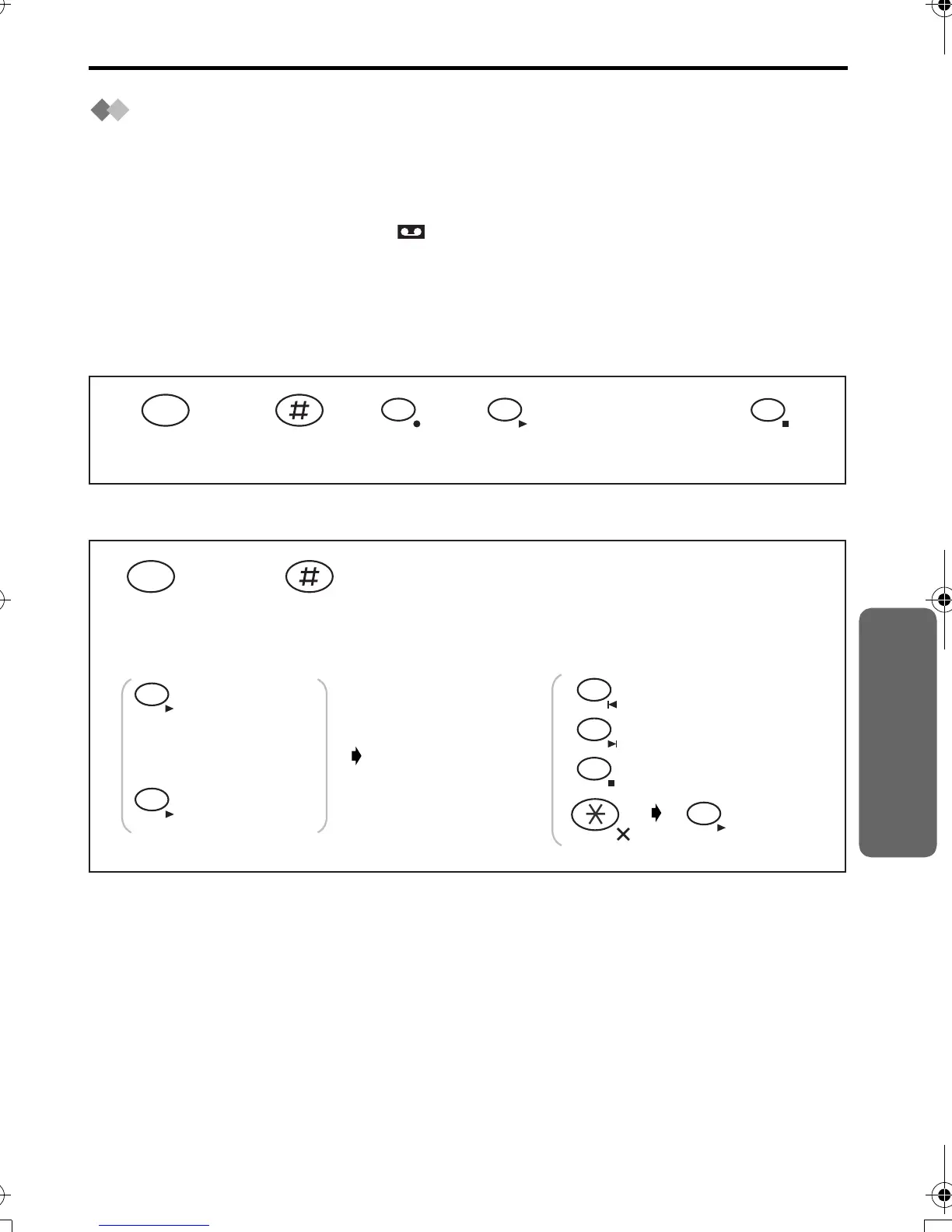
Recording a Memo Message
Playback New/All Incoming/Memo Message(s)
*1 The display starts to show the length of the recording time.
*2 If you press within 5 seconds from the start of playback, the previous message will be
played. If you press after 5 seconds from the start of playback, the current message
will be played.
*3 The next message will be played if recorded.
*4 If you erase a message when there is more than one message in memory, the next
message will begin playback.
Talk clearly
to the
microphone.*1
7
4
9
345 6
Press
INTERCOM.
INT
12
Playback new
message(s).
(During
playback
a message)
Playback all
messages.
Repeat*2
Skip*3
Stop
Clear one
message.*4
34
1
2
9
4
4
5
OR
ALL
Press
INTERCOM.
INT
12
Answering System
420E.book Page 35 Thursday, March 20, 2003 7:41 PM












 To Next Page