Helpline Tel.No. :U.K. 08700 100 076 R.O.I. 01289 8333
17
Cordless Telephone
Phonebook
Hot Key
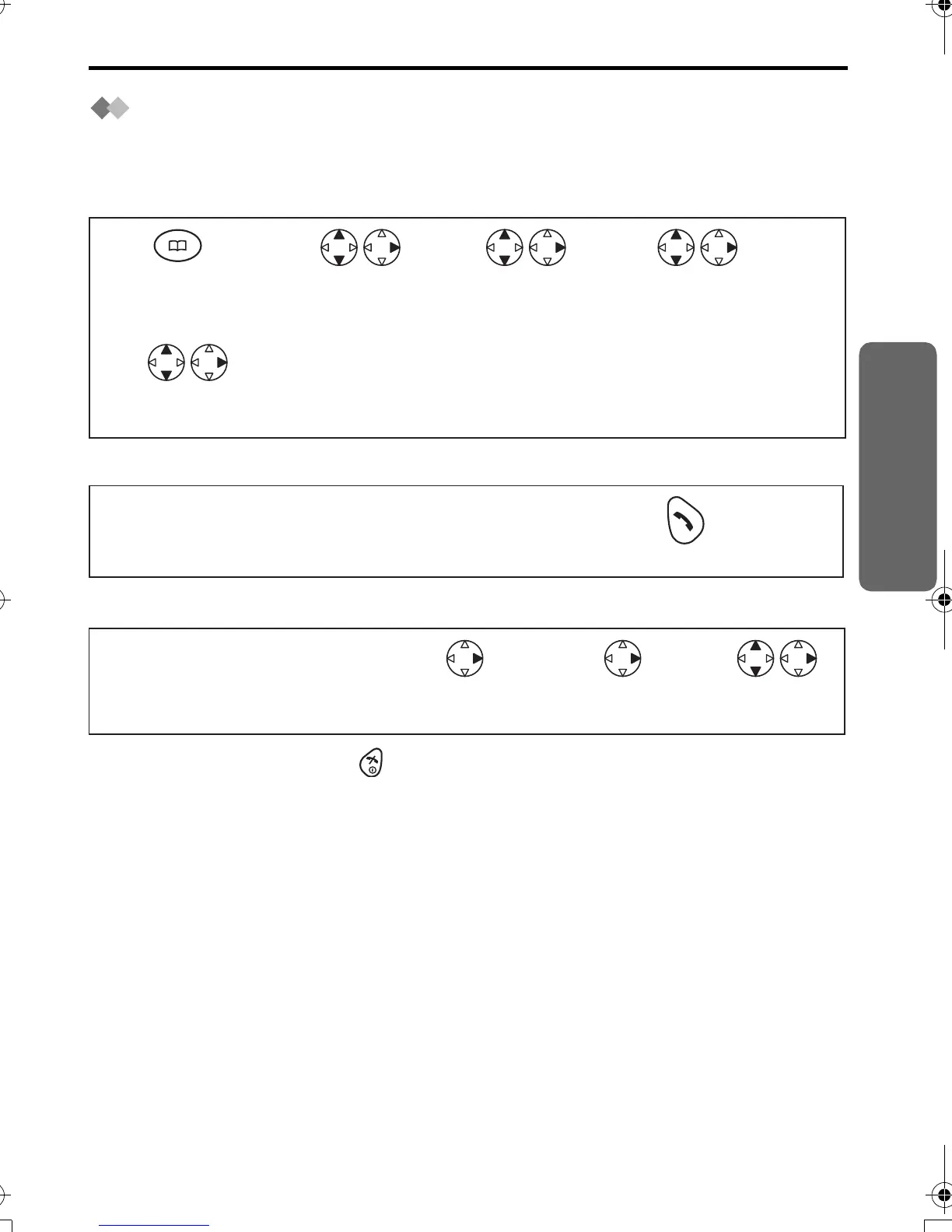
You can assign the dialling buttons 1 through 9 as hot keys. You can choose 9 phone
numbers from the phonebook.
Registering a Phone Number as a Hot Key
Dialling with Hot Key
Clearing the Hot Key Registration
•
To exit the operation, press any time.
*1 If there is no item stored in the phonebook, the display shows "NO ITEM".
*2 The number is flashing if the dialling button is already assigned as a hot key.
*3 Phonebook registration will be remained even hot key registration is cleared.
Press
PHONEBOOK.*1
Search/Select
desired item.
Search/Select
"HOT KEY REG".
Search/Select
"YES".
Search/Select
desired dialling
button number.*2
1
5
23 4
Press and hold the dialling button registered as a hot key.
Press TALK.
12
Press and hold the dialling
button registered as
a hot key.
Press RIGHT. Select "CLEAR". Search/Select
"YES".*3
1234
420E.book Page 17 Thursday, March 20, 2003 7:41 PM







 To Next Page