4.3 Programming the VoIP Gateway Card in the Chicago Office
Getting Started 41
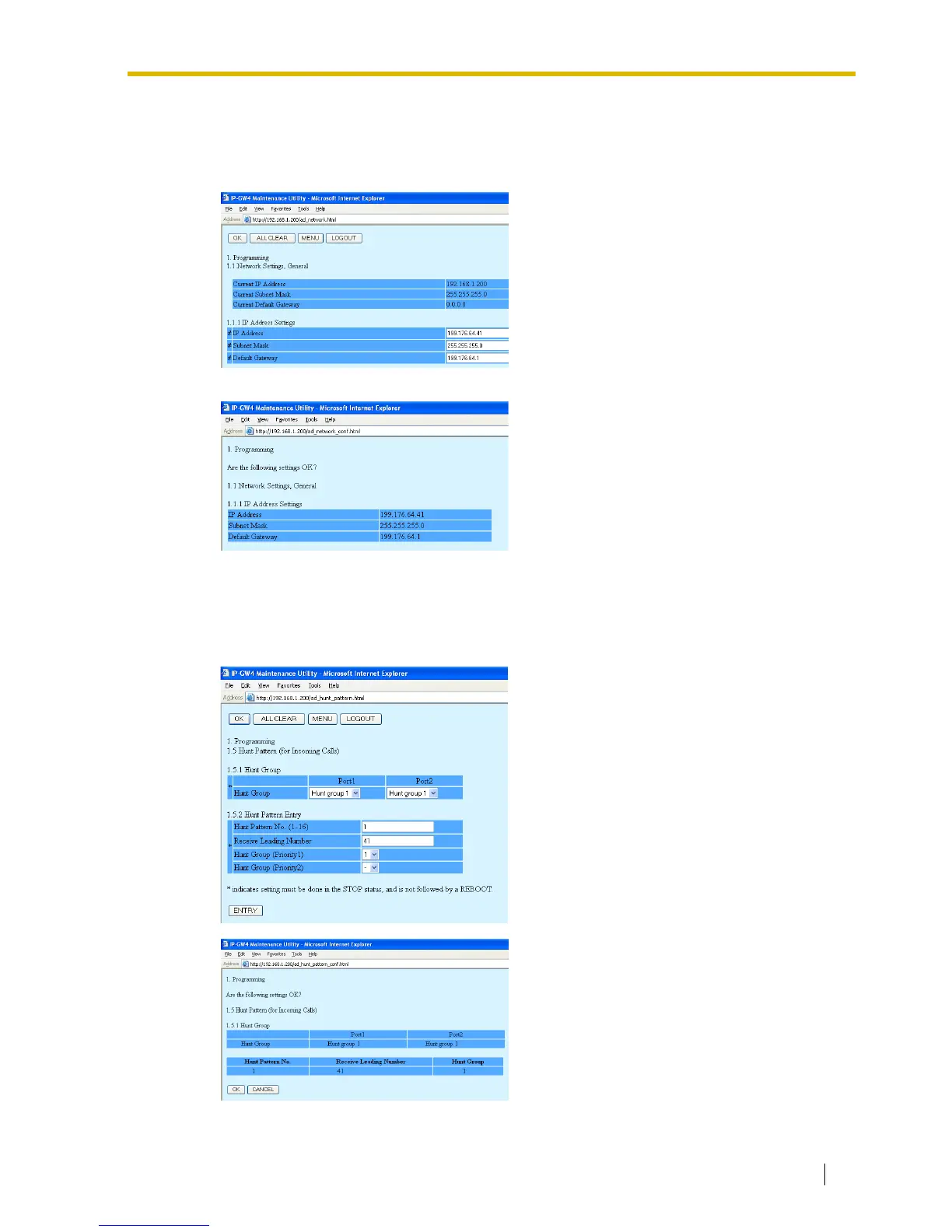
Assigning the IP Address
Note that the card in the Chicago office requires different IP address settings from the card in
the Los Angeles office.
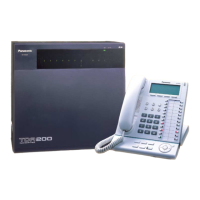
Assigning the Hunt Pattern
Note that the card in the Chicago office requires a different PBX code from the card in the Los
Angeles office.
1. Click 1.1 Network Settings, General in the
main menu.
2.
a. In the IP Address box, type
199.176.64.41.
b. In the Subnet Mask box, type
255.255.255.0.
c. In the Default Gateway box, type
199.176.64.1.
d. Click OK.
3. Confirm your entry, and then click OK.
1. Click 1.5 Hunt Pattern (for Incoming Calls)
in the main menu.
2.
a. In the Hunt Pattern No. box, type 1.
b. In the Receive Leading Number box,
type 41 (PBX code).
c. Click ENTRY.
d. Click OK.
3. Confirm your entry, and then click OK.



 To Next Page