5.1 Programming the PBX in the Los Angeles Office
46 Getting Started
5.1 Programming the PBX in the Los Angeles
Office
This section details the procedure to program the PBX in the Los Angeles office. After the PBX
in the Los Angeles office has been fully programmed, repeat the procedure for the PBX in the
Chicago office with the appropriate setting values (see "5.2 Programming the PBX in the
Chicago Office").
Note
It is assumed that you have already installed the KX-TDA50 Maintenance Console (PC
programming software for the KX-TDA50 PBX) in your PC.
1. Start the KX-TDA50 Maintenance Console
from the Start menu.
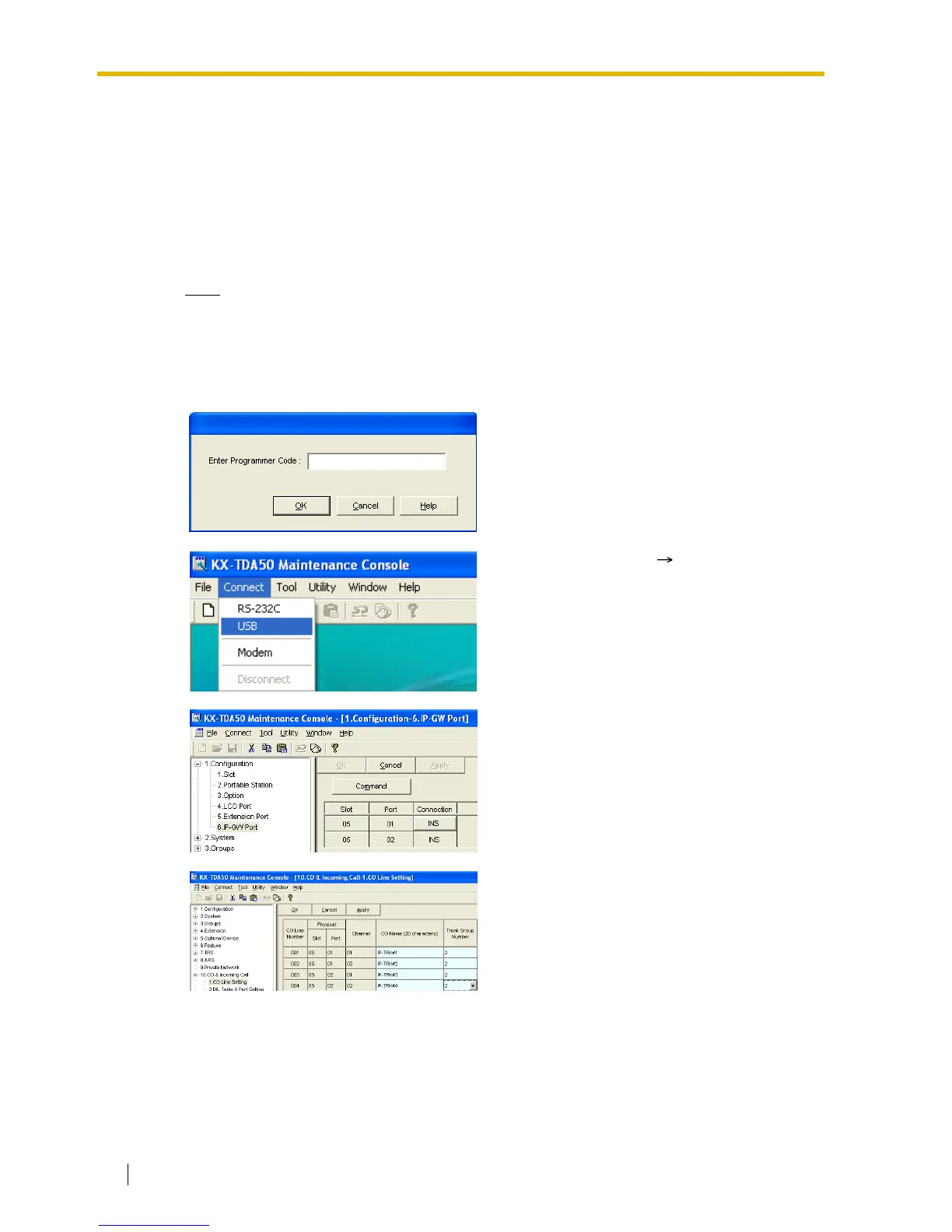
2.
a. Type the Installer Level Programmer
Code (default: INSTALLER).
b. Click OK.
3.
a. Click Connect RS-232C or USB.
b. In the next screen, type the system
password for installer (default: 1234).
c. Click OK.
The program menu appears.
4.
a. Double-click Configuration.
b. Double-click IP-GW Port.
Confirm that ports 1 and 2 are in service
(INS).
5.
a. Double-click CO & Incoming Call.
b. Double-click CO Line Setting.
c. Type the CO Name and assign an
unused Trunk Group Number to be
used for all VoIP gateway trunks (CO
lines).
d. Click OK.



 To Next Page