B2 Programming for the Extension Number Method
68 Getting Started
Programming the PBX in the Chicago Office
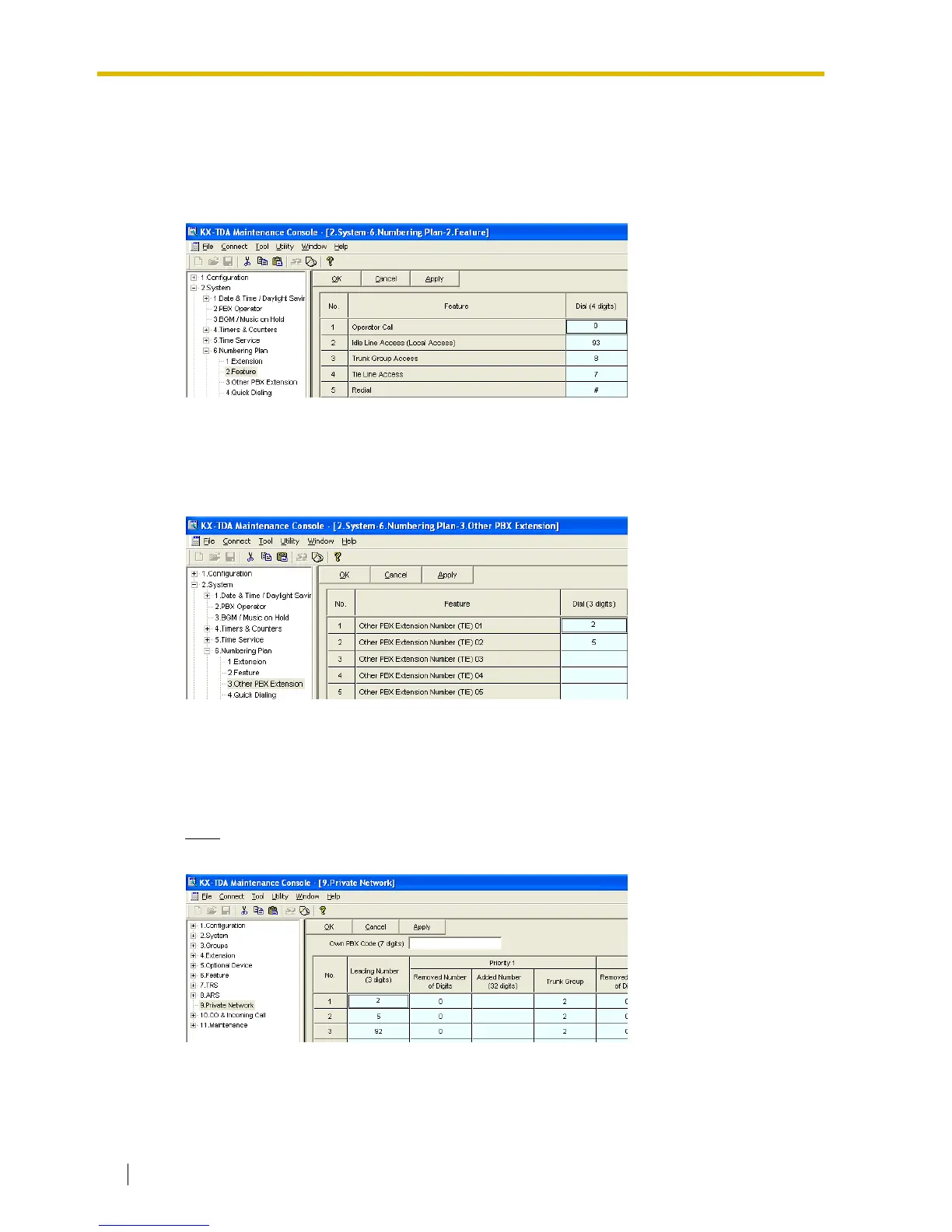
Step 6
Assign the PSTN trunk (CO Line) access number:
In the Idle Line Access (Local Access) box, type 93 (for Chicago office PSTN access).
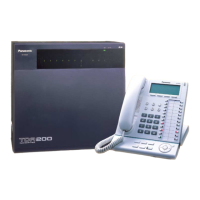
Step 7
Assign the leading number used to reach the extensions of the remote PBX:
In the Other PBX Extension Number (TIE) box (01 and 02), type 2 (for the Los Angeles office
extensions) and 5 (for the Los Angeles office fax extensions).
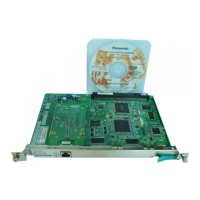
Step 8
Assign the routing information to route calls to the remote PBX:
In the Leading Number box, type 2 (for the Los Angeles office extensions), 5 (for the Los
Angeles office fax extensions), and 92 (for Los Angeles office PSTN access).
Note
Do not set any value in the Own PBX Code box.
After the above step, follow step 8 of the procedure in "5.2 Programming the PBX in the
Chicago Office".



 To Next Page