Entering Characters
You can enter characters and digits using the dialling keys.
The available character entry modes are Alphabetic (ABC), Numeric
(0-9), Greek ( ), Extended 1 ( ), Extended 2 ( ).
For available characters, see "Character Mode Table" (page 38).
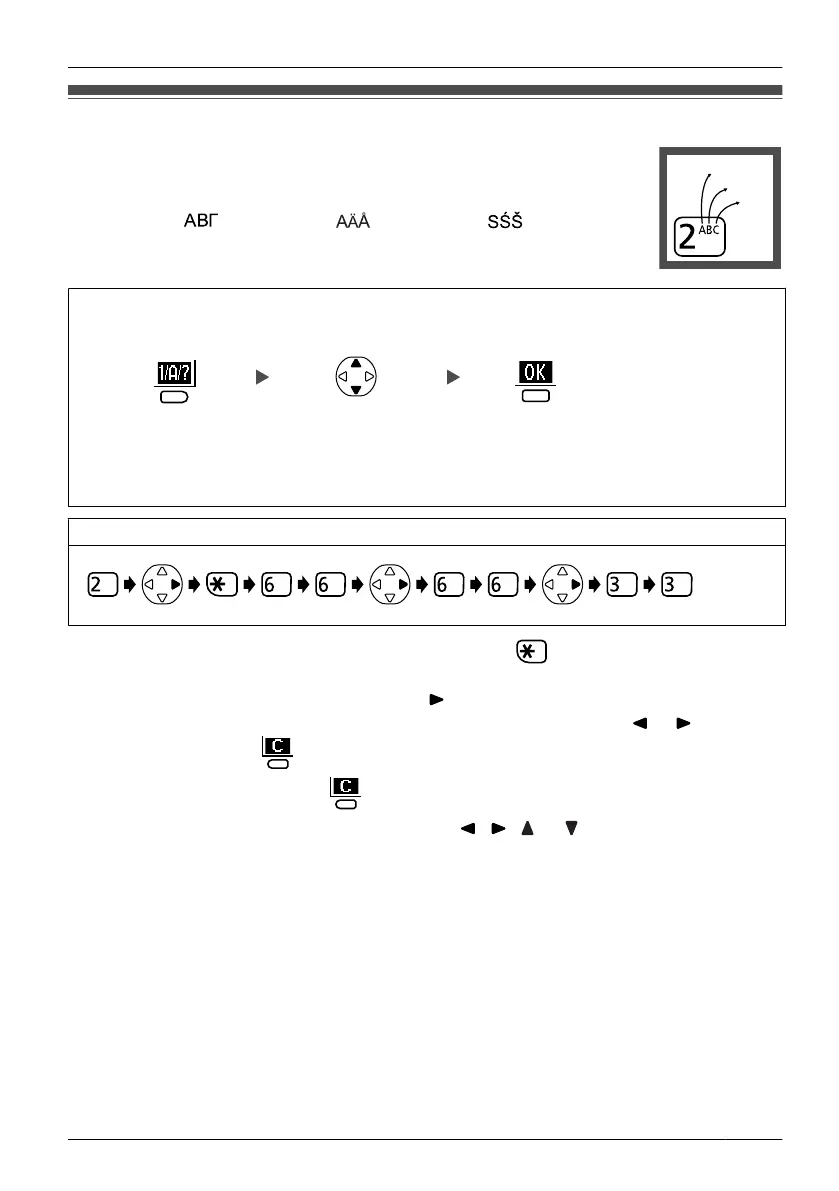
During character entry for storing and editing an item in the Phonebook
Press the right
soft key.
Select the desired
character entry mode.
Press the
centre soft key.
Example: To enter "Anne" in Alphabet Mode.
• To switch between uppercase and lowercase, press .
• To enter a character located on the same dialling key as the previous character, move
the cursor by pressing the Navigator Key , then enter the desired character.
• If you enter
a different character by mistake, press the Navigator Key
or to highlight
the character, press to delete it, then enter the correct character.
• To clear an entire line, press for more than 1 second.
• To move the cursor, press the Navigator Key , , or .
37
Using the Handset Phonebook












 To Next Page