Installation
Battery Installation
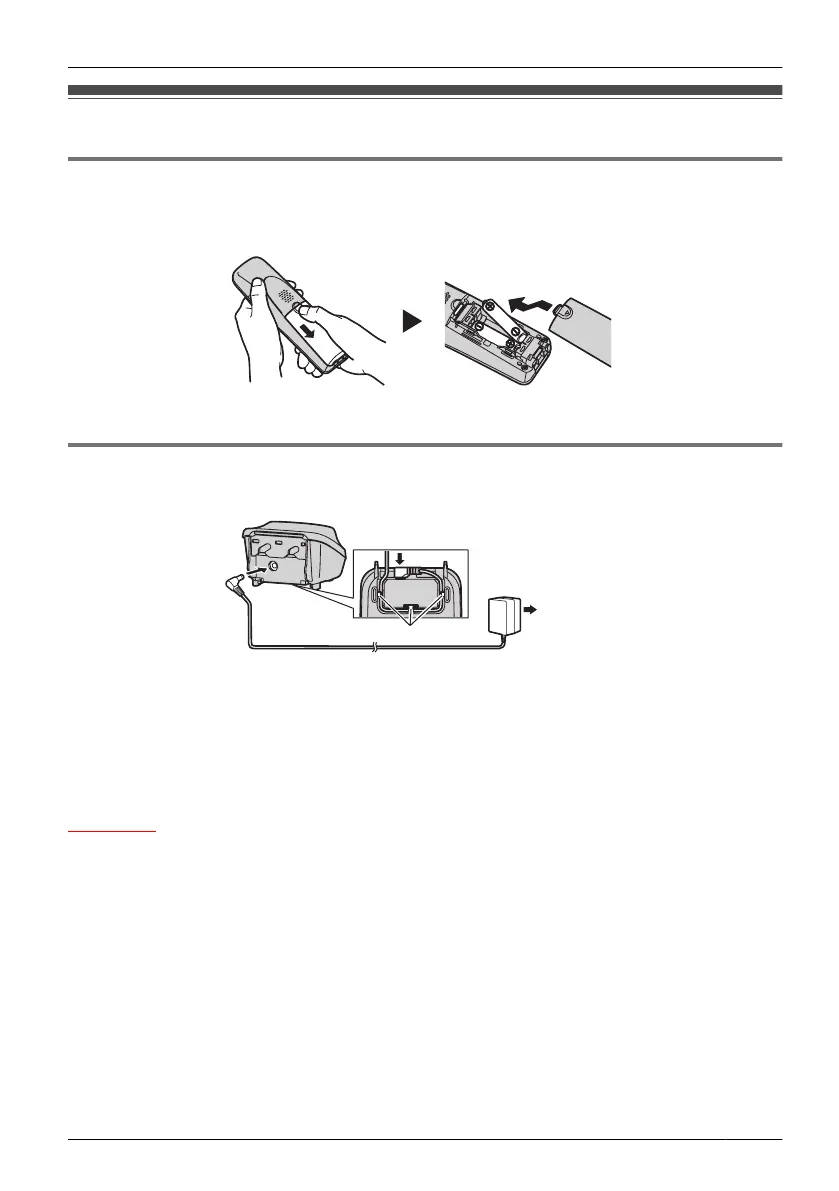
Open the battery cover, insert the batteries, and close the cover as indicated below.
Charger Connection
Connect the AC adaptor to the charger.
• The AC adaptor should be connected to a vertically oriented or floor-mounted AC outlet.
Do not connect the AC adaptor to a ceiling-mounted AC outlet, as the weight of the
adaptor may cause it to become disconnected.
• Fasten the AC adaptor cord to the cord holder.
•
Use only the included Panasonic AC adaptor. (See "Accessories (included)" on page
4.)
WARNING
• To reduce the risk of fire or electric shock, do not overload AC outlets and extension
cords.
• Do
not bundle the charger’s AC adaptor cord with the power cords of machines located
nearby.
• Completely insert the AC adaptor/power plug into the AC outlet. Failure to do so may
cause electric shock and/or excessive heat resulting in a fire.
5
Before Initial Use












 To Next Page