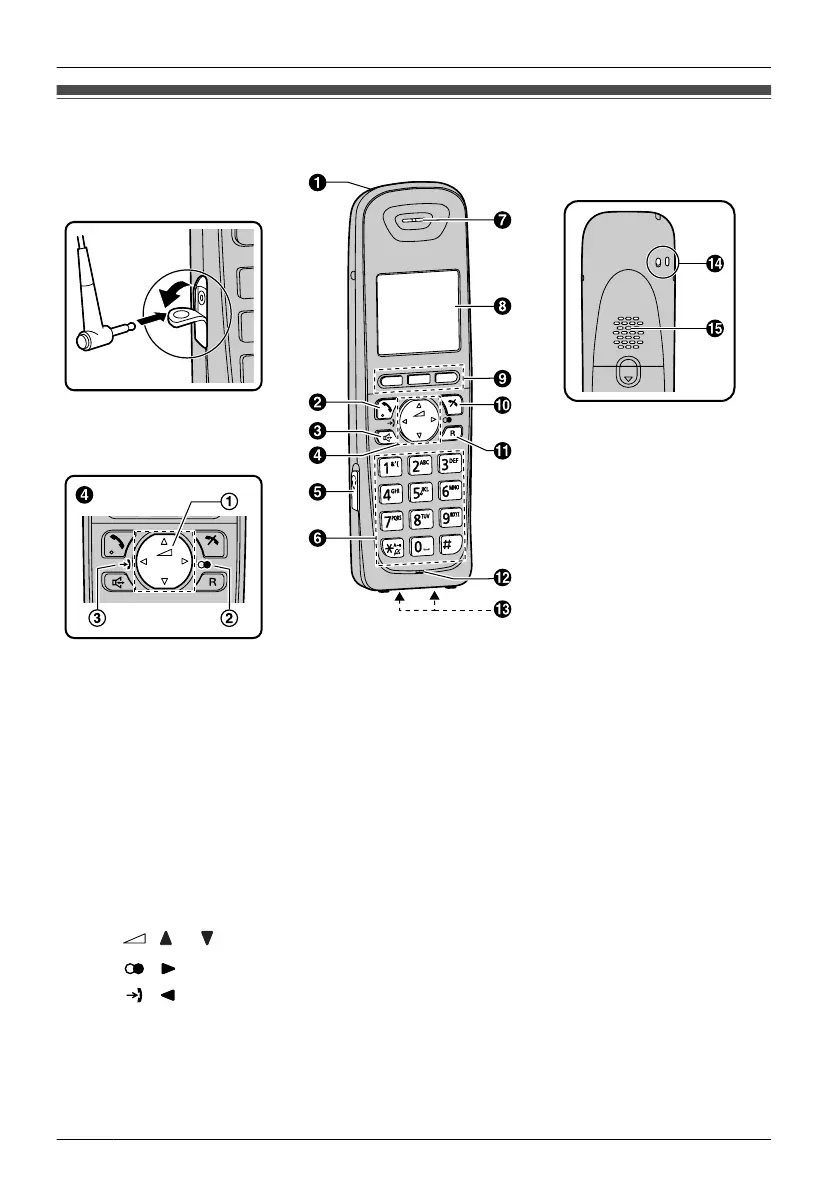
Location of Controls
The headset is an optional
accessory.
Open the cover.
[Back View]
A Ringer/Charge Indicator
B TALK
Used to make or answer calls.
In Hands-free mode, pushing this key switches to Receiver mode.
C SP-PHONE (Speakerphone)
Used to make or answer calls. You can talk with the other party through the speaker
using Hands-free mode.
In Receiver mode, pushing this key switches to Hands-free mode.
During a conversation using a headset, Hands-free mode does not work.
D Navigator Key
Used to scroll through various lists and items.
A
( or : Volume): Used to adjust the receiver or speaker volume while talking.
B ( : Outgoing Call Log): Used to view the Outgoing Call Log.
C
( : Incoming Call Log): Used to view the Incoming Call Log.
E Headset Jack
F Dial Keypad
G Receiver
8
Before Operating the Handset
Before Operating the Handset












 To Next Page