Error Messages
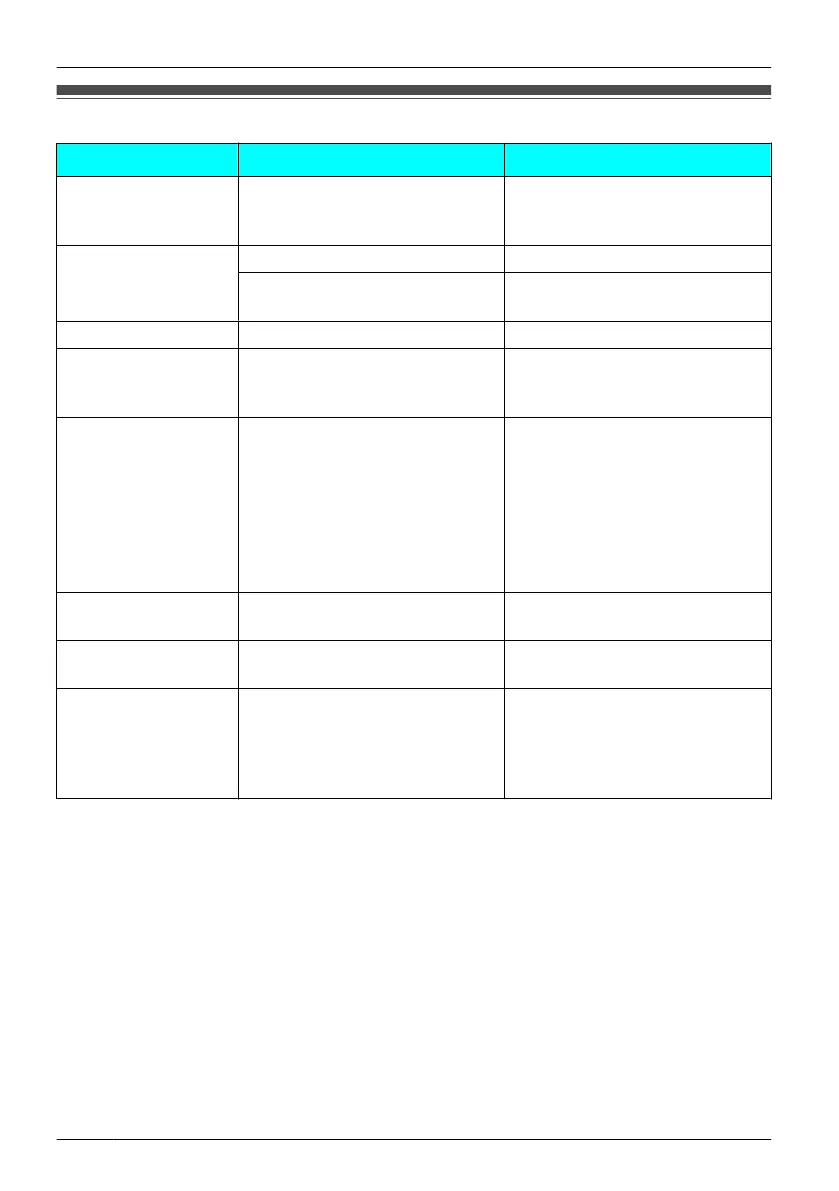
Error Message Possible Cause Solution
Register Unit
The handset has been
cancelled or the handset has
not been registered.
Consult your dealer.
No Service
The handset is out of range. Move closer to the CS.
The CS is turned off. Make sure the power cord is
connected.
CS Busy
The CS is busy. Try again later.
Charge Batt.
The handset batteries have
little charge remaining.
Charge the batteries fully. (See
"Charging the Batteries
" on page
6.)
No Entries
When trying to view the
Phonebook: No items have
been stored. (See "Storing an
Item in the Handset
Phonebook" on page 32.)
When trying to view the
Incoming or
Outgoing Call Log:
No logs have been stored.
Memory Full
The Phonebook is full and
cannot store the new item.
Remove unnecessary data in the
Phonebook and try again.
Insert battery
The handset was placed on the
charger without batteries.
Insert the batteries properly.
Use rechargeable
battery.
The wrong type of batteries
such as Alkaline
or Manganese
was inserted.
Use only the rechargeable Ni-MH
batteries. (See "Accessories
(included)" on page 4 and
"Replacing the Batteries" on page
51.)
50
Troubleshooting and Error Messages












 To Next Page