EasyManua.ls Logo

Panasonic KX-WT115 - Deleting Stored Items; Deleting Phonebook and Call Log Entries

Panasonic KX-WT115
60 pages
Print Icon
To Next Page IconTo Next Page
To Previous Page IconTo Previous Page
Loading...
Deleting Stored Items in Handset Phonebook/
Outgoing Call Log/Incoming Call Log
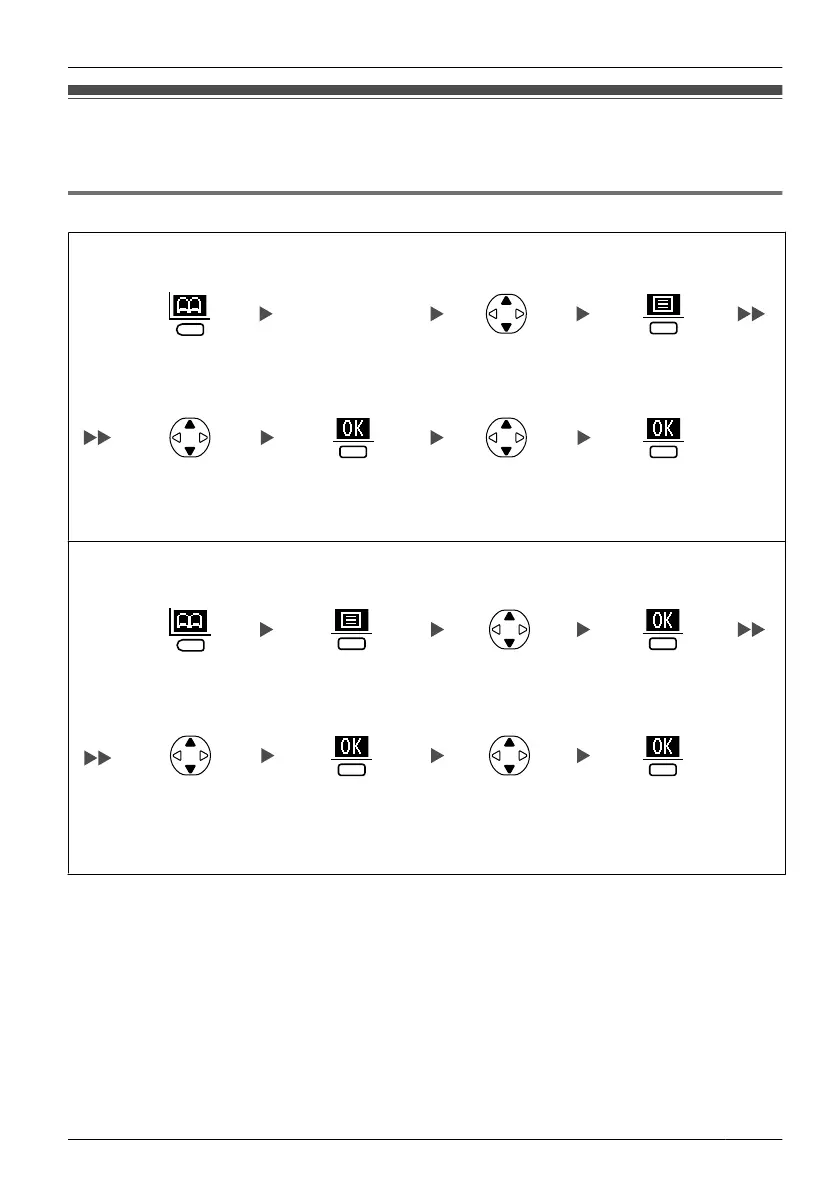
Handset Phonebook
Erasing an entry
Press the left
soft key.
Enter the first
character of the
desired name
(if required).
Select "Erase".
Select the
desired item
(if required).
Press the
centre soft key.
Select "Yes". Press the
centre soft key.
Press the
centre soft key.
Erasing all entries
Press the left
soft key.
Select "Yes".
Select "Erase
All".
Press the
centre soft key.
Press the
centre soft key.
Select "Yes". Press the
centre soft key.
Press the
centre soft key.
To search for an item in the Phonebook, see page 20.
41
Deleting Stored Items

Table of Contents

Related product manuals