111
Writing to a memory card or DVD (AVCHD format/DVD-Video format)
Editing AVCHD/AVCHD Lite or MPEG2 motion pictures/copying to media
5
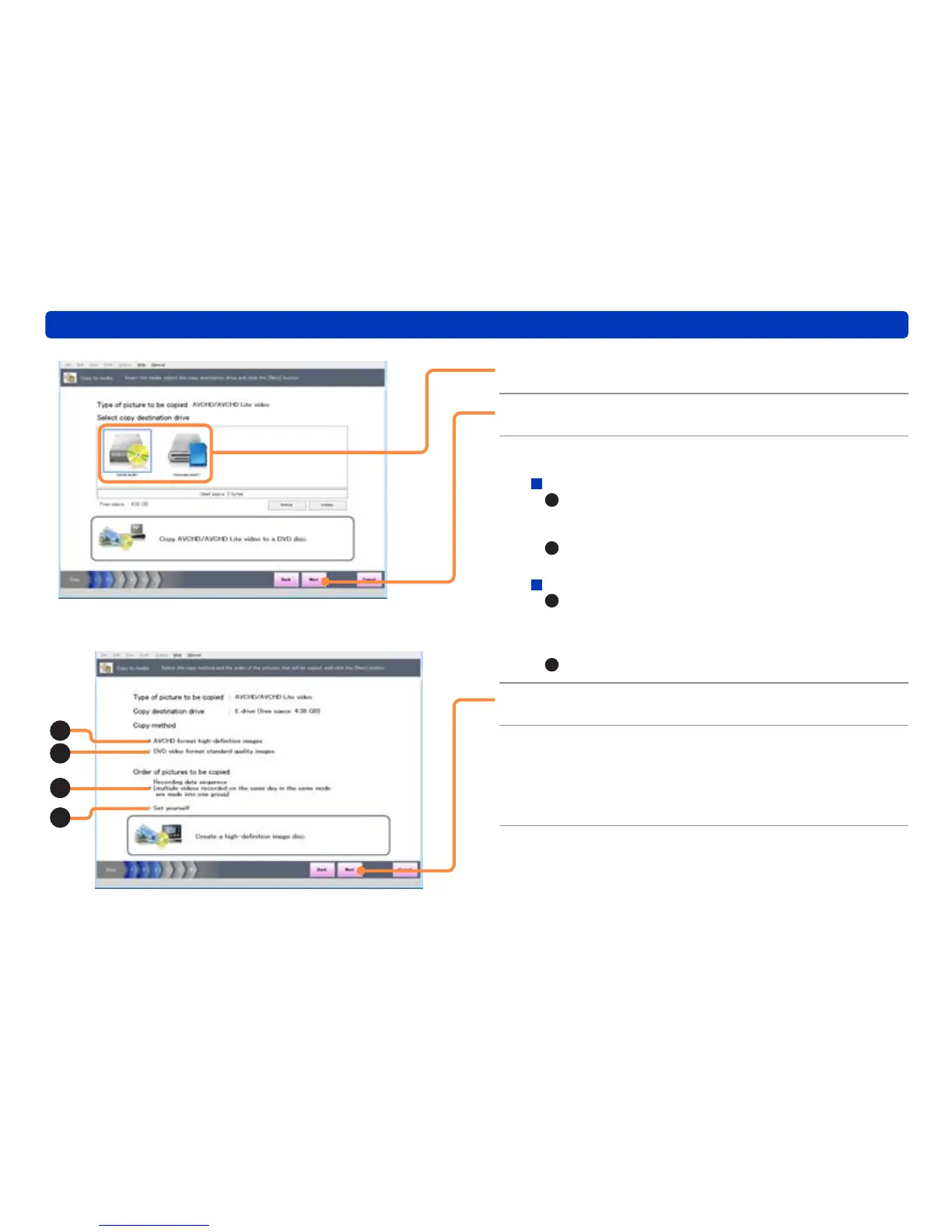
Select the writing drive or memory card.
6
Click [Next].
7
Select the copy settings.
Copy method (when writing to DVD only)
A
: Copy in high definition quality.
(MPEG2 motion pictures cannot be copied in AVCHD
format)
B
: Copy in standard quality, in a format that can be played
back on ordinary DVD players.
Order of pictures to be copied
C
: Copy in the recording date order. If you copy with this
setting, multiple motion pictures that were recorded
on the same day and in the same mode are combined
together.
D
: You can select the playback order.
8
Click [Next].
9
Select a picture by selecting its check
box.
Check the total data size of the selected pictures and the free
space available on the disc.
A
B
C
D


 To Next Page
 Loading...