Mini VRF SYSTEM
Remote Controller Functions
5 - 3
1. Simple Settings Function
5
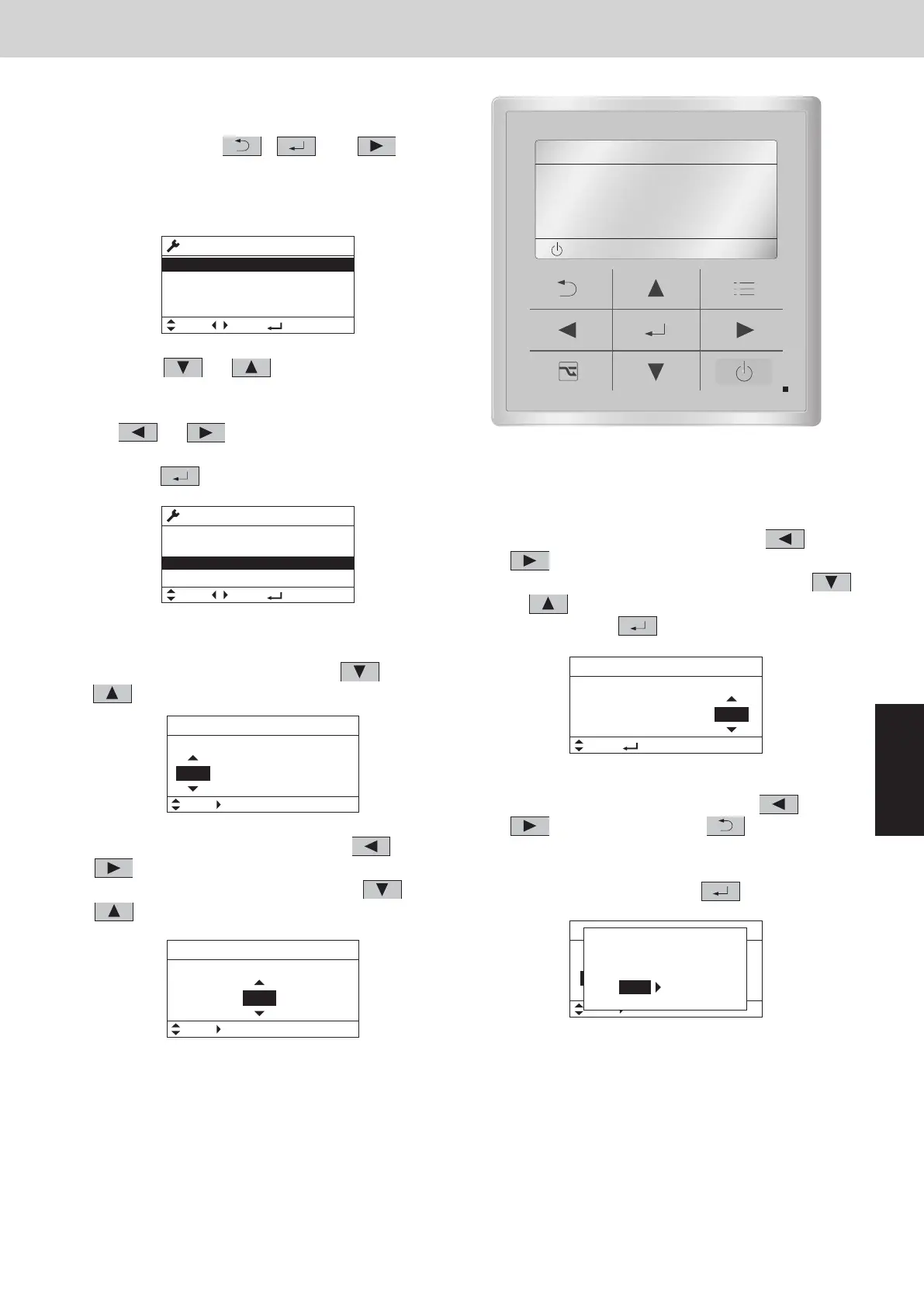
<Procedure of CZ-RTC5B>
(1)
Keep pressing the
, and
buttons
simultaneously for 4 or more seconds.
The “Maintenance func” screen appears on the
LCD display.
(2) Press the
or button to see each
menu.
If you wish to see the next screen instantly, press
the or button.
Select “7. Simple settings” on the LCD display and
press the button.
The “Simple settings” screen appears on the LCD
display.
Select the “Unit no.” by pressing the or
button for changes.
(3) Select the “Code no.” by pressing the
or
button.
Change the “Code no.” by pressing the or
button.
(4)
Select the “Set data” by pressing the or
button.
Select one of the “Set data” by pressing the
or button.
Then press the button.
(5) Select the “Unit no.” by pressing the
or
button and press the button.
The “Exit simple settings and restart?” (Simple
setting-end) screen appears on the LCD display.
Select “YES” and press the button.
SM830231-00_Single_欧州.indb 3 2014/04/04 13:48:31
20:30 (THU)
START
[ ]
Maintenance func
1. Outdoor unit error data
2. Service contact
3. RC setting mode
4. Test run
Sel. Page [ ] Confirm
20:30 (THU)
Maintenance func
5. Sensor info.
6. Servicing check
8. Detailed settings
Sel. Page [ ] Confirm
20:30 (THU)
7. Simple settings
Simple settings
Unit no. Code no. Set data
01
1-1 0001
Sel. Next
20:30 (THU)
Simple settings
Unit no. Code no. Set data
10001-1
Sel. Next
20:30 (THU)
01
Simple settings
Unit no. Code no. Set data
1-1
Sel.
20:30 (THU)
01 0002
[ ] Confirm
Simple settings
Unit no. Code no. Set data
ALL
Sel. Next
20:30 (THU)
01 0002
Exit simple settings
and restart?
NOYES
Maintenance func
XX / XX
[ ][ ]
ECONAVI
nanoeX
RC. setting mode
Maintenance func
XX / XX
[ ][ ]
Simple settings
Detailed settings
Auto address
Simple settings
[ ][ ]
Unit no.
Code no.
ALL
01
Set data 00010001
Simple settings
[ ][ ]
Unit no.
Code no.
ALL
01
Set data 00010001
Simple settings
[ ][ ]
Set data
1-1
10
00010001
Unit no.
s
Code no.
?
Exit simple
settings
estartand r
YES
NO
Simple settings
[ ][
Unit no.
Code no.
ALL
01
Set data 00010001
Confrm
]
]
Simple settings
[ ][ ]
Unit no.
Code no.
ALL
01
Set data 00010001
]
Select “Simple settings” on the LCD display and press the
After selecting “Unit no.”, press the
Simple Settings Function
<Procedure of CZ-RTC6 series>
Stop the system before performing these steps.
(1) Keep pressing the
This allows the filter lifetime, operating mode priority change, central control address, and other settings to be made
for an individual or group-control indoor unit to which the remote controller used for simple settings is connected.
When simple settings mode is engaged, operation stops at the individual or group-control indoor unit to which the
remote controller for simple settings is connected.
, and
4 or more second
The “Maintenance func” screen appears on the LCD display.
s.
buttons simultaneously for
(2) Press the or button to see each menu.
button.
The “Simple settings” screen appears on the LCD display.
The “Simple settings” screen appears on the LCD display (proceed to
Step (6)).
(3) Select the “Unit no.” by pressing the
or button.
button and proceed to Step (4).
(4) Select the “Code no.” by pressing the
After selecting “Code no.”, press the
or button.
button and proceed to Step (5).
If the
button is pressed, proceed to Step (6).
button.
(5) Select the “Set data” by pressing the
After selecting “Set data”, press the
or button.
NOT E
(6) If the button is pressed under the display, the following
display (Simple setting-end screen) appears.
Then select “YES” by pressing the or button and
press the button. (Return to normal remote controller
display.)
SM830289-01_欧州向け R32 mini VRF 8,10HP SM&TRSM.indb 3SM830289-01_欧州向け R32 mini VRF 8,10HP SM&TRSM.indb 3 2021/05/07 10:16:102021/05/07 10:16:10



 To Next Page