EasyManua.ls Logo

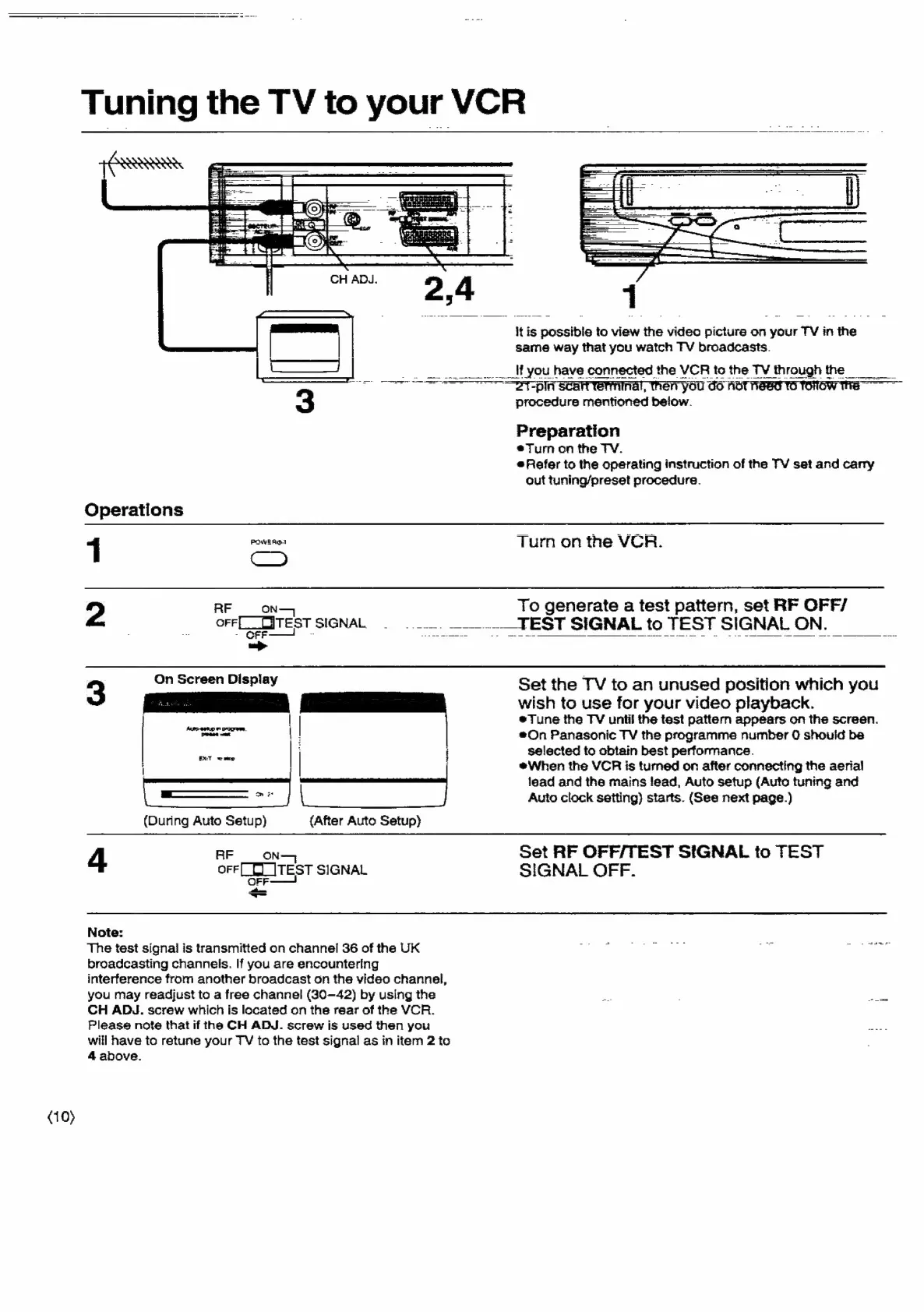
Panasonic NV-SD350 - Tuning the TV to Your VCR

Panasonic NV-SD350
48 pages
Print Icon
To Next Page IconTo Next Page
To Previous Page IconTo Previous Page
Loading...
(10)
Tuning
the
TV
to
your
VCR
=
Et
aed
Re:
Operations
1
POWER®.1
Cc
2
RF
ON
orr[_Test
SIGNAL.
itl
3
On
Screen
Display
pete
|
|
|
EX:T
=
mop
|
S|
(During
Auto
Setup)
{After
Auto
Setup)
4
AF
ON—
OFF
LELITEST
SIGNAL
is
Note:
The
test
signal
is
transmitted
on
channel
36
of
the
UK
broadcasting
channels.
If
you
are
encountering
interference
from
another
broadcast
on
the
video
channel,
you
may
readjust
to
a
free
channel
(30-42)
by
using
the
CH
ADJ.
screw
which
is
located
on
the
rear
of
the
VCR.
Please
note
that
if
the
CH
ADJ.
screw
is
used
then
you
will
have
to
retune
your
TV
to
the
test
signal
as
in
item
2
to
4
above.
iti
is
ere
to
view
fic
video
picture
on
your
TV
in
nthe
same
way
that
you
watch
TV
broadcasts.
___'f
you
have
connected
the
VCR
tothe
TV
through
the
“FT
-pini
Scant
terminal,
then
you
6
hot
need
to
rorow
tts
procedure
mentioned
below.
Preparation
eTurm
on
the
TV.
Refer
to
the
operating
instruction
of
the
TV
set
and
carry
out
tuning/preset
procedure.
Turn
on
the
VCR
To
generate
a
test
pattern,
set
RF
OFF/
__..
__.._TEST
SIGNAL
to
TEST
SIGNAL
ON.
Set
the
TV
to
an
unused
position
which
you
wish
to
use
for
your
video
playback.
*Tune
the
TV
unti
the
test
pattern
appears
on
the
screen.
#On
Panasonic
TV
the
programme
number
0
should
be
selected
to
obtain
best
performance.
eWhen
the
VCR
is
tumed
on
after
connecting
the
aerial
lead
and
the
mains
lead,
Auto
setup
(Auto
tuning
and
Auto
clock
setting)
starts.
(See
next
page.)
Set
RF
OFF/TEST
SIGNAL
to
TEST
SIGNAL
OFF.

Related product manuals