EasyManua.ls Logo

Panasonic NV-SD350 - Insert Editing

Panasonic NV-SD350
48 pages
Print Icon
To Next Page IconTo Next Page
To Previous Page IconTo Previous Page
Loading...
{28)
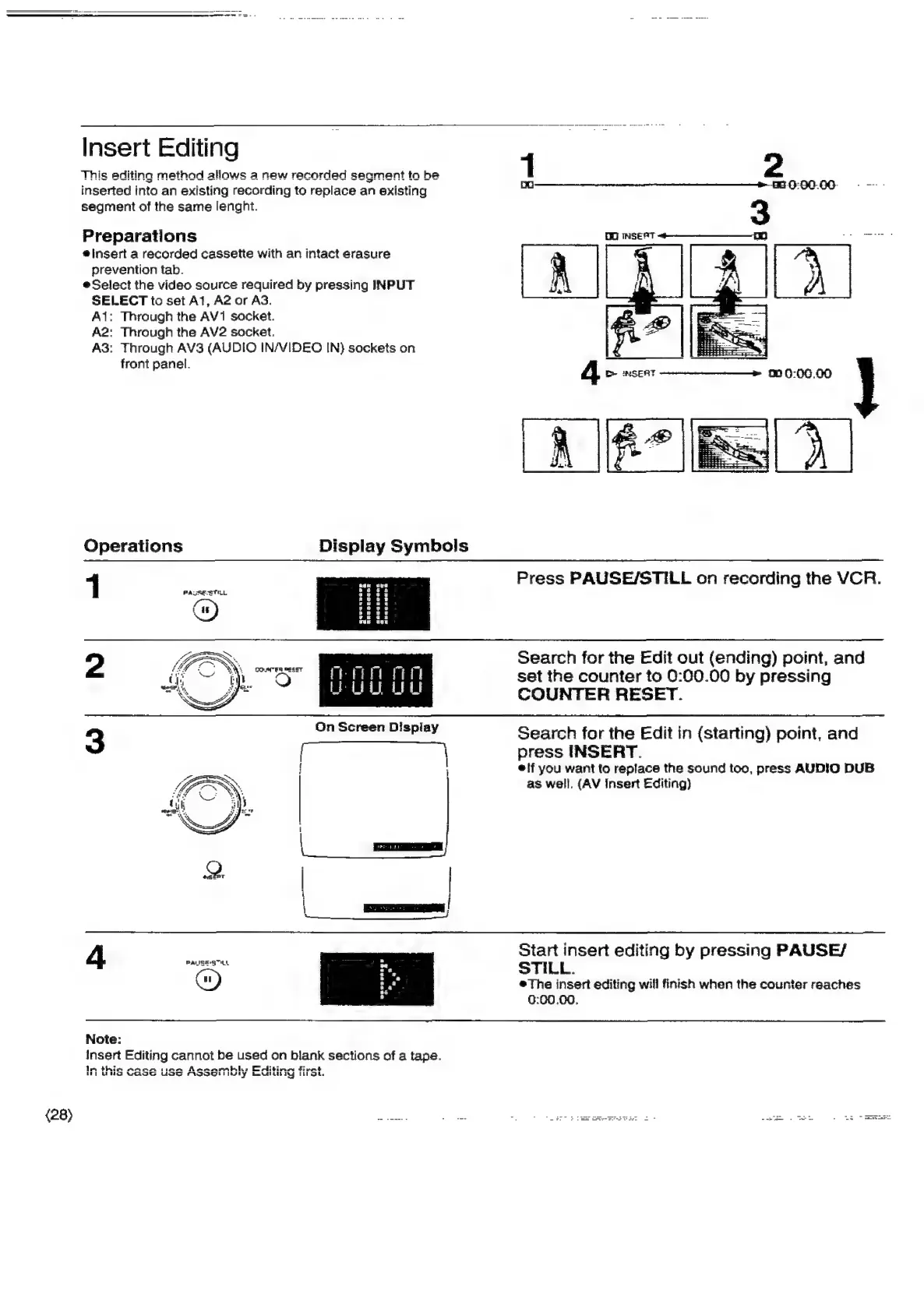
Insert
Editing
This
editing
method
allows
a
new
recorded
segment
ta
be
inserted
into
an
existing
recording
to
replace
an
existing
segment
of
the
sarne
lenght.
Preparations
#insert
a
recorded
cassette
with
an
intact
erasure
prevention
tab.
Select
the
video
source
required
by
pressing
INPUT
SELECT
to
set
At,
A2
or
AS.
Ai:
Through
the
AV1
socket.
A2:
Through
the
AV2
socket.
A3:
Through
AV3
(AUDIO
IN/VIDEO
IN)
sockets
on
front
panel.
Operations
1
2
4
PAUSE-S™HL
Note:
Insert
Editing
cannot
be
used
on
blank
sections
of
a
tape.
Im
thie
Asean
sian
Asernarmblh:
Eelitinn
fivnt
RL
MNO
Woe
USS
FLOOOHI
Wy
bewdidil
ty
Ikiaot.
Display
Symbols
OO
INSEST
Press
PAUSE/STILL
on
recording
the
VCR.
Search
for
the
Edit
out
(ending)
point,
and
set
the
counter
to
0:00.00
by
pressing
COUNTER
RESET.
Search
for
the
Edit
in
(starting)
point,
and
press
INSERT.
*if
you
want
to
replace
the
sound
too,
press
AUDIO
DUB
as
well.
(AV
Insert
Editing)
Start
insert
editing
by
pressing
PAUSE/
STILL.
The
insert
editing
will
finish
when
the
counter
reaches
0:00.00.

Related product manuals