EasyManua.ls Logo

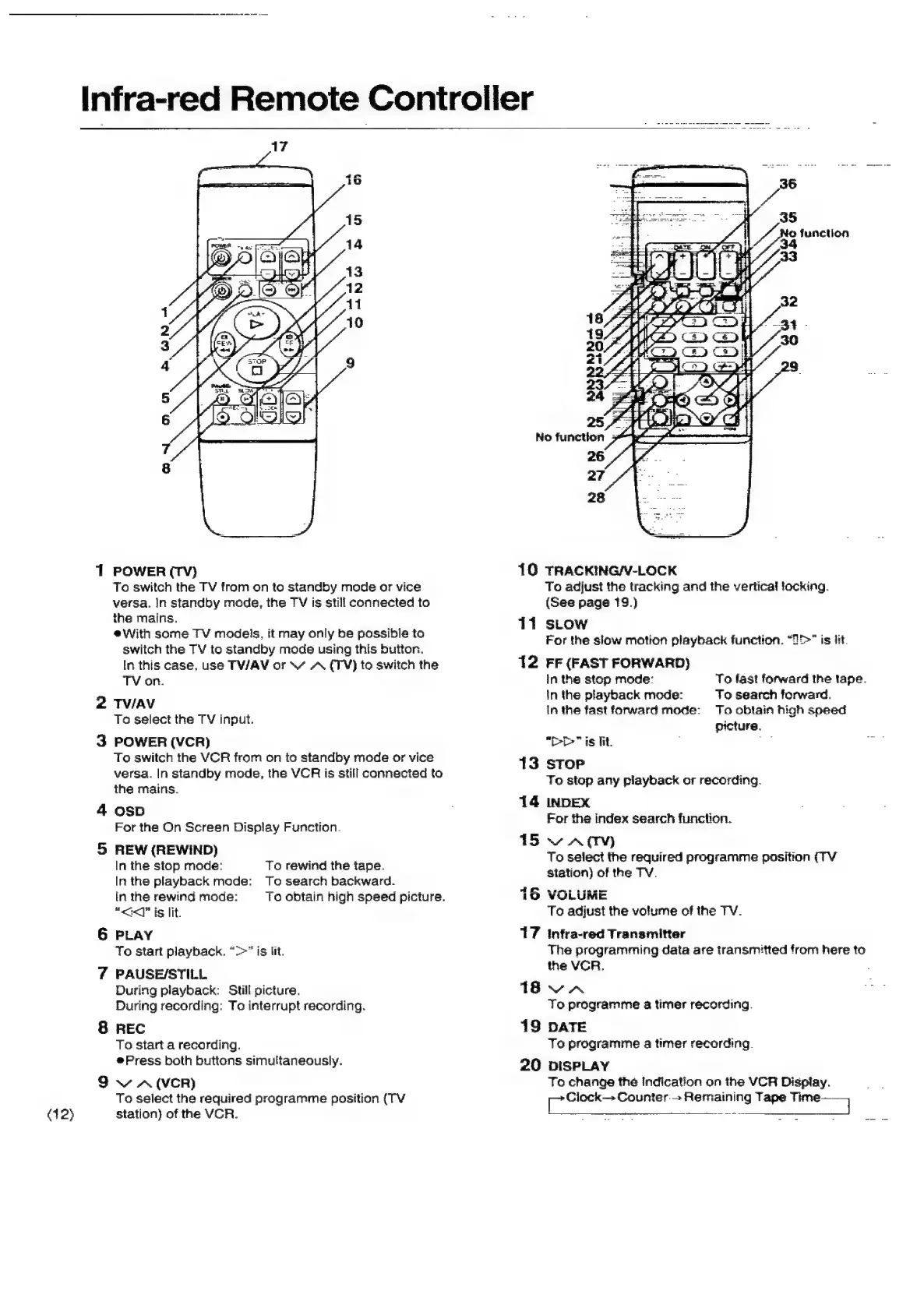
Panasonic NV-SD350 - Infra-Red Remote Controller

Panasonic NV-SD350
48 pages
Print Icon
To Next Page IconTo Next Page
To Previous Page IconTo Previous Page
Loading...
(12)
1
POWER
(TV)
To
switch
the
TV
from
on
to
standby
mode
or
vice
versa.
In
standby
mode,
the
TV
is
stili
connected
to
the
mains.
eWith
some
TV
models,
it
may
only
be
possible
to
switch
the
TV
to
standby
mode
using
this
Dutton.
In
this
case,
use
TV/AV
or
\“
A
(TV)
to
switch
the
TV
on.
2
TV/AV
To
select
the
TV
input.
3
POWER
(VCR)
To
switch
the
VCR
from
on
to
standby
mode
or
vice
versa.
In
standby
mode,
the
VCR
is
still
connected
to
the
mains.
4
osD
For
the
On
Screen
Display
Function.
5
REW
(REWIND)
In
the
stop
mode:
In
the
playback
mode:
in
the
rewind
mode:
“<<]”
is
lit.
6
PLAY
To
start
playback.
“>”
is
lit.
7
PAUSE/STILL
During
playback:
Still
picture.
During
recording:
To
interrupt
recording.
8
REC
To
start
a
recording.
@Press
both
buttons
simultaneously.
9
v
A
(VCR)
To
select
the
required
programme
position
(TV
station)
of
the
VCR.
To
rewind
the
tape.
To
search
backward.
To
obtain
high
speed
picture.
Infra-red
Remote
Controller
10
TRACKING/V-LOCK
To
adjust
the
tracking
and
the
vertical
focking.
(See
page
19.)
11
sLow
For
the
slow
motion
playback
function.
“25>”
is
fit.
12
FF
(FAST
FORWARD)
in
the
stop
mode:
in
the
playback
mode:
In
the
fast
forward
mode:
To
fast
forward
the
tape.
To
search
forward.
To
obtain
high
speed
picture.
"i>"
is
Tit.
_
13
stop
To
stop
any
piayback
or
recording.
14
INDEX
For
the
index
search
function.
Svacy
To
select
the
required
programme
position
(TV
station)
of
the
TV.
suns
tie
15
VOLUME
To
adjust
the
volume
of
the
TV.
17
Infra-red
Transmitter
The
programming
data
are
transmitted
from
here
to
the
VCR.
1avA
To
programme
a
timer
recording.
19
DATE
To
programme
a
timer
recording.
20
DISPLAY
To
change
the
indication
on
the
VCR
Dispiay.
Soaeae
Counter.
Remaining
Tape
Liiasame
.

Related product manuals