EasyManua.ls Logo

Panasonic NV-SD350 - Assembly Editing; Synchronized Editing

Panasonic NV-SD350
48 pages
Print Icon
To Next Page IconTo Next Page
To Previous Page IconTo Previous Page
Loading...
Editing
Assembly
Editing
This
function
can
be
used
to
make
up
an
edited
tape
from
other
recordings
or
video
sources.
This
enables
you
to
record
a
new
segment
immediately
.
after
a
previously
recorded
segment.
Preparations
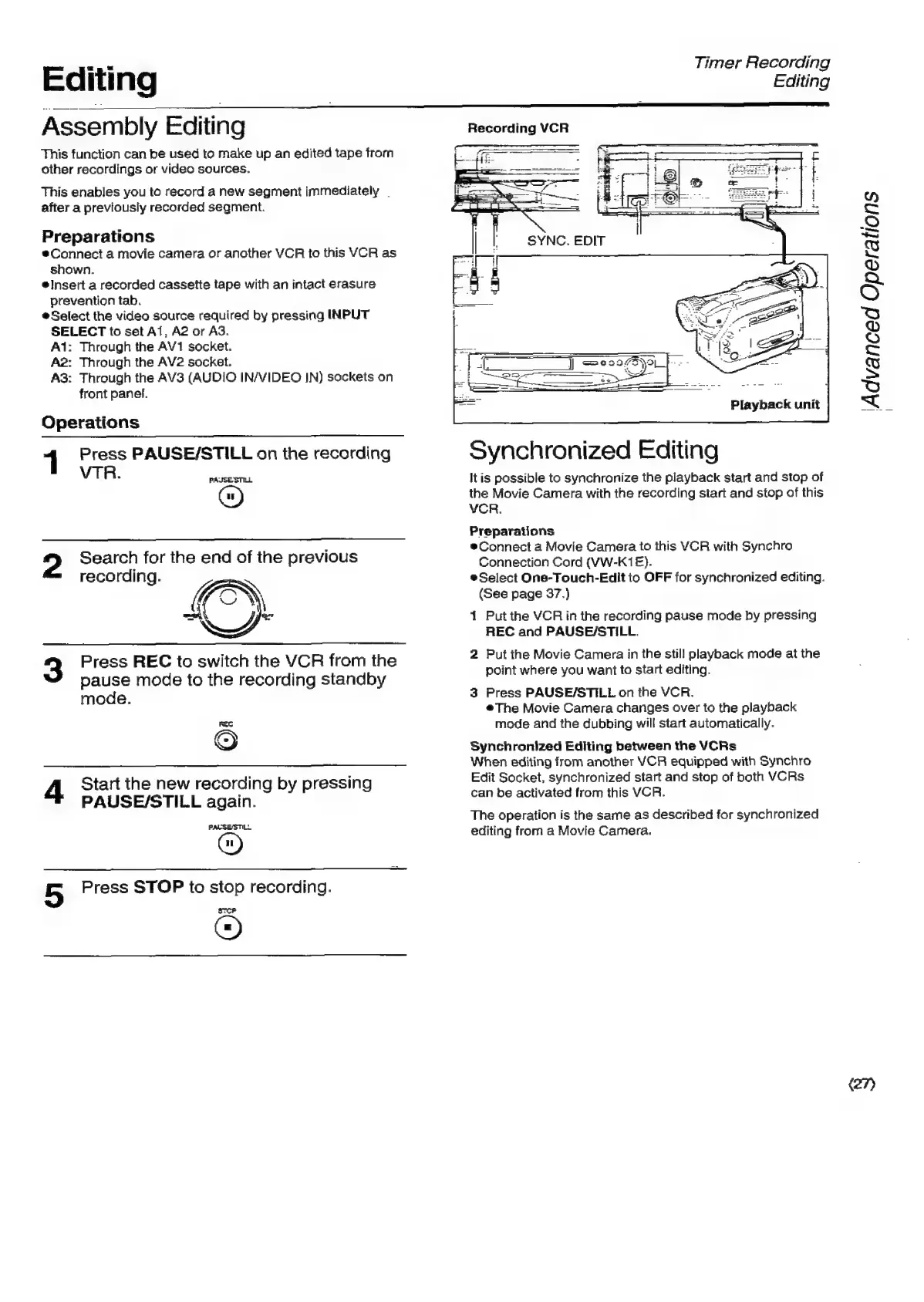
®Connect
a
movie
camera
or
another
VCR
to
this
VCR
as
shown.
*®Insert
a
recorded
cassette
tape
with
an
intact
erasure
prevention
tab.
Select
the
video
source
required
by
pressing
INPUT
SELECT
to
set
Al,
A2
or
AG.
Ai:
Through
the
AV1
socket.
A2:
Through
the
AV2
socket.
A3:
Through
the
AV3
(AUDIO
IN/VIDEO
JN)
sockets
on
front
panel.
Operations
Press
PAUSE/STILL
on
the
recording
VTR.
PAJSE
STILL
2
Search
for
the
end
of
the
previous
recording.
Press
REC
to
switch
the
VCR
from
the
pause
mode
to
the
recording
standby
mode.
FEC
©
4
Start
the
new
recording
by
pressing
PAUSE/STILL
again.
PALSESTILL
5
Press
STOP
to
stop
recording.
Srcp
Timer
Recording
Editing
Recording
VCR
Synchronized
Editing
It
is
possible
to
synchronize
the
playback
start
and
stop
of
the
Movie
Camera
with
the
recording
start
and
stop
of
this
VCR.
Preparations
®Connect
a
Movie
Camera
to
this
VCR
with
Synchro
Connection
Cord
(VW-K1E).
®Select
One-Touch-Edit
to
OFF
for
synchronized
editing.
(See
page
37.)
1
Put
the
VCR
in
the
recording
pause
mode
by
pressing
REC
and
PAUSE/STILL.
2
Put
the
Movie
Camera
in
the
still
playback
mode
at
the
point
where
you
want
to
start
editing.
3
Press
PAUSE/STILL
on
the
VCR.
©The
Movie
Camera
changes
over
to
the
playback
mode
and
the
dubbing
will
start
automatically.
Synchronized
Editing
between
the
VCRs
When
editing
from
another
VCR
equipped
with
Synchro
Edit
Socket,
synchronized
start
and
stop
of
both
VCRs
can
be
activated
from
this
VCR.
The
operation
is
the
same
as
described
for
synchronized
editing
from
a
Movie
Camera.
(27)
‘Advanced
Operations

Related product manuals