EasyManua.ls Logo

Panasonic NV-SD350 - Controls and Connection Sockets

Panasonic NV-SD350
48 pages
Print Icon
To Next Page IconTo Next Page
To Previous Page IconTo Previous Page
Loading...
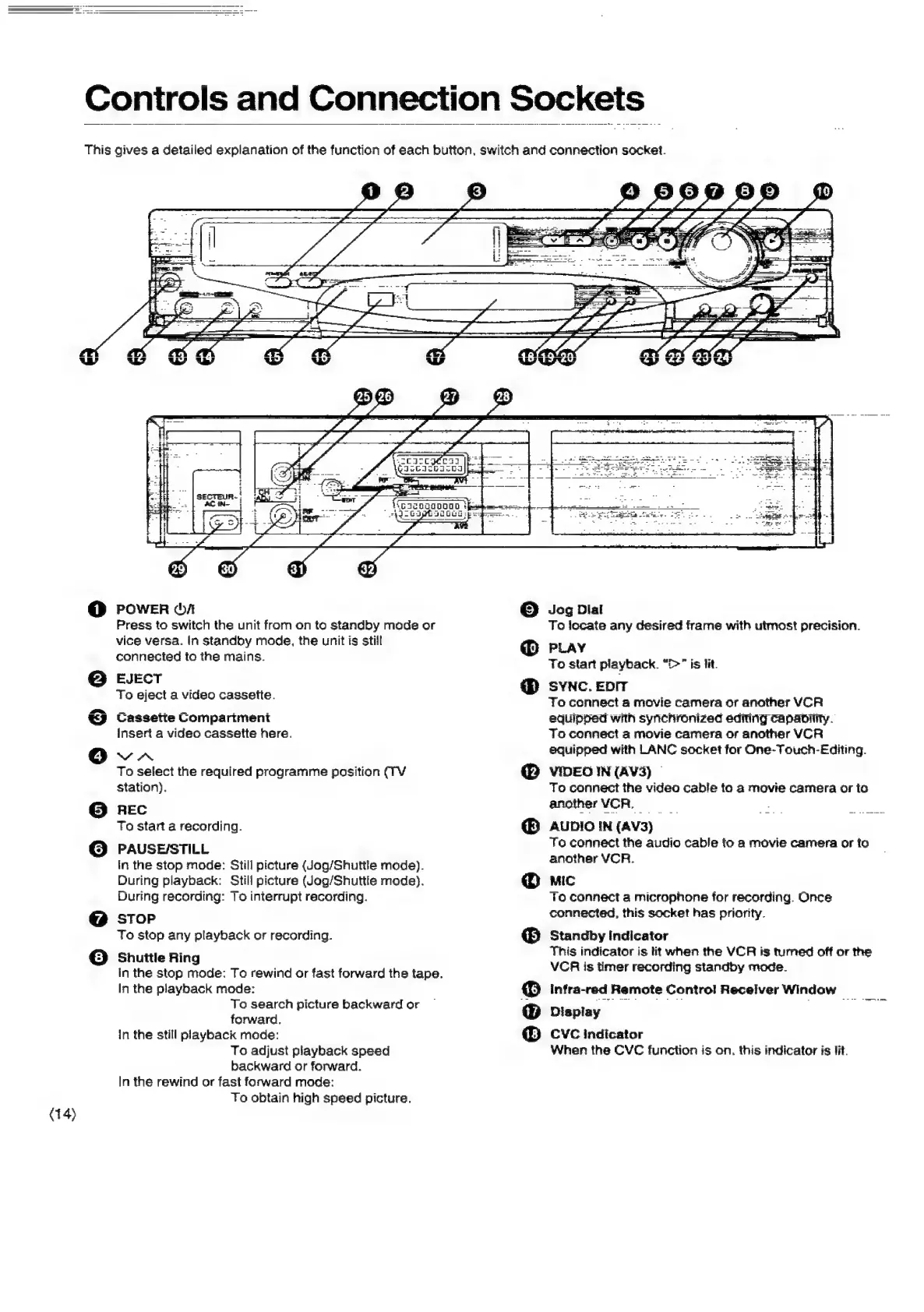
(14)
Controls
and
Connection
Sockets
This
gives
a
detailed
explanation
of
the
function
of
each
button.
switch
and
connection
socket.
oo
6
®@
O
© 9
Pa)
43)
27
28
————
a
op
renrrescregehir
ME
EET
EE
SE
TIEIE
sr
te
mt
i
i
oer
2
ead
POWER
OA
Press
to
switch
the
unit
from
on
to
standby
mode
or
vice
versa.
In
standby
mode,
the
unit
is
still
connected
to
the
mains.
EJECT
To
eject
a
video
cassette.
Cassette
Compariment
insert
a
video
cassette
here.
VN
To
select
the
required
programme
position
(TV
station).
REC
To
start
a
recording.
PAUSE/STILL.
in
the
stop
mode:
Still
picture
(Jog/Shuttle
mode).
During
playback:
Still
picture
(Jog/Shuttle
mode).
During
recording:
To
interrupt
recording.
STOP
To
stop
any
playback
or
recording.
Shuttle
Ring
In
the
stop
mode:
To
rewind
or
fast
forward
the
tape.
In
the
playback
mode:
To
search
picture
backward
or
forward.
in
the
still
playback
mode:
To
adjust
playback
speed
backward
or
forward.
In
the
rewind
or
fast
forward
mode:
To
obtain
high
speed
picture.
-
Sar
aie
=
exntois
i
VGIDSOAODOD
|
fee
ee
nee
ee
"JI
GsptsaGes
-peg-=
ert
©
®
®
®
®
©
@
®
Jog
Dial
To
locate
any
desired
frame
with
utmost
precision.
PLAY
To
start
playback.
“>”
is
lit.
SYNC.
EDIT
To
connect
4a
movie
camera
or
another
VCR
equipped
with
synchronized
editing
capaninty.
To
connect
a
movie
camera
or
another
VCR
equipped
with
LANC
socket
for
One-Touch-Editing.
VIDEO
IN
(AV3)
©
To
connect
the
video
cable
to
a
movie
camera
or
to
anotherVCR.
>
AUDIO
IN
(AV3)
To
connect
the
audio
cable
to
a
movie
camera
or
to
another
VCR.
MIC
To
connect
a
microphone
for
recording.
Once
connected,
this
socket
has
priority.
Standby
!ndicator
This
indicator
is
tit
when
the
VCR
is
tumed
off
or
the
VCR
is
timer
recording
standby
mode.
Infra-red
Remote
Control
Receiver
Window
=
Display
CVC
indicator
When
the
CVC
function
is
on.
this
indicator
is
Jit.

Related product manuals