EasyManua.ls Logo

Panasonic NV-SD350 - Page 19

Panasonic NV-SD350
48 pages
Print Icon
To Next Page IconTo Next Page
To Previous Page IconTo Previous Page
Loading...
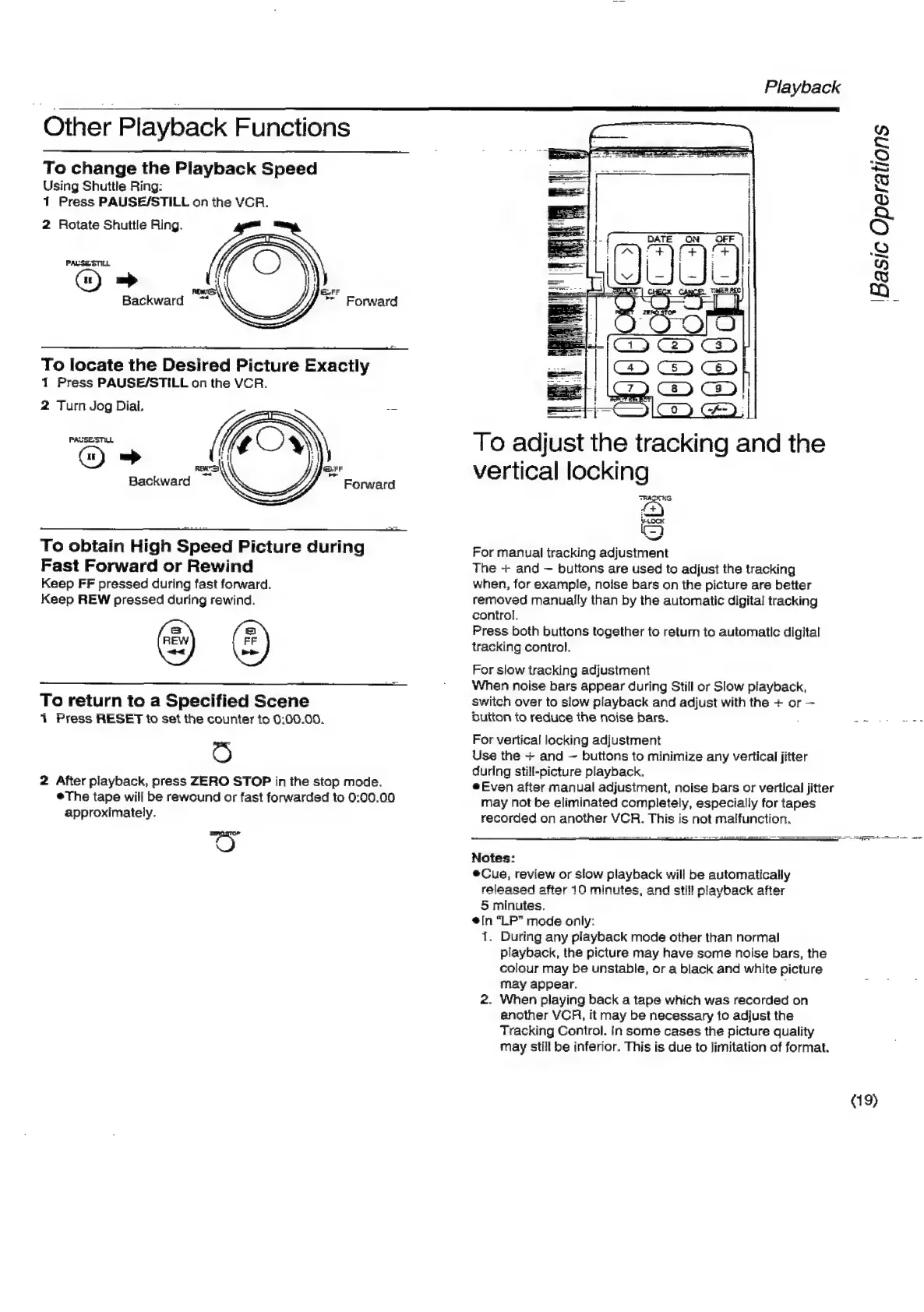
ther
Playback
Functions
To
change
the
Playback
Speed
Using
Shuttle
Ring:
1
Press
PAUSE/STILL
on
the
VCR.
2
Rotate
Shuttle
Ring.
PALSE
STILL
«=>
Backward
al
Forward
To
locate
the
Desired
Picture
Exactly
1
Press
PAUSE/STILL
on
the
VCR.
2
Turn
Jog
Dial.
PAGSESTILL
G)
=>
Backward
Forward
To
obtain
High
Speed
Picture
during
Fast
Forward
or
Rewind
Keep
FF
pressed
during
fast
forward.
Keep
REW
pressed
during
rewind.
=
REW
.
FF
+
be
To
return
to
a
Specified
Scene
1
Press
RESET
to
set
the
counter
ito
0:00.00.
2
After
playback,
press
ZERO
STOP
in
the
stop
mode.
The
tape
will
be
rewound
or
fast
forwarded
to
0:00.00
approximately.
See
Playback
ations
Basic
Oper.
vertical
locking
TRALK
SS
f+)
(9
~~
For
manual
tracking
adjustment
The
+
and
buttons
are
used
to
adjust
the
tracking
when,
for
example,
noise
bars
on
the
picture
are
better
removed
manually
than
by
the
automatic
digital
tracking
control.
Press
both
buttons
together
to
return
to
automatic
digital
tracking
control.
For
slow
tracking
adjustment
When
noise
bars
appear
during
Still
or
Slow
playback,
switch
over
to
slow
playback
and
adjust
with
the
+
or
Dutton
to
reduce
the
noise
bars.
;
ac
TEC
Reis
For
vertical
locking
adjustment
Use
the
+
and
~
buttons
to
minimize
any
vertical
jitter
during
still-picture
playback.
*@Even
after
manual
adjustment,
noise
bars
or
vertical
jitter
may
not
be
eliminated
completely,
especially
for
tapes
recorded
on
another
VCR.
This
is
not
malfunction.
SS
>
St
er
Notes:
®Cue,
review
or
slow
playback
will
be
automatically
released
after
10
minutes,
and
still
playback
after
5
minutes.
@[n
“LP”
mode
only:
1.
During
any
playback
mode
other
than
normal
playback,
the
picture
may
have
some
noise
bars,
the
colour
may
be
unstable,
or
a
black
and
white
picture
may
appear.
,
2.
When
playing
back
a
tape
which
was
recorded
on
another
VCR,
it
may
be
necessary
to
adjust
the
Tracking
Control.
In
some
cases
the
picture
quality
may
still
be
inferior.
This
is
due
to
limitation
of
format.
(19)

Related product manuals