EasyManua.ls Logo

Panasonic NV-SD350 - Page 41

Panasonic NV-SD350
48 pages
Print Icon
To Next Page IconTo Next Page
To Previous Page IconTo Previous Page
Loading...
Setting
the
Remote
Controfler
for
Operation
of
your
TV
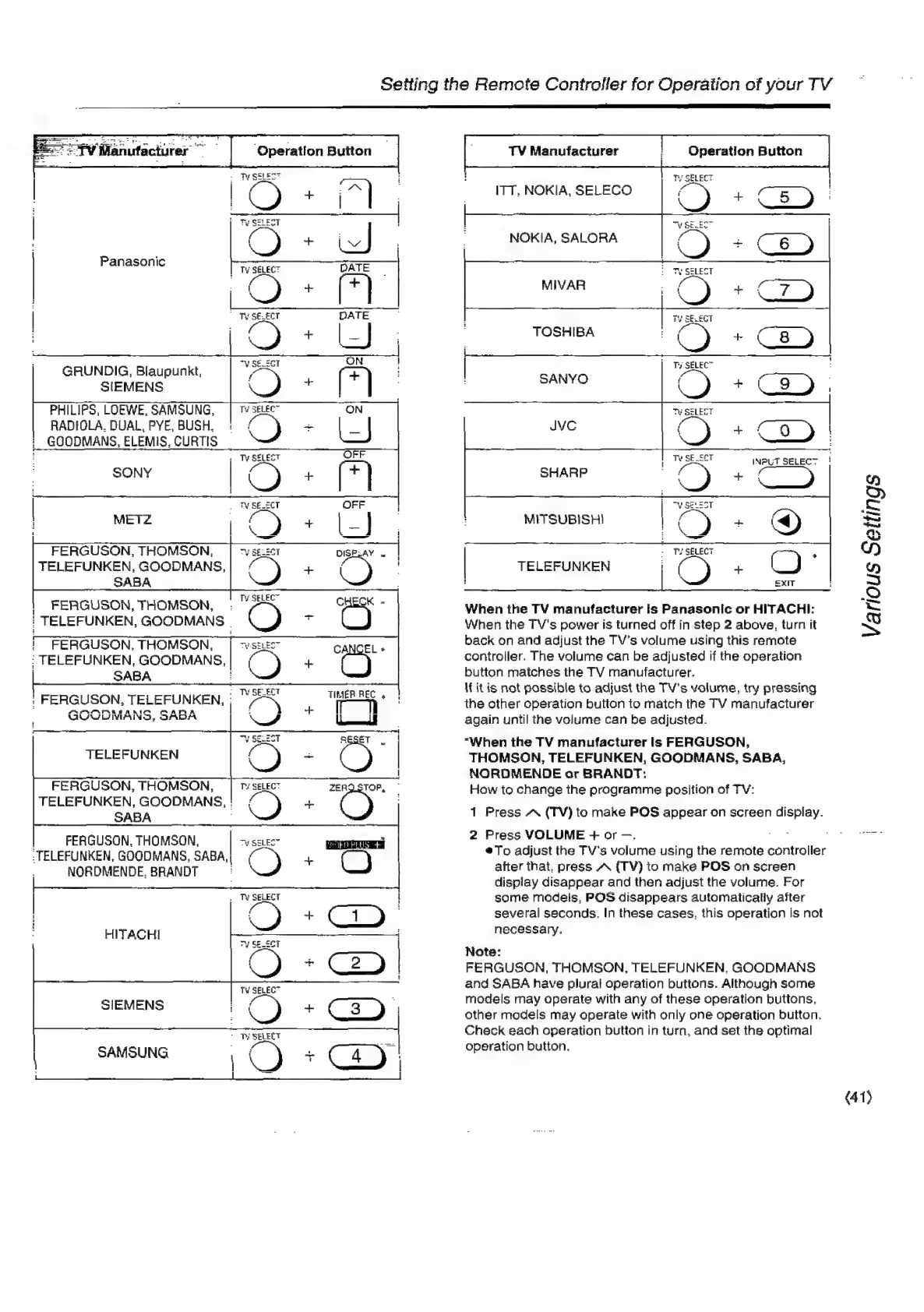
Panasonic
GRUNDIG,
Blaupunkt,
SIEMENS
PHILIPS,
LOEWE,
SAMSUNG,
RADIOLA.
DUAL,
PYE,
BUSH.
GOODMANS,
ELEMIS,
CURTIS
Powe
OO
FERGUSON,
THOMSON,
TELEFUNKEN,
GOODMANS,
SABA
|
FERGUSON,
THOMSON,
:
"AN
CHECK
-
|
TELEFUNKEN,
GOODMANS
.
C)
i
FERGUSON,
THOMSON,
|
vse
CANCEL
»
TELEFUNKEN,
GOODMANS,|
(+
C)
|
SABA
3
|
FERGUSON,
UNKEN,
”/*
oe
Y
WAY
VLIVIAING,
ODADA
TELEFUNKEN
FERGUSON,
THOMSON,
TELEFUNKEN,
GOODMANS,
:
SABA
|
FERGUSON,
THOMSON,
|
-
-TELEFUNKEN,
GOODMANS,
SABA,
|
NORDMENDE,
BRANDT
HITACHI
SIEMENS
\
SAMSUNG
{
:
TV
Manufacturer
!
Operation
Button
iTT,
NOKIA,
SELECO
NOKIA,
SALORA
TOSHIBA
SANYO
|
Ee)
+
C9)
INPUT
SELECT
!
Cc)
]
2
a
D>
MITSUBISHI
Te
i
)
=
|
-
Te
SELECT
2
Y)
|
TELEFUNKEN
|
(
)
+
(
)
2)
:
|
£xIT
:
oan
|
2
When
the
TV
manufacturer
Is
Panasonic
or
HITACHI:
~
When
the
TV's
power
is
turned
off
in
step
2
above,
turn
it
SS
back
on
and
adjust
the
TV’s
volume
using
this
remote
controller.
The
volume
can
be
adjusted
if
the
operation
button
matches
the
TV
manufacturer.
If it
is
not
possible
to
adjust
the
TV’s
volume,
try
pressing
the
other
operation
button
to
match
the
TV
manufacturer
again
until
the
volume
can
be
adjusted.
“When
the
TV
manufacturer
is
FERGUSON,
THOMSON,
TELEFUNKEN,
GOODMANS,
SABA,
NORDMENDE
or
BRANDT:
How
to
change
the
programme
position
of
TV:
1
Press
AW
(TV)
to
make
POS
appear
on
screen
display.
2
Press
VOLUME
+
or
—.
on
€.
Ge
Sars
@To
adjust
the
TV's
volume
using
the
remote
controller
after
that,
press
A
(TV)
to
make
POS
on
screen
dispiay
disappear
and
then
adjust
the
volume.
For
some
models,
POS
disappears
automatically
after
several
seconds.
In
these
cases.
this
operation
is
not
necessary.
Note:
FERGUSON,
THOMSON,
TELEFUNKEN,
GOODMANS
and
SABA
have
plural
operation
buttons.
Although
some
models
may
operate
with
any
of
these
operation
buttons.
other
models
may
operate
with
only
one
operation
button.
Check
each
operation
button
in
turn,
and
set
the
optimal
operation
button.
(41)

Related product manuals