PAN9026 Wi-Fi/Bluetooth Module 5 Full Usage
Quick Start Guide Rev. 1.2 Page 24 of 34
5.6 Using Wi-Fi Location Demo
Additionally to acting as a Fine Time Measurement (FTM) responder, the PAN9026-IMX can
also be used as the initiator itself and make Round Trip Time (RTT) measurements. To
demonstrate this feature, the system contains the “WiFi Location Demo”.
This section describes how to start and use the “WiFi Location Demo”.
The following requirement must be met:
✓ A Wi-Fi access point (supporting FTM) is available and running.
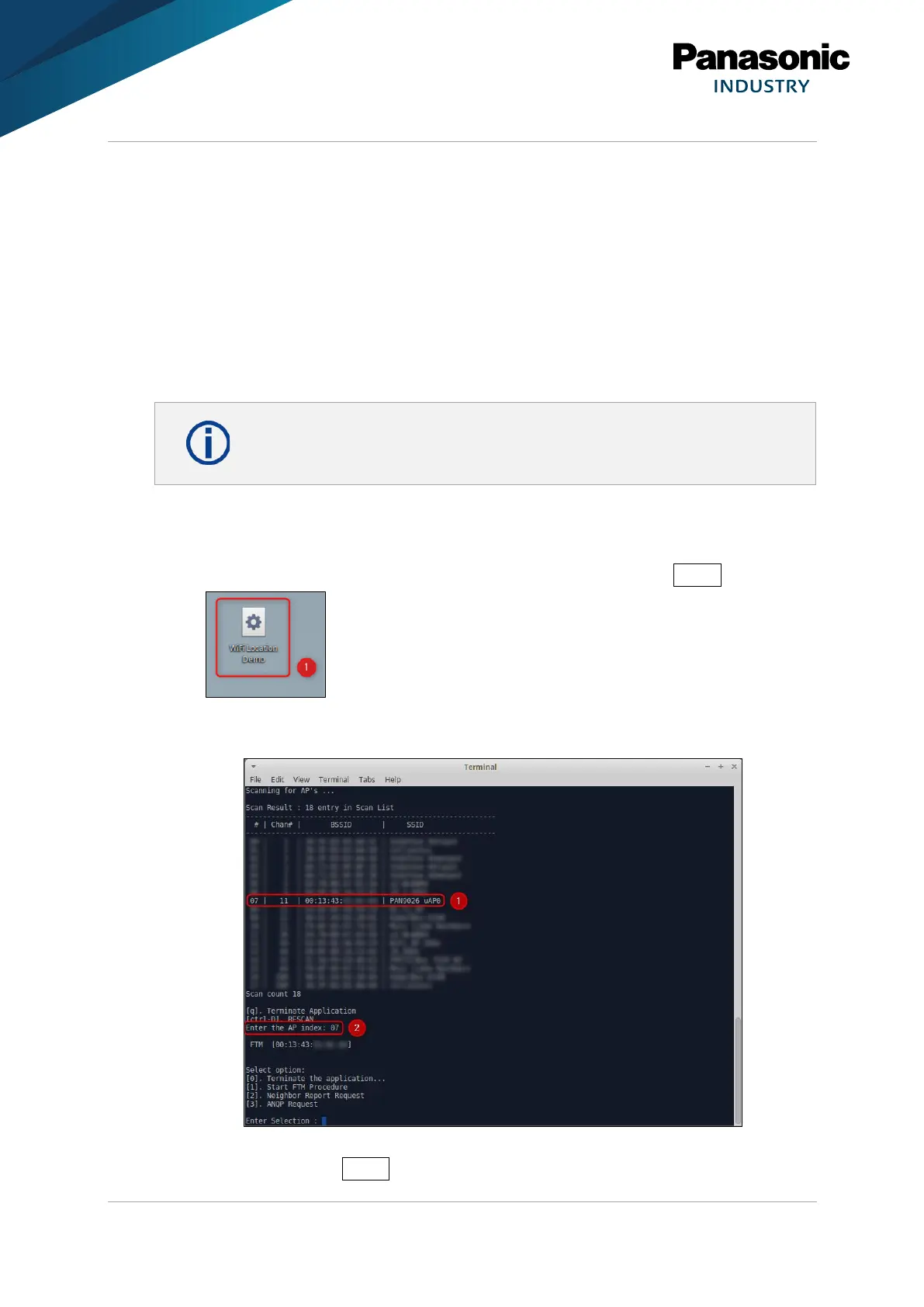
1. Open WiFi Location Demo (1), located on the desktop.
Alternatively, the “WiFi Location Demo” can be started from the command line: Type in
/home/ubuntu/marvell/wifi_location_demo.sh and press Enter .
➔ A new terminal window will be opened.
➔ The application scans for Wi-Fi access points in reach and lists them (1).
2. Select the access point that should be used as the responder: Type in the according
index (2) and press Enter.















 To Next Page