20 - ENGLISH
About your projector
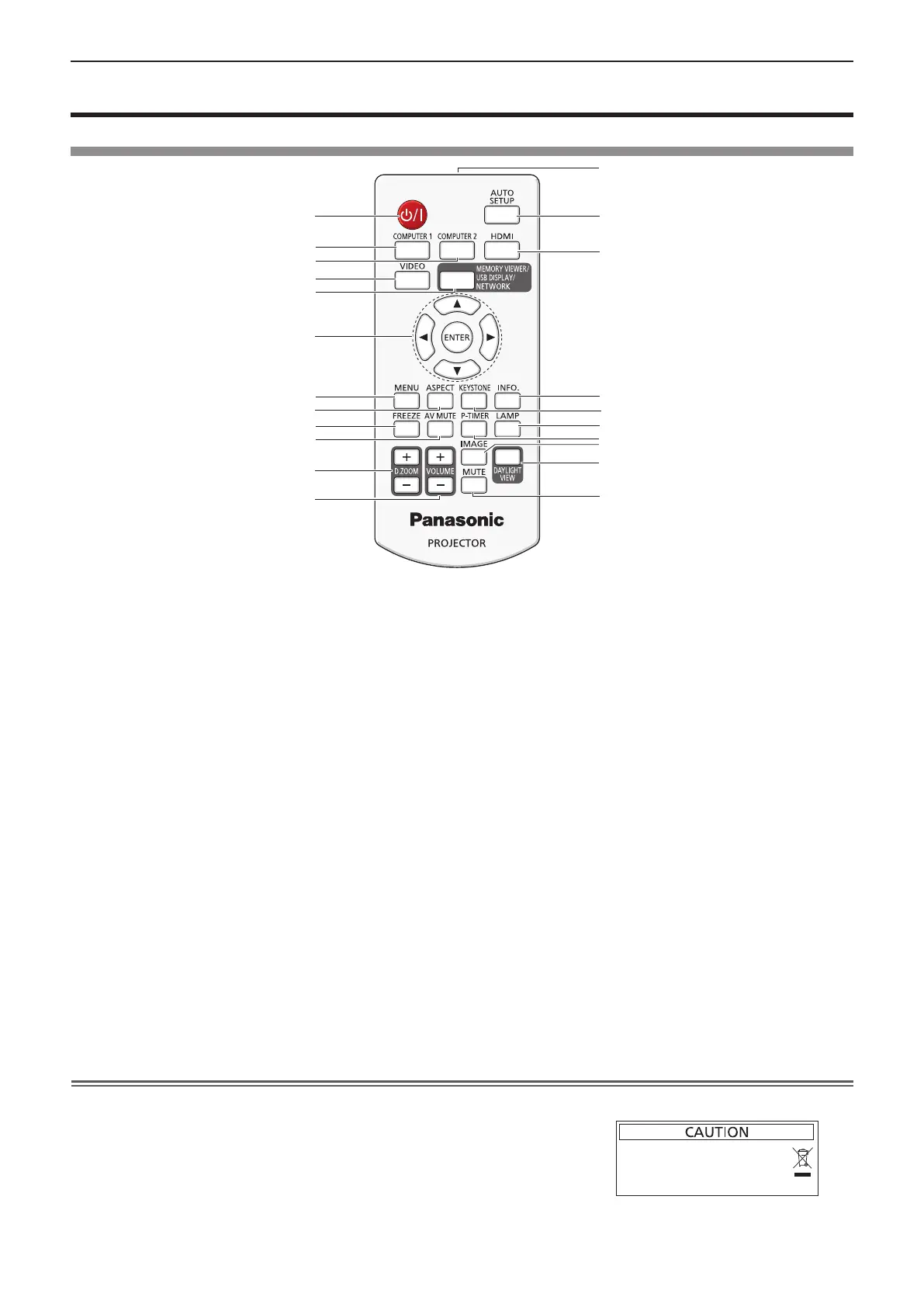
Remote control
1
2
3
4
5
6
7
8
9
10
12
13
14
15
16
17
18
19
20
21
11
22
1 Power <v/b> button (v standby / b power on)
Turns the projector on or off.
2 <COMPUTER 1> button
Switches the Computer 1 or Component (YC
B
C
R
/YP
B
P
R
)
signal to project.
3 <COMPUTER 2> button
Switches the Computer 2 signal to project.
4 <VIDEO> button
Switches the Video signal or S-video signal to project.
5 <MEMORY VIEWER/USB DISPLAY/NETWORK>
button
Switches the Memory Viewer signal, the USB Display
signal or the Network signal to project.
6 <ENTER> button/asqw buttons
Used to navigate through the menu screen.
7 <MENU> button
Open or close the On-Screen Menu. (x page 44)
8 <ASPECT> button
Switches the aspect ratio of the image.
9 <FREEZE> button
Pauses the projected image and mute the audio
temporarily. (x page 40)
10 <AV MUTE> button
Used to turn off the audio and video temporarily.
(x page 40)
11 <D.ZOOM +/-> buttons
Zoom in and out the images. (x page 40)
12 <VOLUME +/–> buttons
Adjusts the volume of the built-in speaker or audio
output. (x page 41)
13 Remote control signal emitter
14 <AUTO SETUP> button
Executes Input search, Auto PC adj. and Auto Keystone
correction at the same time. (x page 38)
15 <HDMI> button
Switches the HDMI signal to project.
16 <INFO.> button
Displays the [Info.] menu. (x page 73)
17 <KEYSTONE> button
Displays the [Keystone] menu. (x page 39)
18 <LAMP> button
Switches the settings of [Lamp control].
(
Æ
pages 40, 56)
19 <P-TIMER> button
Operate the P-timer function. (x page 40)
20 <IMAGE> button
Switches the image mode.
(
x
pages 41, 52)
21 <DAYLIGHT VIEW> button
Used to correct the image when the projector is used in a
bright surroundings.
(
x
pages 42, 54)
22 <MUTE> button
Used when temporarily turning off the audio.
(x page 41)
Attention
f Do not drop the remote control.
f Avoid contact with liquids.
f Do not attempt to modify or disassemble the remote control.
f Please observe the following contents that are described on
the back of the remote control unit (see the right picture).
1. Do not use a new battery together with an old battery.
2. Do not use unspecied batteries.
3. Make sure the polarities (+ and -) are correct when inserting the batteries.
f In addition, please read the contents that are related to batteries in the "Read this rst!".
1. 请勿把旧电池和新电池一起使用。
2. 请勿使用不合规格的电池。
3. 确保电池安装正确。
原产地:中国
1.Do not use old battery with new one.
2.Do not use batteries other than the
type specified.
3.Be sure the batteries are inserted properly.
Chapter 1 - Preparation - About your projector











 To Next Page