EasyManua.ls Logo

Panasonic RR-US430 - Performing Meeting Recordings; Recording Mode and Sensitivity Settings

Panasonic RR-US430
44 pages
Print Icon
To Next Page IconTo Next Page
To Previous Page IconTo Previous Page
Loading...
12
RQT8824
Meeting recording
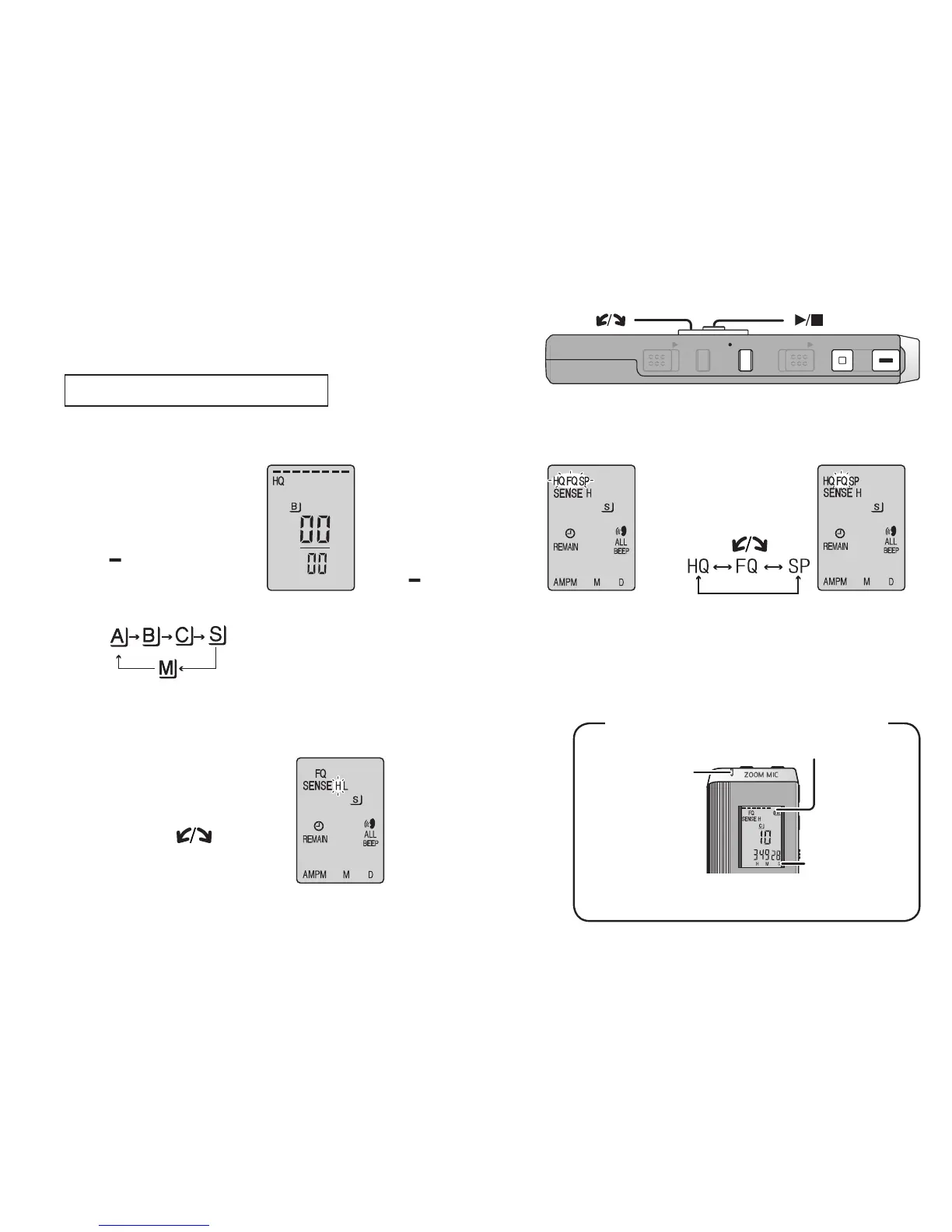
Using different combinations of recording modes and microphone sensitivity levels, you can adjust audio
quality according to recording situations.
Recording
1
Select a Meeting
Recording folder
(A, B, C or S)
5
Record
Light stays on
while recording.
(Flashes while
paused.)
Recording
elapsed time
(Flashes while
paused.)
Display changes depending on recording levels.
Press [
*
FOLDER/
MENU].
Each time you
press
2
Display
the recording
mode menu
1
Press and hold
[
*
FOLDER/
MENU] for 1
second or longer.
2
After making sure
the display at
right, press
[
q
/
g
] to confirm.
3
Select
the recording
mode
1
Tu r n [ ].
2
Press
[
q
/
g
]
to confirm.
HQ: High quality
FQ: Fine quality
SP: Standard play
4
Select the microphone
sensitivity level
1
Press
[
q
/
g
]
to
display microphone
sensitivity.
2Tu r n [ ] and
press
[
q
/
g
]
to
confirm.
3Press [STOP].
Press
[REC/PAUSE].
Display during recording
*
The factory
setting is “HQ”.
ZOOMHOLD
ERASE FOLDER
STOP
REC
/
PAU S E
[]
[]
H: Far
L: Near

Table of Contents

Related product manuals