Control guide
54
Control guide
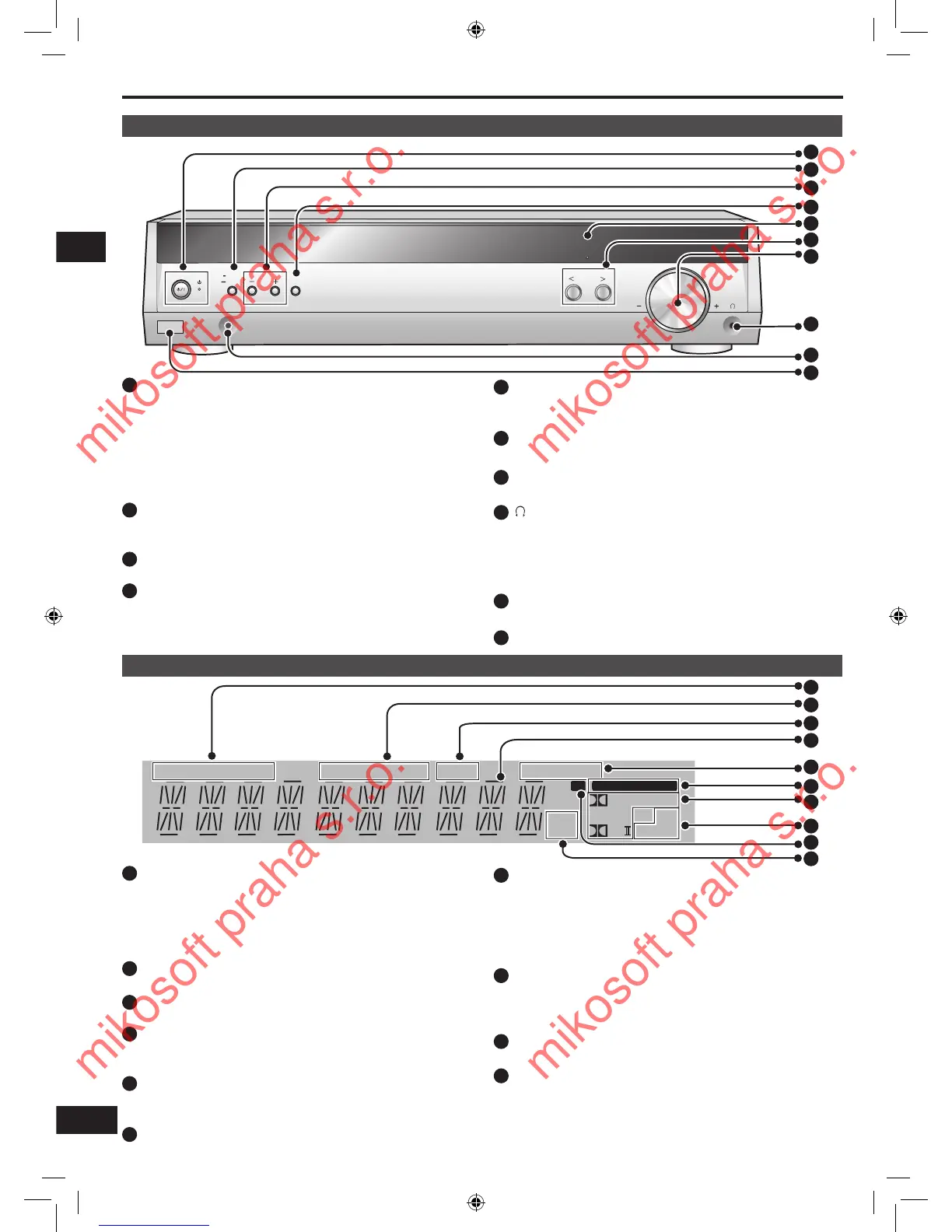
Standby indicator [^]
When the unit is connected to the AC mains supply, this
indicator lights up in standby mode and goes out when the
unit is turned on.
Standby/on switch [8]
Press to switch the unit from on to standby mode or vice
versa. In standby mode, the unit is still consuming a small
amount of power.
Main unit
Display
[-MENU,
―
SETUP, RETURN]
For entering menus to make various settings.
For returning to previous menus.
•
•
[TUNE, 3, 4]
For tuning the radio and selecting menu or setup items.
SETUP MIC jack
For calibration microphone.
[kHz, MHz]
Frequency unit indicators
kHz: AM, or PCM sampling frequency
MHz: FM
[TUNED, ST, MONO]
Radio indicators
TUNED: A station is tuned
ST: A stereo FM broadcast is tuned
MONO: You have switched to monaural mode to improve
reception
[SLEEP]
Sleep timer indicator.
General display
Shows the input mode, radio frequency and other general
information.
[ENTER]
Used during menu or setup operations.
[RDS, PS, PTY]
Shows the current RDS display mode.
[M]
Flashes or lights during presetting.
[% DIGITAL, DTS, % PLΙΙ]
Lights to indicate the source's input signal and decoding
format used.
% DIGITAL: Dolby Digital sources
DTS: DTS sources
% PLΙΙ: Dolby Pro Logic ΙΙ decoder is being used
[SFC, 2CH MIX]
SFC: Appears when you are using an SFC mode
2CH MIX: Appears when you are listening to a multi-channel
source with headphones
[VOLUME]
Volume control.
[ ] Headphone jack
Plug type: 3.5 mm stereo
Sound does not come from the speakers if you connect
headphones.
Avoid listening for prolonged periods of time to prevent
hearing damage.
•
•
[PCM, C.FOCUS]
PCM: Lights when the PCMFIX mode is set
C.FOCUS: Appears when you are using Center Focus
[DIGITAL INPUT]
Lights when input is digital.






 To Next Page