RQTX0151
15
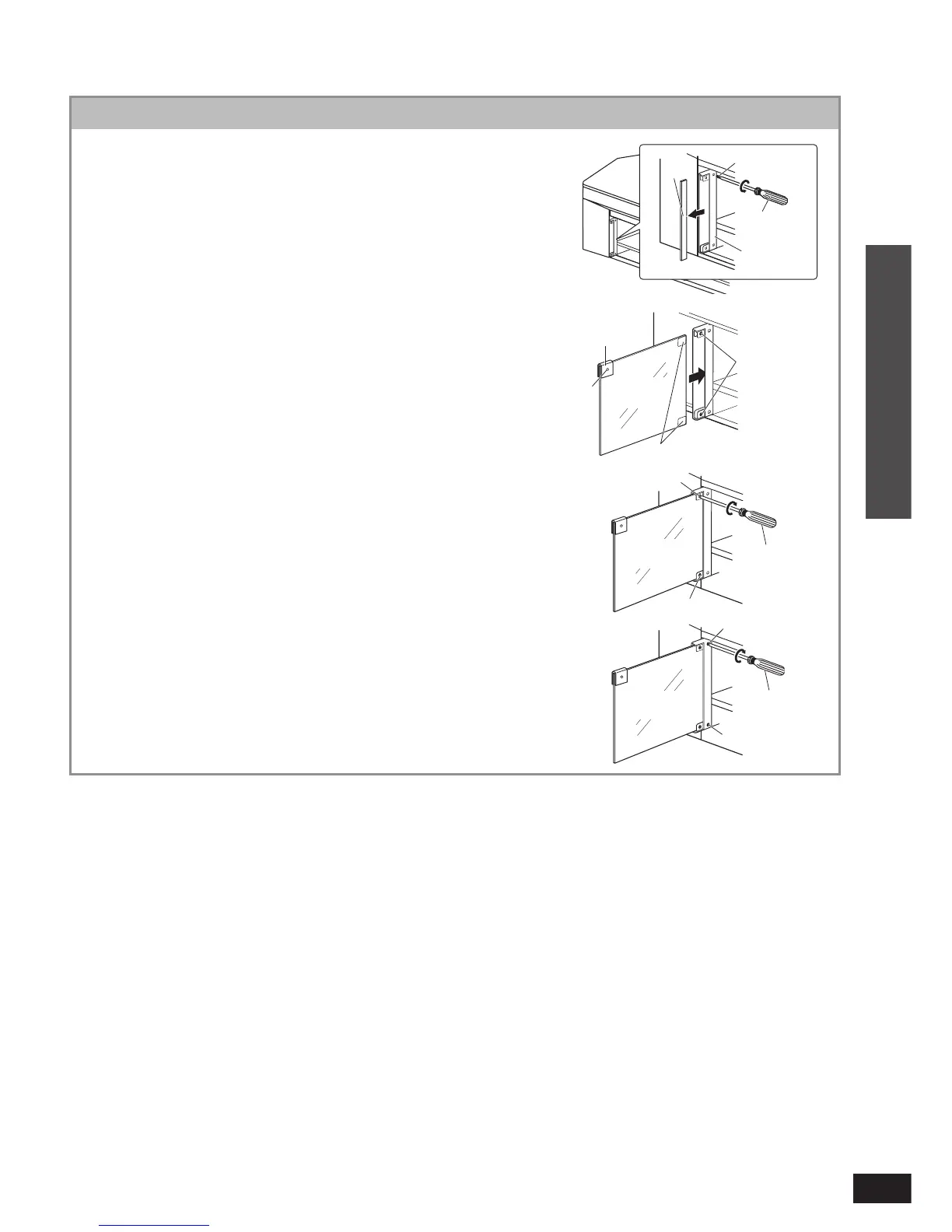
Glass door assembly
Remove 4 screws from the glass holder
using a Phillips-head screwdriver and
take out the board.
Before taking out the board, remove the tape fi xing the
glass holder.
Use the Phillips-head screwdriver that matches the screw
size.
Insert the glass door (included) to the
glass holder fi rmly and tighten
the 2 screws in front tentatively.
The illustration at right shows how to fi x the left glass door.
One side of the magnet catch has a hole.
This is the inner side of the glass.
The slippage prevention sheet is pasted on the glass
holder inserting part on the surface of the glass door.
Fix as it is.
Close the glass door to adjust the height
and gap on both sides. Open the glass
door so it does not misalign and tighten
2 screws in front with the Phillips-head
screwdriver.
Tighten 2 screws at the back fi rmly.
Install the other glass door in the same way.
•
•
•
•
•
•
1
2
3
4
Board
Glass
holder
Magnet
catch
Hole
Slippage prevention sheet
Phillips-head
screwdriver
Screw
Screw
Screw
Screw
Inner side
of glass
Screw
Inner side
of glass
Inner side
of glass
Phillips-head
screwdriver
Phillips-head
screwdriver
Screw
Connection
Installing and assembling the rack












 To Next Page