RQTX0151
18
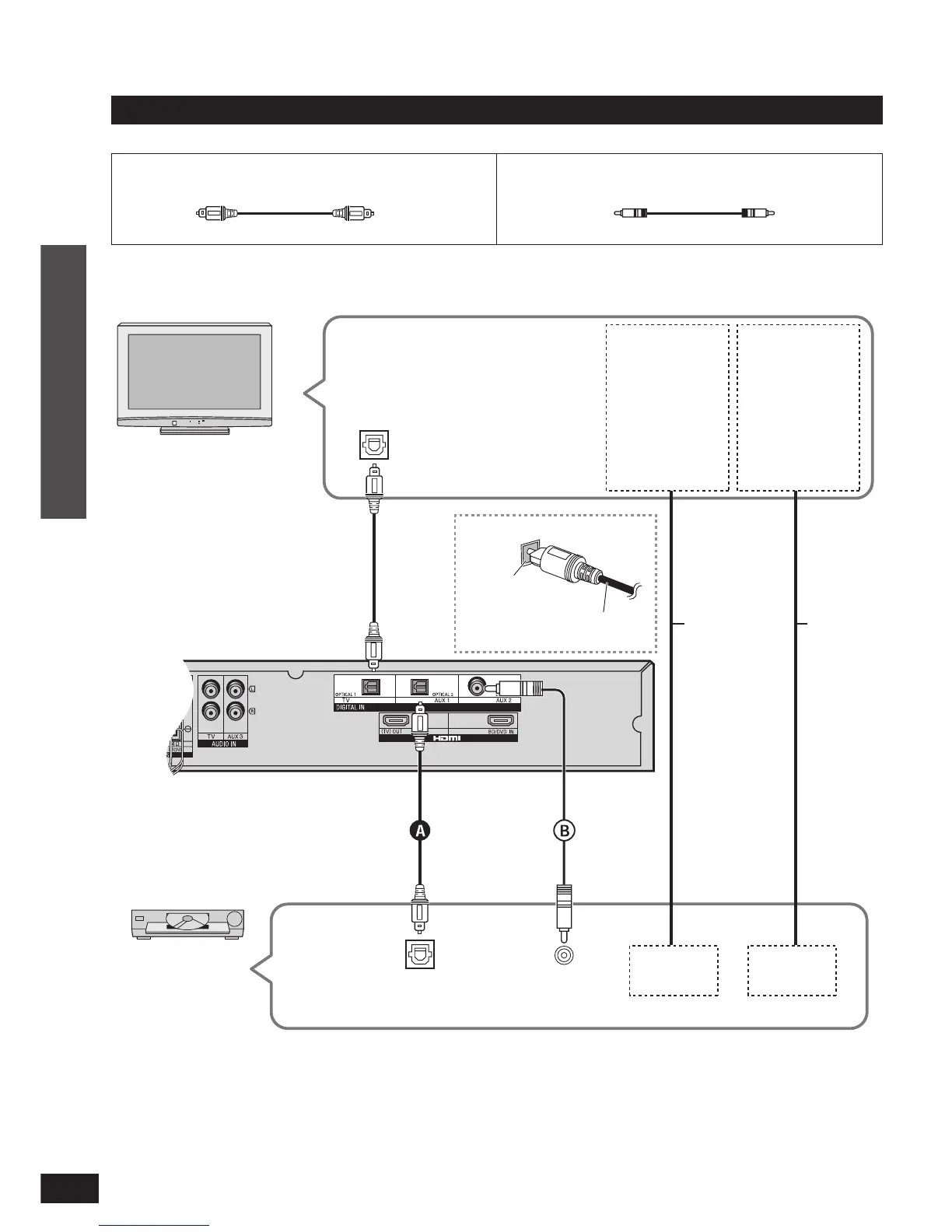
Home Theater connections
Connecting the optical fi bre
cable
Note the shape
and fi t it
correctly into the
terminal.
Do not
bend!
Optical fibre cable (not included)
Connecting with digital terminal-mouted equipment
Connection cable
Refer to the operating instructions for the equipment you are connecting for the correct type of video cable.•
TV
Digital audio
out (optical)
Connect the video
directly from the
other equipment to
the television.
VIDEO IN AUDIO IN
Use this connection
so audio from the
equipment can
be heard through
the television’s
speakers even if
this system is in
standby mode.
Video cable
Audio
cable
Amplifier
DVD player etc.
Digital audio out
(optical)
VIDEO OUT
AUDIO OUT
Coaxial cable (not included)
Digital audio out
(coaxial)
Connection
Home Theater connections
Make the connection either
A
or
B
according to the suitability for your
equipment.












 To Next Page