EasyManua.ls Logo

Panasonic SC-HTR310 - Basic Audio and Video Connections

Panasonic SC-HTR310
40 pages
Print Icon
To Next Page IconTo Next Page
To Previous Page IconTo Previous Page
Loading...
RQTX0151
16
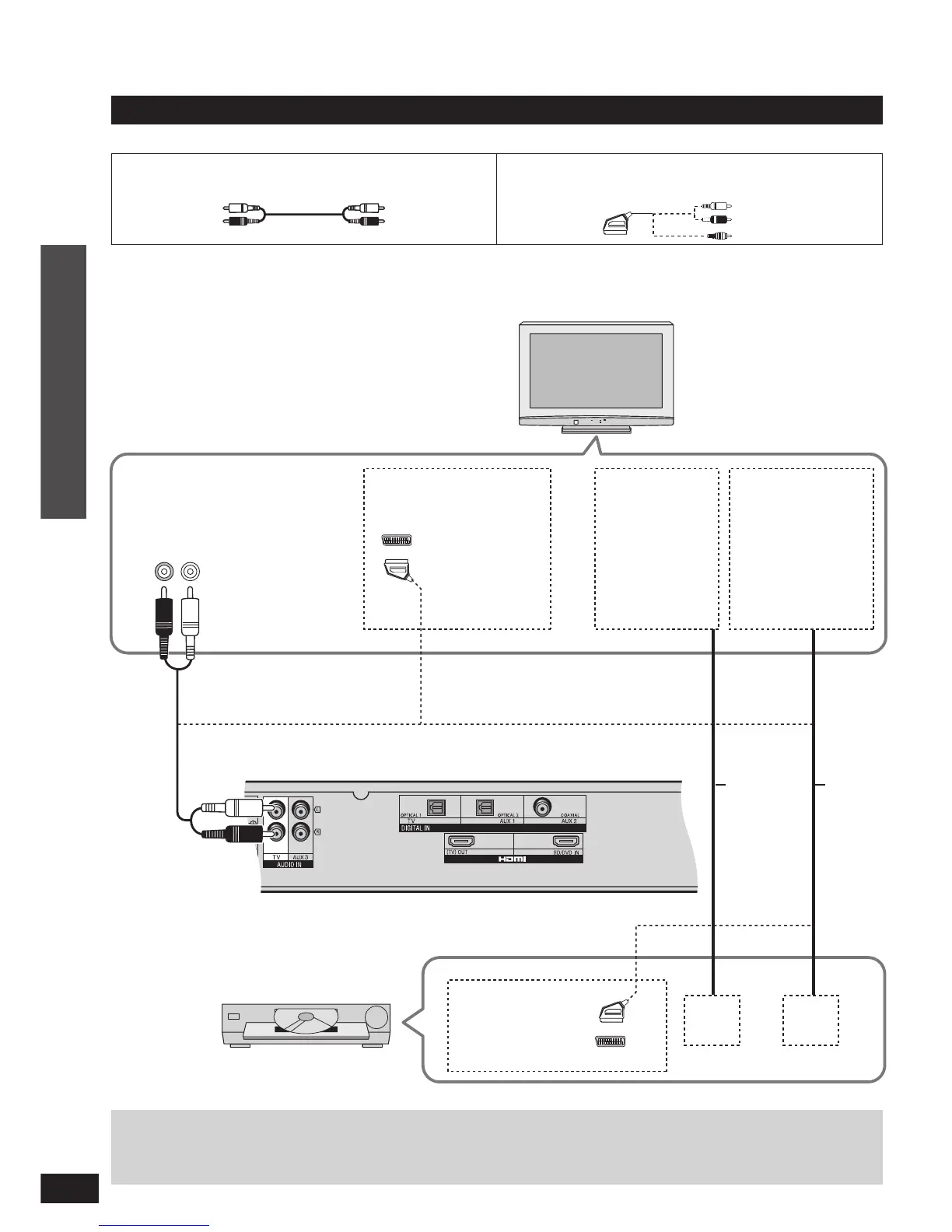
Basic connections
Connection
Home Theater connections
Reduce the volume on the television and select TV after you have done connections as
above if you want to use this system.
TV
Audio out
R L
Use this connection
so audio from the
equipment can be
heard through the
television’s speakers
even if this system is
in standby mode.
AUDIO IN
Video
cable
Audio
cable
Ampli er
DVD player etc.
VIDEO
OUT
AUDIO
OUT
Stereo phono cable (not included)
Connection cable
Refer to the operating instructions for the equipment you are connecting for the correct type of video cable.
Home Theater connections
Connect the video
directly from the
other equipment to
the television.
VIDEO IN
21-pin scart cable (not included)
AV
AV
21-Pin scart cable
connection also
possible.
21-Pin scart cable
connection also
possible.

Related product manuals