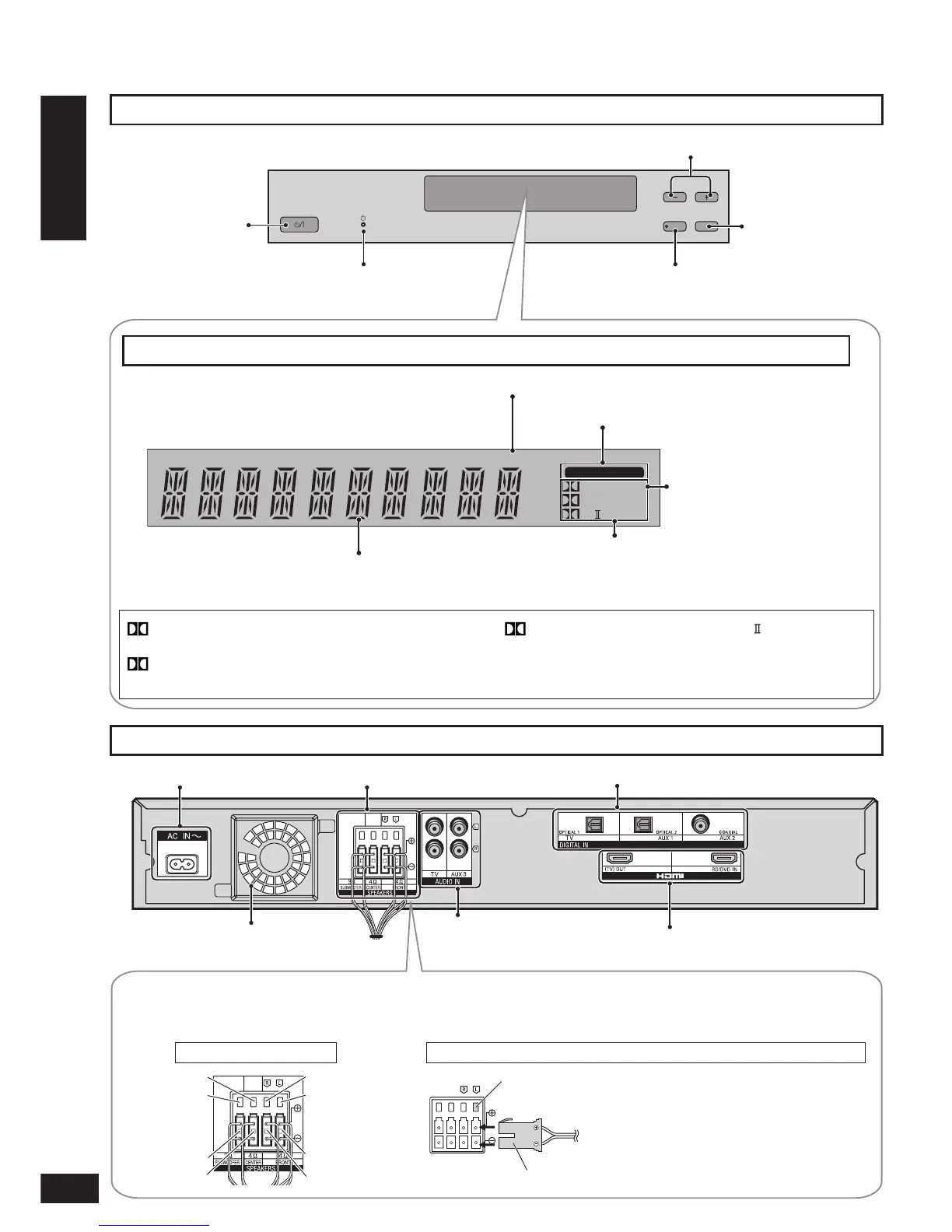
Speaker terminalsAC inlet (
®
page 22) Digital input terminal (
®
pages 17 to 21 and 28)
Audio input terminal
(
®
pages 16, 17, 19 and 21)
HDMI terminal (
®
pages 17 and 28)
RQTX0151
8
ゲーム(サウンド)
ゲーム(サウンド)
VOLUME
WHISPER MODE
SURROUND
INPUT
SELECTOR
Speaker terminals
The speakers are already connected. Do not touch the connectors unless absolutely necessary.
If the connectors become disconnected, refer to the illustrations below for connection.
Connector connection
How to attach the connectors
Make sure the colour on the connector
indicates the same as corresponding
terminal and insert the connector straight all
the way.
DIGITAL : Dolby Digital sources
DTS : DTS sources
VS : When Dolby Virtual Speaker is working
SFC : When you are using an SFC mode
PLⅡ :
When Dolby Pro Logic decoder is being
used
(When using Dolby Virtual Speaker on
2 channel stereo source)
Control panel
Control guide
For adjusting volume (
®
page 24)
Standby/on switch
(
®
pages 22 to 24)
Standby indicator
(
®
page 22)
“SELECTOR” switch
(
®
page 24)
Before use
Control guide
Display
When input signal is fi xed to
DTS (
®
page 33)
PCM
DIGITAL DTS
PL
SFC
VS
DIGITAL INPUT
Digital surround signal/Sound fi eld (
®
below, pages 26 and 27)
When input signal is digital
When input signal is fi xed to PCM (
®
page 33)
General display
Amplifi er
Exhaust hole (Cooling fan)
Green
White
Red
Purple
White
Red
Purple
Green
For using “WHISPER MODE SURROUND”
(
®
page 29)
Terminal block
Connector












 To Next Page