RQTX0151
32
Play
Functions and settings
Functions and settings
1
Press and hold for about 2 seconds.
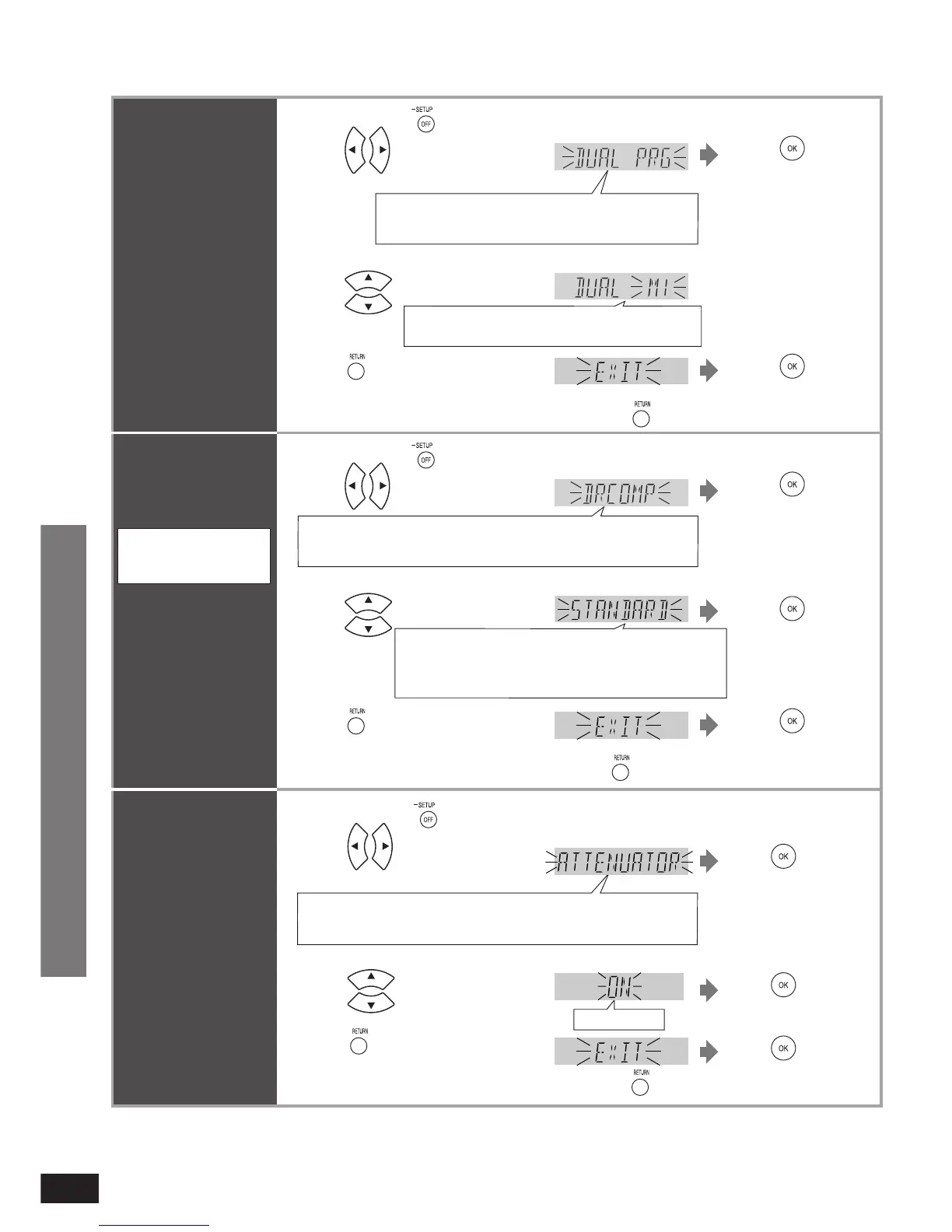
Switching the
attenuator
Switch the attenuator
“ON ” when big sounds
become distorted while
playing an analogue
input source.
2 Press to select
“ATTENUATOR”.
Press to
confirm.
Select “EXIT” and confi rm
to fi nish the setup mode.
•
REAL C.,
Ú
BASS,
Ú
TREBLE, BALANCE, HDMI, TV DELAY,
DUAL PRG, DRCOMP, ATTENUATOR, REMOTE, INPUT MODE,
RESET, EXIT
3 Press to select “ON”.
ON, OFF
Factory setting: OFF
4 Press a few times to select
“EXIT”.
Press
Press to
confirm.
Press to
confirm.
Return to previous menu/cancel.
Ú
Only appears when audio adjustment can be made.
Clear audio at low
volume
It compresses the
dynamic range so
that you can still hear
dialogue and leave the
sound fi eld unaffected.
Use this function when
you have to turn the
volume down, such as
late at night.
Dynamic range
compression for Dolby
Digital
OFF: Normal playback; STANDARD: The level
recommended by the producer of the software for
household viewing; MAX: The maximum allowable
compression (recommended for night viewing)
2
1
Press to select “DRCOMP”.
3 Press to select setting.
Press and hold for about 2 seconds.
Press to
confirm.
Select “EXIT” and confi rm
to fi nish the setup mode.
•
Press to
confirm.
Factory setting: OFF
REAL C.,
Ú
BASS,
Ú
TREBLE, BALANCE, HDMI, TV DELAY,
DUAL PRG, DRCOMP, ATTENUATOR, REMOTE, INPUT MODE,
RESET, EXIT
4 Press a few times to select
“EXIT”.
Press to
confirm.
Press
Ú
Only appears when audio adjustment can be made.
Return to previous menu/cancel.
Switching between
dual sounds
You can switch
between dual sounds of
Dolby Digital signals.
M1: Main audio, M2: Sub channel audio output,
M1+M2: Main + Sub channel audio output
2
1
Press to select
“DUAL PRG”.
3 Press to select the sound.
Press and hold for about 2 seconds.
Press to
confirm.
Select “EXIT” and confi rm
to fi nish the setup mode.
•
REAL C.,
Ú
BASS,
Ú
TREBLE, BALANCE, HDMI,
TV DELAY, DUAL PRG, DRCOMP, ATTENUATOR,
REMOTE, INPUT MODE, RESET, EXIT
4 Press a few times to select
“EXIT”.
Press to
confirm.
Press
Ú
Only appears when audio adjustment can be made.
Return to previous menu/cancel.












 To Next Page