RQTX0151
17
Turn off all components before making any connections.
To connect equipment, refer to the appropriate operating
instructions.
•
•
Connection
Home Theater connections
HDMI cable notes
Use a Panasonic HDMI cable for best results.•
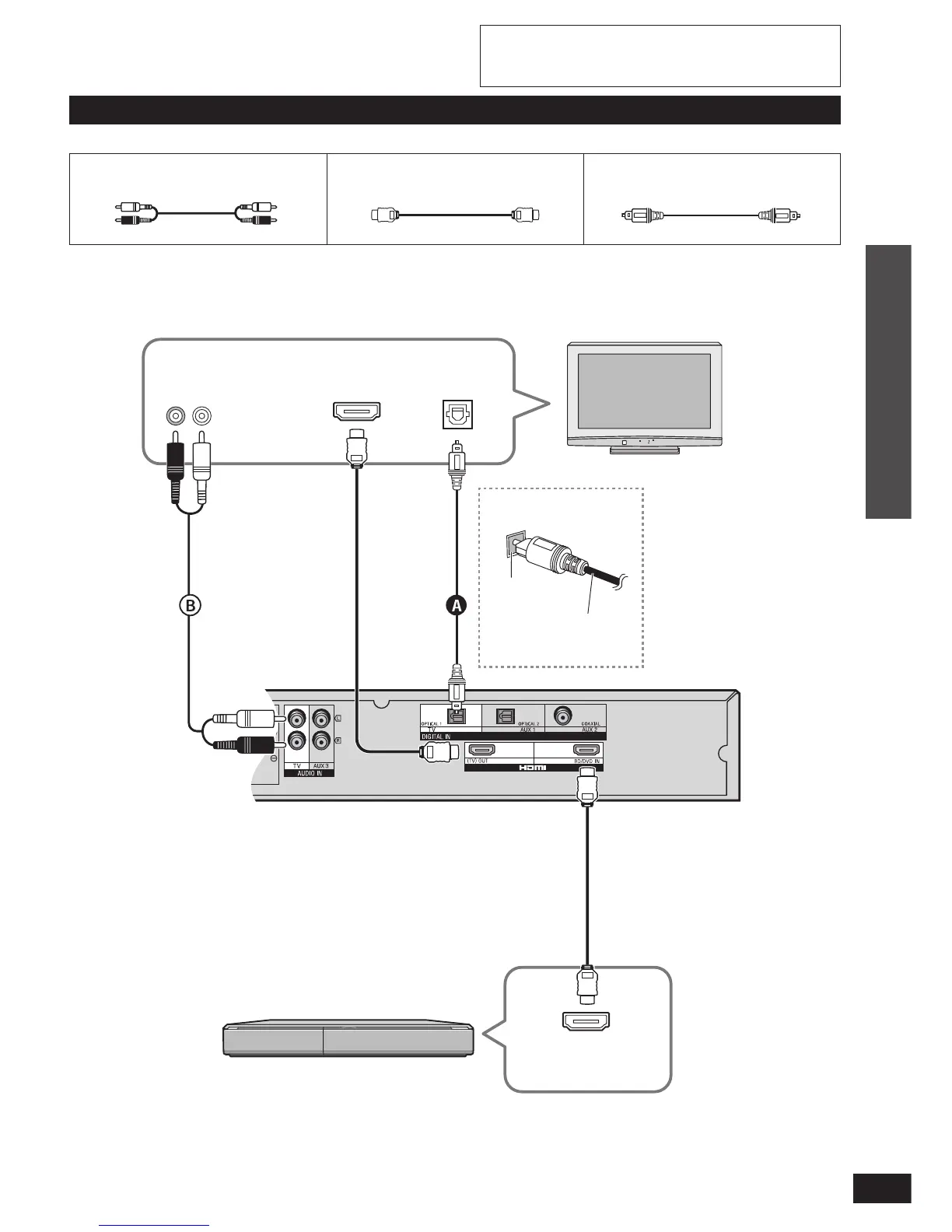
HDMI cable (not included) Optical fibre cable (not included)
Connecting the optical
fi bre cable
Note the
shape and fi t
it correctly
into the
terminal.
Do not
bend!
Connecting equipment with HDMI terminal (TV, DVD recorder, etc.)
Connection cable
HDMI input
Digital audio
out (optical)
TV
Blu-ray Disc player/DVD
recorder, etc.
HDMI
Video/Audio out
Make the connection either
A
or
B
according to
the suitability for your equipment.
Amplifier
Audio out
R L
Stereo phono cable (not included)












 To Next Page