RQTX0151
31
Play
Functions and settings
Reducing
standby power
consumption
(Standby mode)
Standby through function
(
®
pages 25 and 38)
does not work in this
mode if you have
connected through the
HDMI terminal.
VIERA Link “HDAVI
Control” (
®
page 28) will
not function when this
system is off.
Ú
Only appears when audio adjustment can be made.
2
1
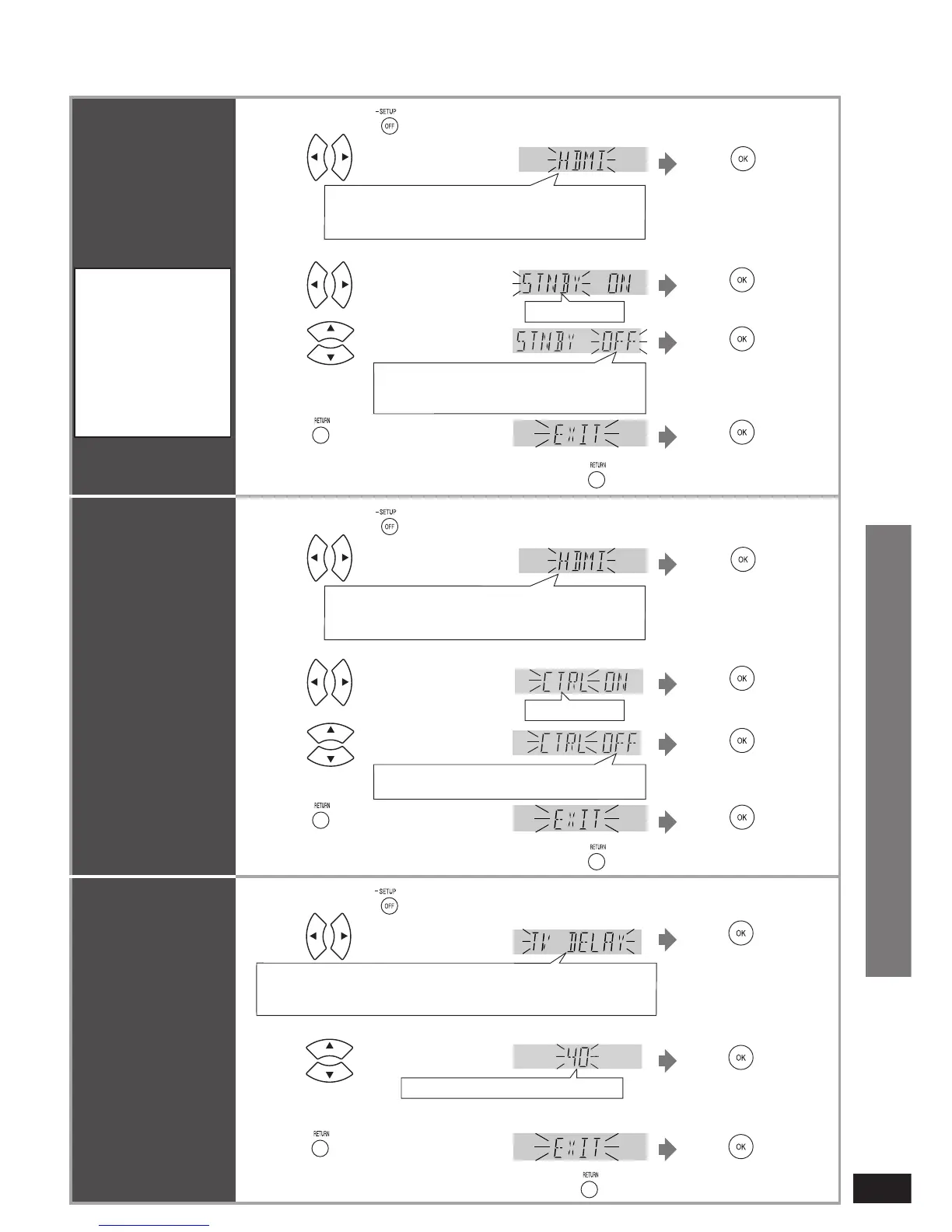
Press to select “HDMI”.
3
Press to select “STNBY”.
STNBY, CTRL
5
Press a few times to select
“EXIT”.
Press
OFF : Standby power consumption reduced
(approx. 0.3 W)
ON : Normal standby power consumption
4
Press to select “OFF”.
Factory setting: ON
Press and hold for about 2 seconds.
REAL C.,
Ú
BASS,
Ú
TREBLE, BALANCE, HDMI,
TV DELAY, DUAL PRG, DRCOMP, ATTENUATOR,
REMOTE, INPUT MODE, RESET, EXIT
Select “EXIT” and confi rm
to fi nish the setup mode.
•
Press to
confirm.
Press to
confirm.
Press to
confirm.
Press to
confirm.
Return to previous menu/cancel.
Adjusting the
time lag between
audio and video
by delaying audio
output
You can adjust audio
timing to video timing
by delaying audio
output when pictures
arrive after sounds.
2
1
Press to select “TV DELAY”.
3 Press to select setting.
AUTO
Ú
, OFF, 10, 20, 30, 40
Factory setting: AUTO
4
Press a few times to select
“EXIT”.
Press
Press and hold for about 2 seconds.
Press to
confirm.
Press to
confirm.
Press to
confirm.
Select “EXIT” and confi rm
to fi nish the setup mode.
•
Return to previous menu/cancel.
REAL C.,
Ú
BASS,
Ú
TREBLE, BALANCE, HDMI, TV DELAY,
DUAL PRG, DRCOMP, ATTENUATOR, REMOTE, INPUT MODE,
RESET, EXIT
Ú
Only appears when audio adjustment can be made.
Ú
Only appears when audio adjustment can be made.
2
1
Press to select “HDMI”.
3
Press to select “CTRL”.
STNBY, CTRL
5
Press a few times to select
“EXIT”.
Press
OFF : When the operation is not linked
ON : When the operation is linked
4
Press to select “OFF”.
Factory setting: ON
Press and hold for about 2 seconds.
REAL C.,
Ú
BASS,
Ú
TREBLE, BALANCE, HDMI,
TV DELAY, DUAL PRG, DRCOMP, ATTENUATOR,
REMOTE, INPUT MODE, RESET, EXIT
Select “EXIT” and confi rm
to fi nish the setup mode.
•
Press to
confirm.
Press to
confirm.
Press to
confirm.
Press to
confirm.
Return to previous menu/cancel.
Setting VIERA Link
“HDAVI Control” to
“OFF”
Ú
For only combination with Panasonic TV
(VIERA) Supporting HDAVI Control 3.












 To Next Page