RQTX0151
33
Play
Functions and settings
Reset
(factory settings)
The operation settings
for the system will
be initialised to the
settings made at the
time of shipment.
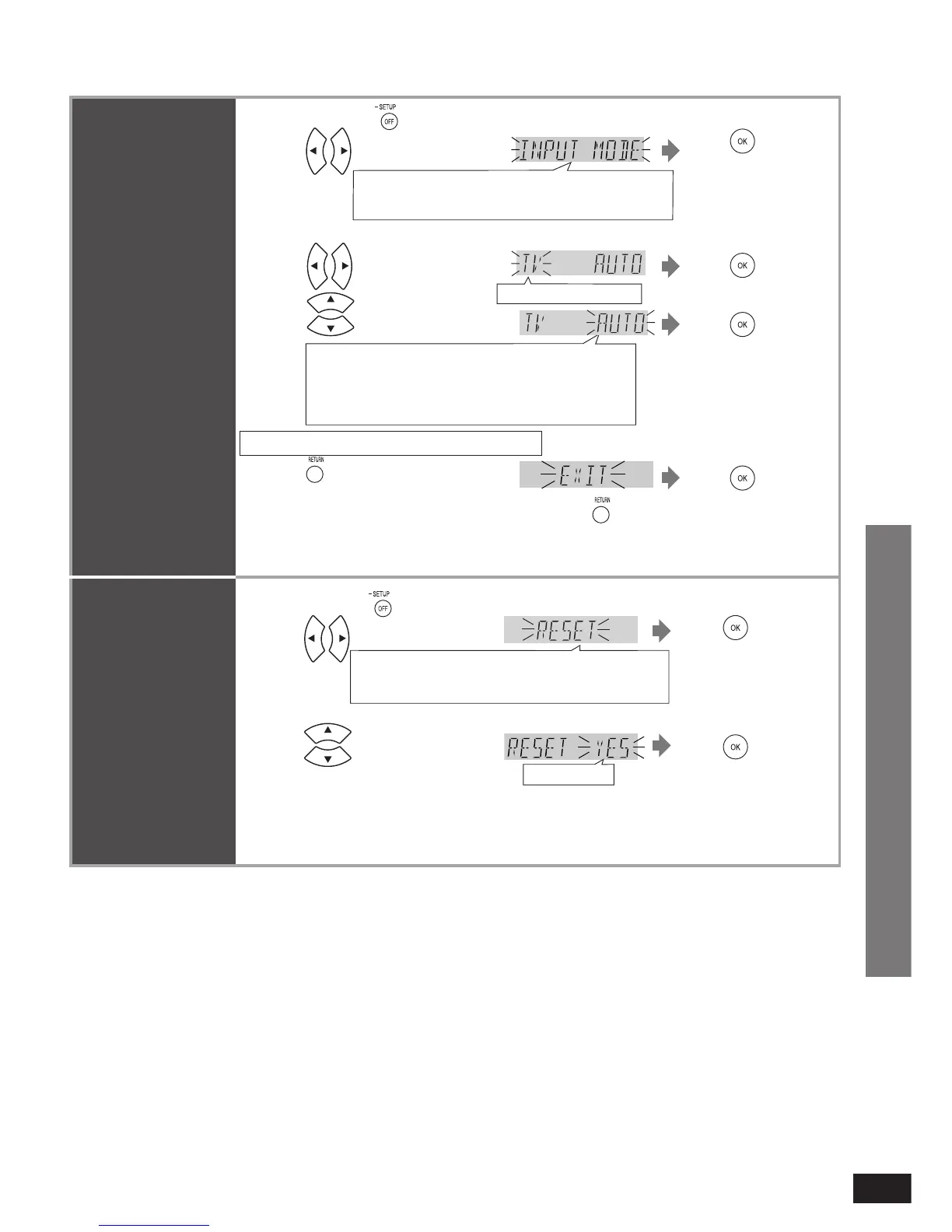
All the settings are reset when you select “YES” and the input selector automatically switches to
“BD/DVD”.
If you select “NO”, you will return to step 2. To exit setup mode, press [RETURN] a few times to
display “EXIT”, and then press [OK].
•
•
2
1
Press to select “RESET”.
3 Press to select “YES”.
Press and hold for about 2 seconds.
Press to
confirm.
Select “EXIT” and
confi rm to fi nish the
setup mode.
•
Press to
confirm.
REAL C.,
Ú
BASS,
Ú
TREBLE, BALANCE, HDMI,
TV DELAY, DUAL PRG, DRCOMP, ATTENUATOR,
REMOTE, INPUT MODE, RESET, EXIT
YES, NO
Ú
Only appears when audio adjustment can be made.
Setting input
signals
Most sources can be
played with “AUTO ”
(factory setting).
However, in the
following cases,
change the input signal
detection setting.
●
When the beginning
of the song is cut
during playback of
CD, set to “PCM ”
(PCM FIX).
●
When the signal is
not detected during
playback of DTS
sources, set to
“DTS ” (DTS FIX).
●
You can fi x the
signal type (digital or
analogue) supplied
by TV.
When noise occurs,
return the setting to
“AUTO ”.
2
1
Press to select “INPUT
MODE”.
Press and hold for about 2 seconds.
REAL C.,
Ú
BASS,
Ú
TREBLE, BALANCE, HDMI,
TV DELAY, DUAL PRG, DRCOMP, ATTENUATOR,
REMOTE, INPUT MODE, RESET, EXIT
Press to
confirm.
Select “EXIT” and
confi rm to fi nish the
setup mode.
•
TV, DVD, AUX1, AUX2
AUTO : Automatic detection
PCM : PCM (from CDs) digital input fi xed
DTS : DTS digital input fi xed
ANLG (TV only):
Fixes the input signal to analogue
DIG (TV only): Fixes the input signal to digital
3
Press to select source.
4
Press to select input signal.
Factory setting: AUTO
Press to
confirm.
Press to
confirm.
Ú
Only appears when audio adjustment can be made.
Repeat steps 3 and 4 to change setting.
5
Press to
confirm.
Press a few times to select
“EXIT”.
Press
Return to previous menu/cancel.












 To Next Page