RQTX0151
34
Functions and settings
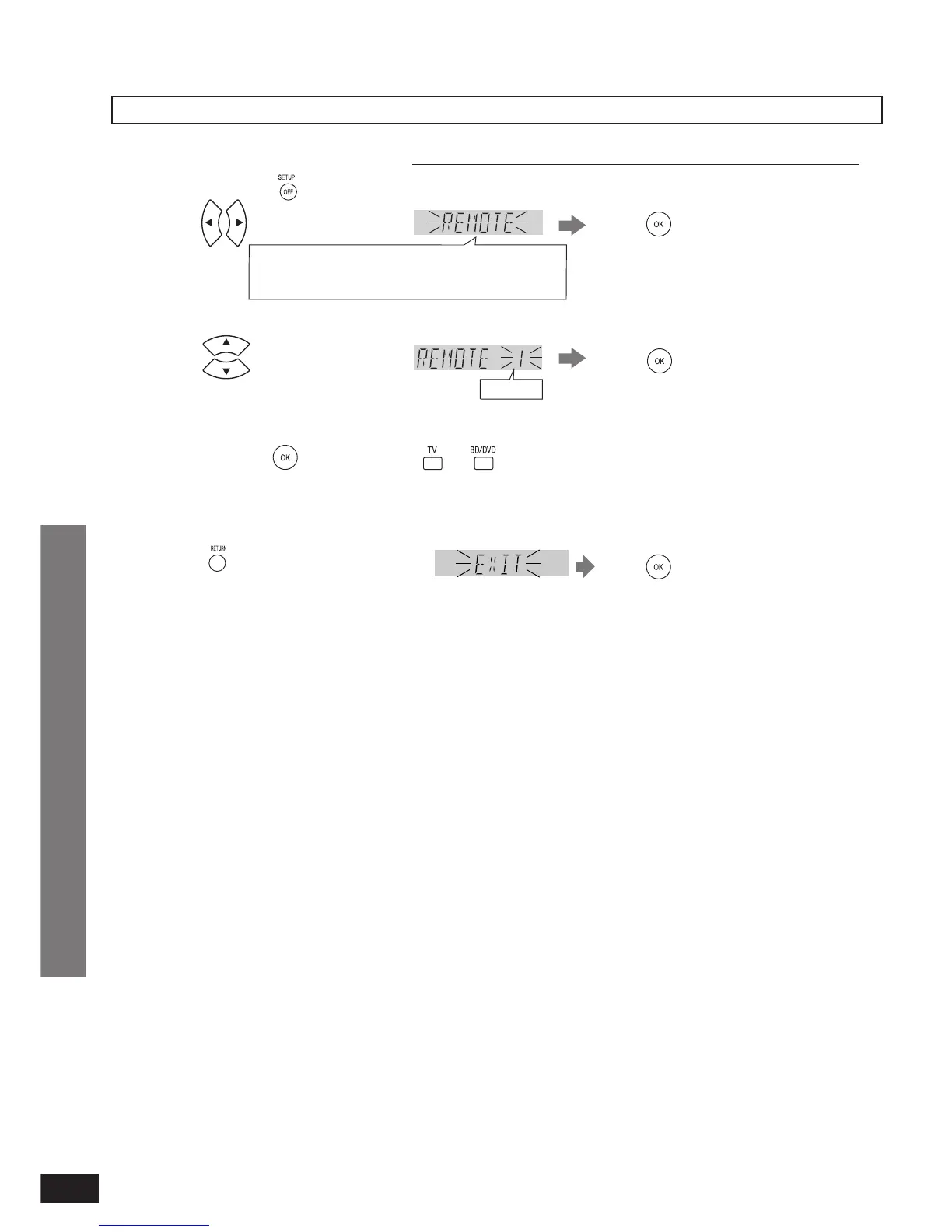
When other equipment (mini component system, AV amp, etc.) manufactured by Panasonic operate
When using this system’s remote control, other equipment may operate. In this case, switch this system’s remote
control code to “REMOTE 1”. Do the following to set the same code number for this system and remote control.
1, 2
3.
Press to select the number.
The remote control code on this system is set.
You cannot fi nish the setting mode until the setting on the remote control is changed. Go to step 4.
•
•
TV: Remote control code 1
BD/DVD: Remote control code 2 (factory setting)
The remote control code on the remote control is set.
Select the same number as the code number you have selected in step 3.
•
•
2.
1.
Press to select “REMOTE”.
Press and hold for about 2 seconds.
REAL C.,
Ú
BASS,
Ú
TREBLE, BALANCE, HDMI,
TV DELAY, DUAL PRG, DRCOMP, ATTENUATOR,
REMOTE, INPUT MODE, RESET, EXIT
Press to confirm.
Select “EXIT” and confi rm
to fi nish the setup mode.
•
Ú
Only appears when audio adjustment can be made.
Factory setting: 2
Press to confirm.
4.
While pressing , press and hold or for about 2 seconds.
5.
Press to confirm.
Press a few times to select
“EXIT”.
Play
Functions and settings












 To Next Page