RQTX0151
30
Play
Functions and settings
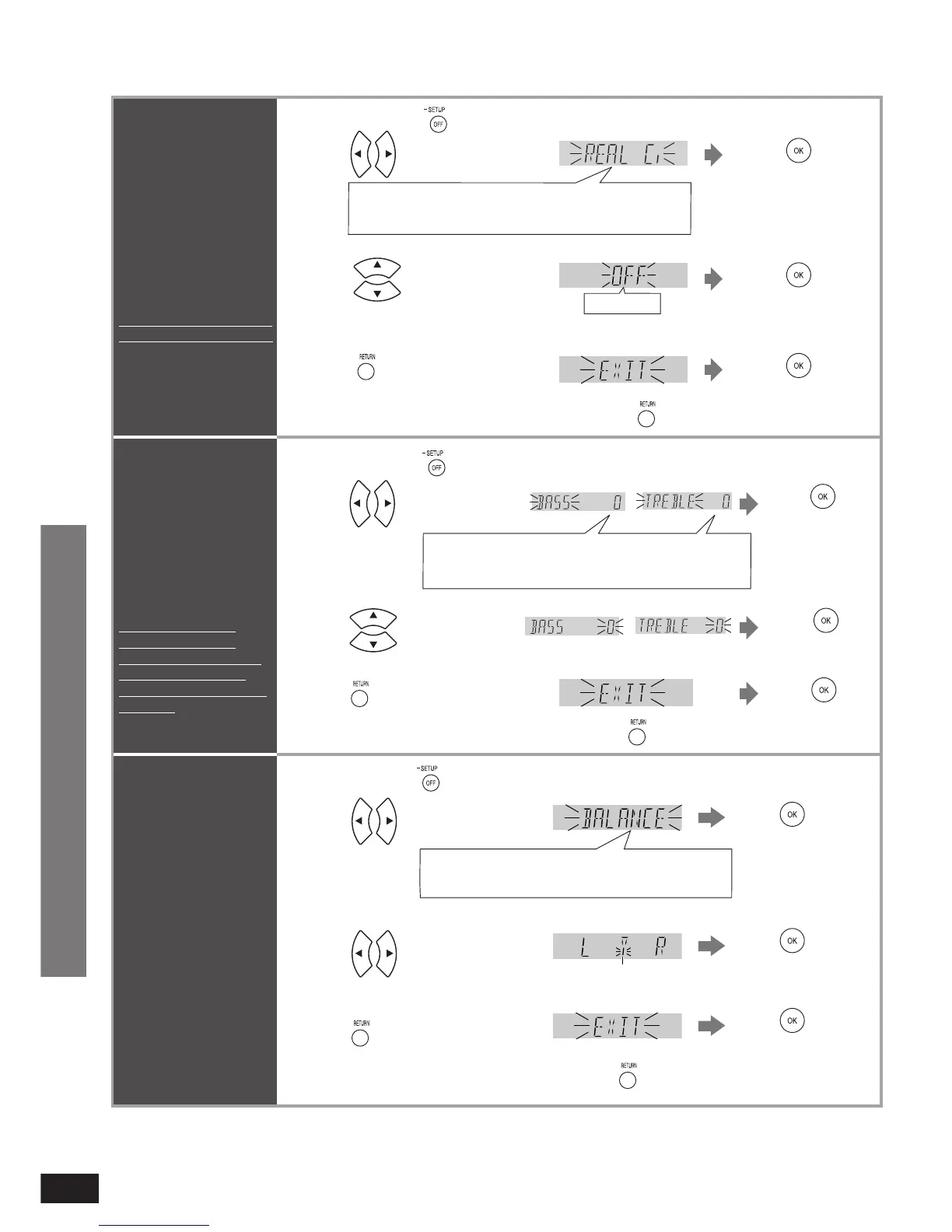
REAL CENTER
function
Makes the dialogue
from the center speaker
clearer when playing
surround sources.
Factory setting is “ON”.
See right to set it “OFF”.
1
Press to
confirm.
Select “EXIT” and confi rm
to fi nish the setup mode.
•
Press and hold for about 2 seconds.
2 Press to select “REAL C.”.
REAL C.,
Ú
BASS,
Ú
TREBLE, BALANCE, HDMI,
TV DELAY, DUAL PRG, DRCOMP, ATTENUATOR,
REMOTE, INPUT MODE, RESET, EXIT
Adjusting sound
quality
You can adjust the level
of bass and treble.
Input signals must be
2 channel of either
analogue or PCM.
This setting is not
displayed in other
conditions. Make sure
the above setting is
made before setup this
function.
Adjusting the
balance
You can adjust the
balance of the front
speakers.
L: Front speaker (left)
R: Front speaker (right)
1 Press and hold for about 2 seconds.
REAL C.,
Ú
BASS,
Ú
TREBLE, BALANCE, HDMI,
TV DELAY, DUAL PRG, DRCOMP, ATTENUATOR,
REMOTE, INPUT MODE, RESET, EXIT
Select “EXIT” and
confi rm to fi nish the
setup mode.
•
Use the bar as a guide.
The effect changes as soon as you select “ON” or “OFF” but you must press [OK] to confi rm
selection.
•
3
Press to select “OFF”.
ON, OFF
Factory setting: ON
4
Press a few times to select
“EXIT”.
Return to previous menu/cancel.
Press
Press to
confirm.
Press to
confirm.
REAL C.,
Ú
BASS,
Ú
TREBLE, BALANCE, HDMI,
TV DELAY, DUAL PRG, DRCOMP, ATTENUATOR,
REMOTE, INPUT MODE, RESET, EXIT
1
Press and hold for about 2 seconds.
2
Press to
confirm.
Press to select “BASS”
or “TREBLE”.
Select “EXIT”
and confi rm to
fi nish the setup
mode.
•
4
Press a few times to select
“EXIT”.
Return to previous menu/cancel.
Press
3
Press to adjust range.
Adjustment range: –6 to +6
Factory setting: 0
Press to
confirm.
Press to
confirm.
Press to select
“BALANCE ”.
2
Press to
confirm.
Press to
confirm.
Press to
confirm.
3
4
Press a few times to select
“EXIT”.
Press
Return to previous menu/cancel.
Ú
Only appears when audio adjustment can be made.
Ú
Only appears when audio adjustment can be made.
Ú
Only appears when audio adjustment can be made.
Press to adjust the
balance.
Functions and settings












 To Next Page