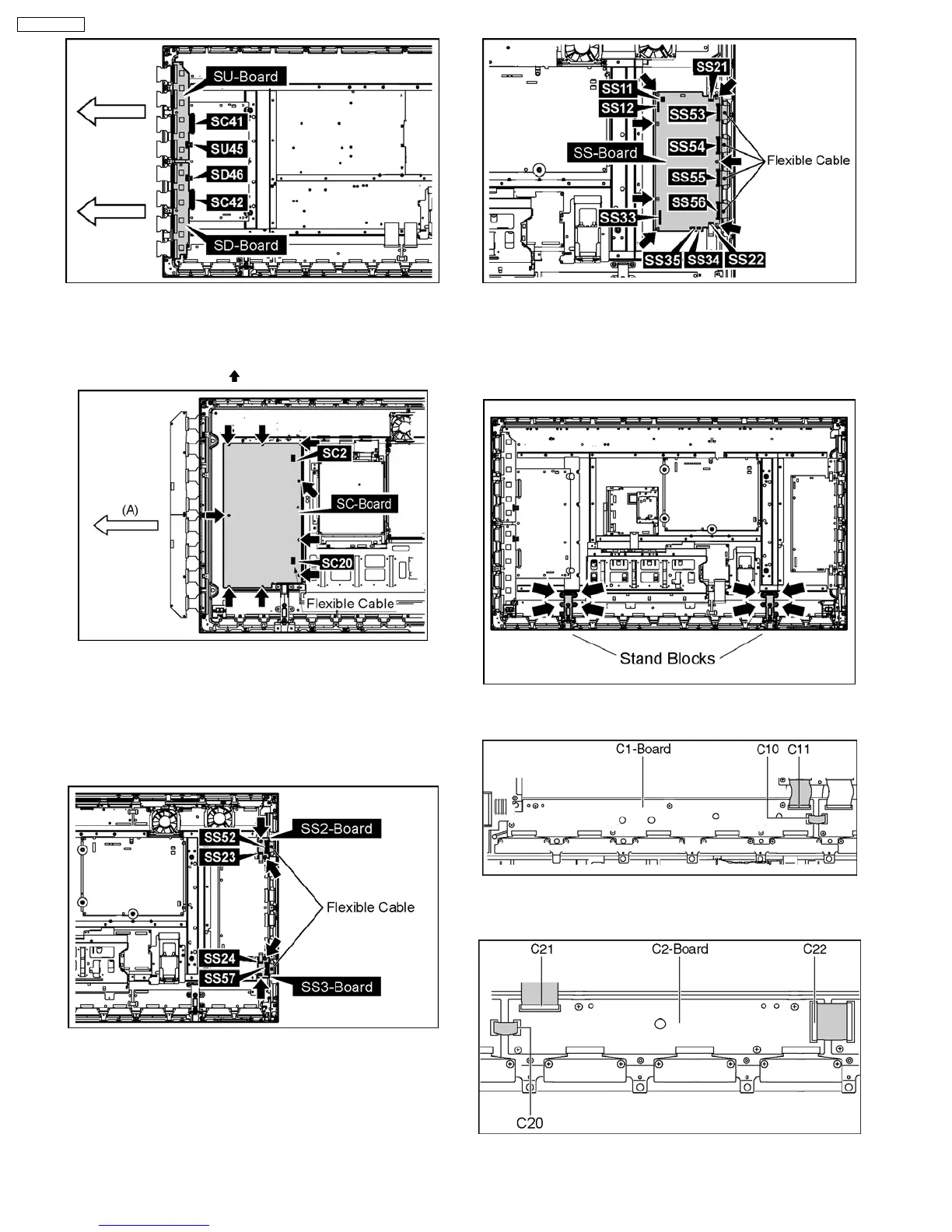
19. Remove the SU-Board and SC-Board.
20. Disconnect the connector (SC2).
21. Disconnect the flexible cable (SC20).
22. Remove 9 screws and (
) then remove the SC-Board.
23. Disconnect the connector (SS23).
24. Remove the Flexible Cable from the connector (SS52).
25. Disconnect the connector (SS24).
26. Remove the Flexible Cable from the connector (SS57).
27. Remove each 2 screws and then remove the SS2-Board
and the SS-3Board.
28. Disconnect the connectors (SS11, SS12, SS21, SS22,
SS33, SS34, SS35).
29. Remove the Flexible Cable from the connectors (SS53,
SS54, SS55, SS56).
30. Remove 7 screws and then remove the SS-Board.
31. Remove the plasma panel section from the servicing stand
and lay on a flat surface such as a t with the plasma panel
surface facing downward.
32. Remove the stand blocks (left, right) fastening screws (x4
each) and remove the stand blocks (left, right).
33. Remove the Flexible Cable from the connectors (C10,
C11).
34. Remove the Flexible Cable from the connector (C20).
35. Remove the connectors (C21 and C22).
36. Disconnect the connectors (C32, C33, C35).
16
TH-50PH10UK






 To Next Page