INPUT MENU
ENTER/
Ŷ
19
Basic Controls
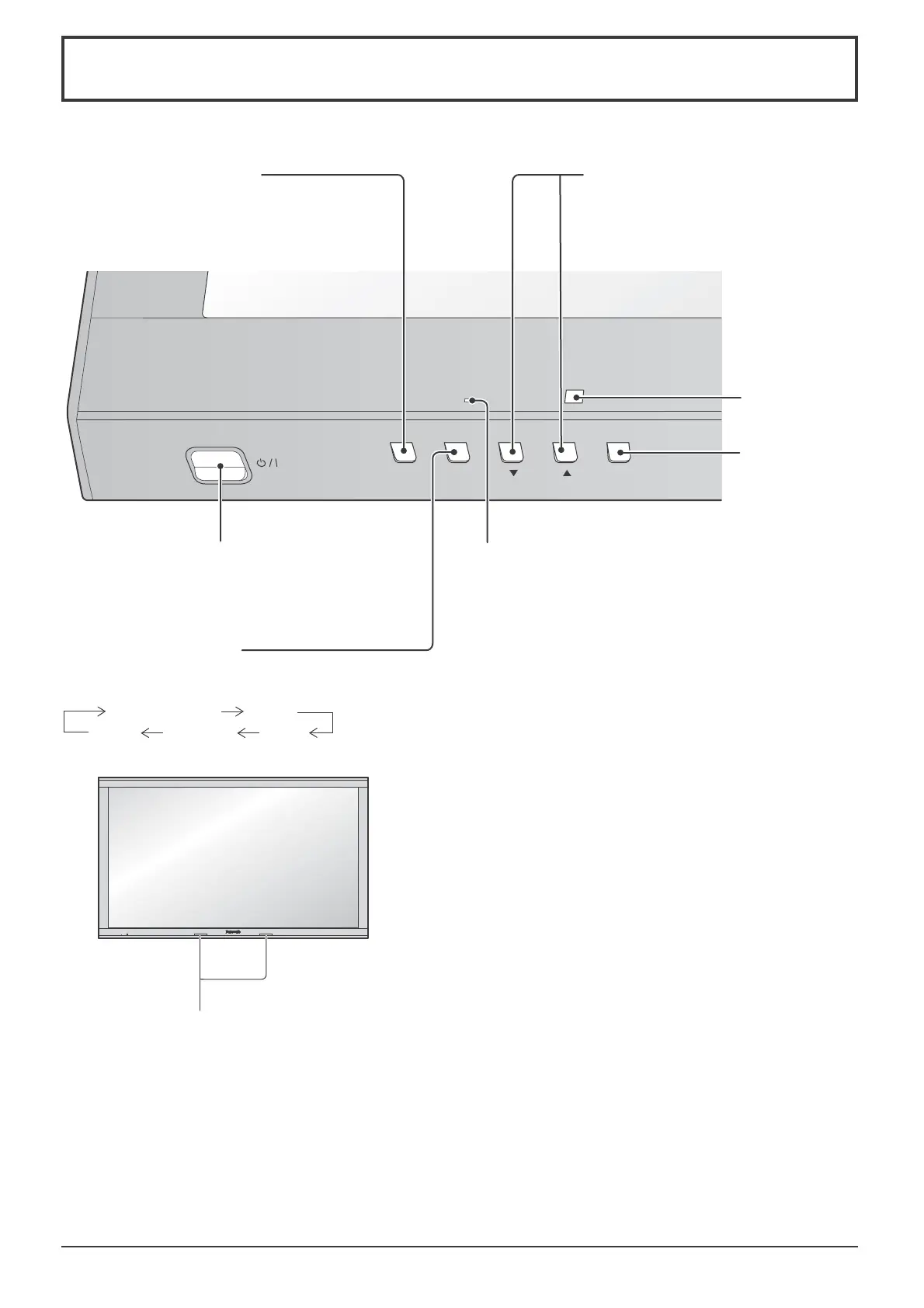
Main Unit
Infrared transmitter for 3D Eyewear
Note:
Do not place any objects between the
transmitter and 3D Eyewear.
Remote control
sensor
Main Power On / Off Switch
Enter / Aspect
button
(see page 21, 24)
When the menu screen is
displayed:
“Ÿ” :
press to move the cursor up
“ź” :
press to move the cursor down
(see page 24)
INPUT button
(Input signal selection)
(see page 18)
Power Indicator
The Power Indicator will light.
• Power-OFF .... Indicator not illuminated (The unit will
still consume some power as long as
the power cord is still inserted into
the wall outlet.)
• Standby ........ Red
Orange (Depending on the type of
the function board installed, when the
power is supplied to the slot)
Orange (When “CONTROL I/F
SELECT” is set to “LAN”. See page
59)
• Power-ON ...... Green
• PC Power management (DPMS)
....................... Orange (With PC input signal.
See page 43)
MENU Screen ON / OFF
Each time the MENU button is pressed, the menu
screen will switch. (see page 24)
Normal Viewing
Picture
Setup
Sound Pos./Size





 To Next Page