49
Setup menu
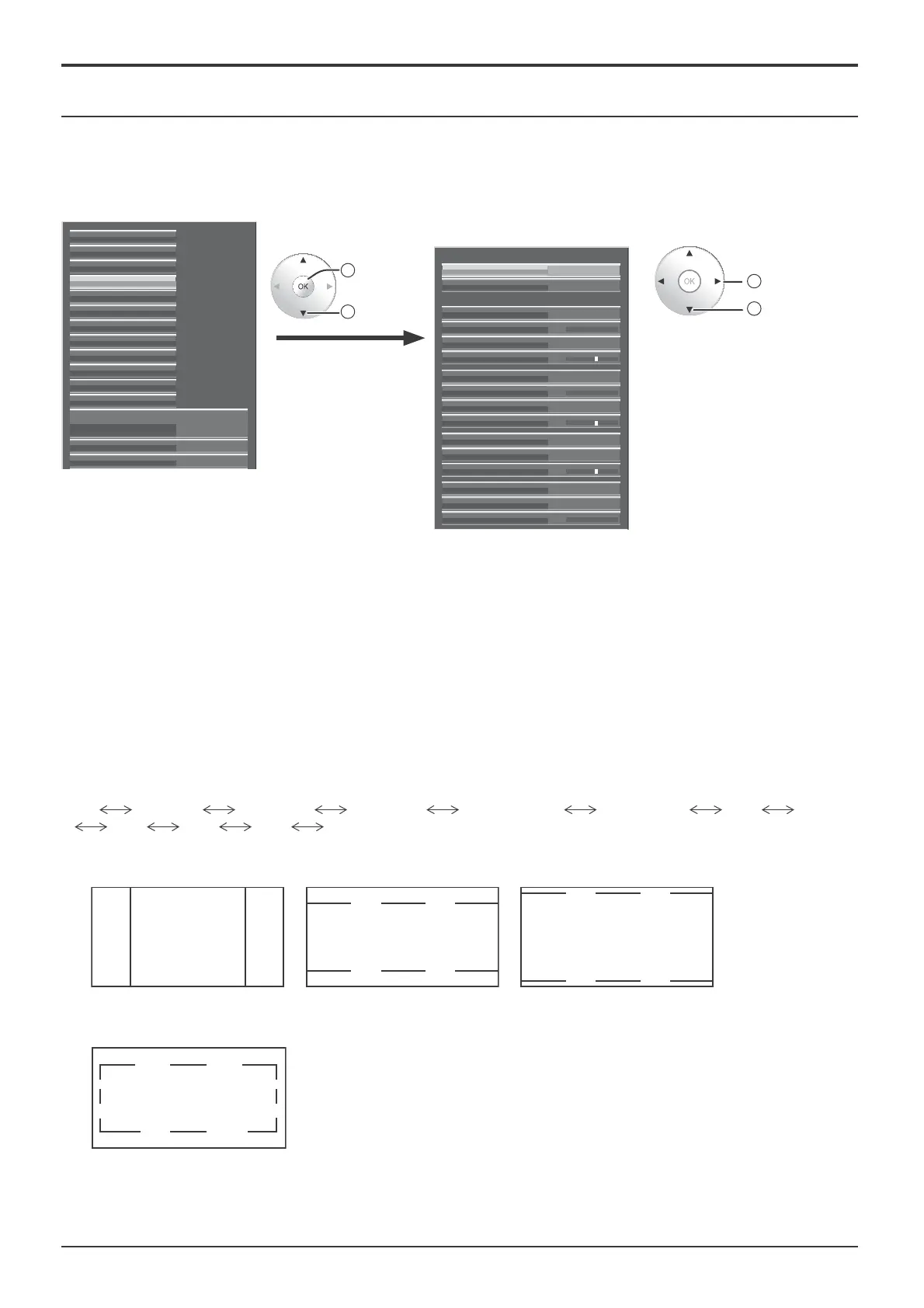
Marker settings
Various markers for editing image are displayed.
Notes:
• This function is available when “Studio mode” in Options menu is set to “On”
• This function is disabled during 3D images.
• An aspect of “4:3” or “16:9” is valid for this function. Only an aspect of “16:9” is valid at the input of HD signal.
Preset1Marker
90%
16:9
Off
Time out (5 min)
Marker Size (%)
Colour
Marker settings
Brightness 3
80%
4:3
Marker Size (%)
Colour
Brightness
Centre
Colour
Brightness
Cross Hatch
Colour
Brightness
Off
Off
Red
Green
Blue
3
3
2
access
1
select
Select the item and set.
2
change
1
select
External scaler mode
Power save Off
Off
Signal
Waveform Monitor
Marker settings
RGB/MONO settings
Extended life settings
Screensaver
Network Setup
Input label
Function Button Settings
On/Off Timer Setup
Day/Time Setup
Component/RGB-in select
RGB
3D Settings
Marker display settings
• Marker
Set show/hide of the marker.
Off: The marker is not displayed.
Preset1 / Preset2: The marker is displayed by Preset1 or 2 setting. You can con¿ gure the display setting of
Preset1/2.
• You can also display the marker with the FUNCTION button on the remote control (see page 63).
• Time out (5 min)
Set the marker display time-out.
On: The marker display disappears in 5 minutes (time out).
Off: The marker display time-out does not occur.
Marker advanced settings
• 16 : 9
Select 16:9 marker display and the marker type.
Off
4:3(1.33) 13:9(1.44) 14:9(1.55) CNSCO(2.39) VISTA(1.85) 95% 93%
90% 88% 80% User
• This setting is valid only if an aspect of “16:9” is used.
Aspect marker:
4:3, 13:9, 14:9, CNSCO, VISTA
4:3 marker CNSCO marker (2.39:1) VISTA marker (1.85:1)
Safe area marker:
95%, 93%, 90%, 88%, 80%, User
• Selecting User allows the marker area set in 1% increments
in “Marker Size (%)” to be reÀ ected in the con¿ guration of
safe area marker.
90% Area marker









 To Next Page