58
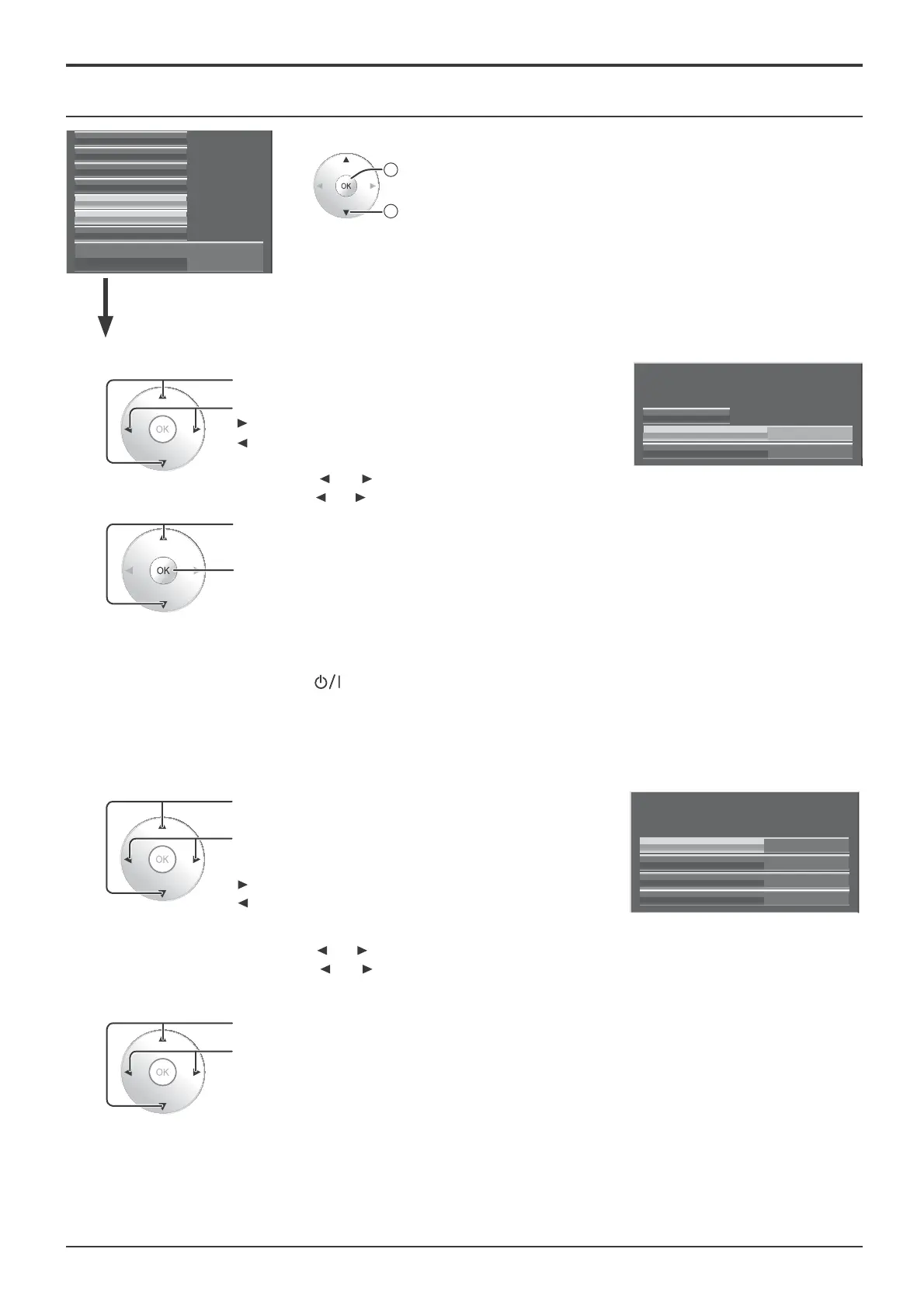
Setup menu
MON
15:00
Time
Day
Day/Time Setup
Time MON 15:00
Set
Day/Time Setup / On/Off Timer Setup
Extended life settings
Screensaver
Network Setup
Input label
Function Button Settings
On/Off Timer Setup
Day/Time Setup
Component/RGB-in select
RGB
2
access
1
select
Press to select Day or Time.
Press to set up Day or Time.
button: Forward
button: Back
Notes:
• Pressing “
” or “ ” button once changes Time 1 minute.
• Pressing “
” or “ ” button continuously changes Time by 15 minutes.
Press to select Set.
Press to store Day/Time Setup.
Notes:
• Set cannot be selected unless Time is set.
• Unless setting the present time other than “99:99”, “Day” and “Time” cannot be set.
• The settings of “Day” and “Time” are reset when leaving the display turned off for about
7 days for the following reasons:
Pressing
switch of the unit to turn off the display.
Disconnecting the AC cord.
Interruption of power supply.
1
2
Day/Time Setup
On/Off Timer Setup
Press to select POWER ON Time / POWER OFF
Time.
Press to setup
POWER ON Time / POWER OFF Time.
button: Forward
button: Back
Notes:
• Pressing “ ” or “ ” button once changes POWER ON Time / POWER OFF Time 1 minute.
• Pressing “
” or “ ” button continuously changes POWER ON Time / POWER OFF Time
by 15 minutes.
Press to select POWER ON Function/POWER OFF Function.
Press to select On.
Note: Timer function will not work unless “Time” is set.
2
1
12:00
16:00
POWER OFF Time
POWER ON Time
Off
POWER OFF Function
Off
POWER ON Function
On/Off Timer Setup
Time 15:00






 To Next Page