32
Picture Adjustments
0
2.2
Input level
Advanced settings
Normalise
Gamma
0
0
Off
W/B High R
W/B High G
0W/B High B
0W/B Low R
0W/B Low G
0W/B Low B
Cinema reality
OffStudio Gain
0Black extension
OffNoise reduction
Colour gamut
2
access
1
select
Colour gamut
Colour gamut
Native
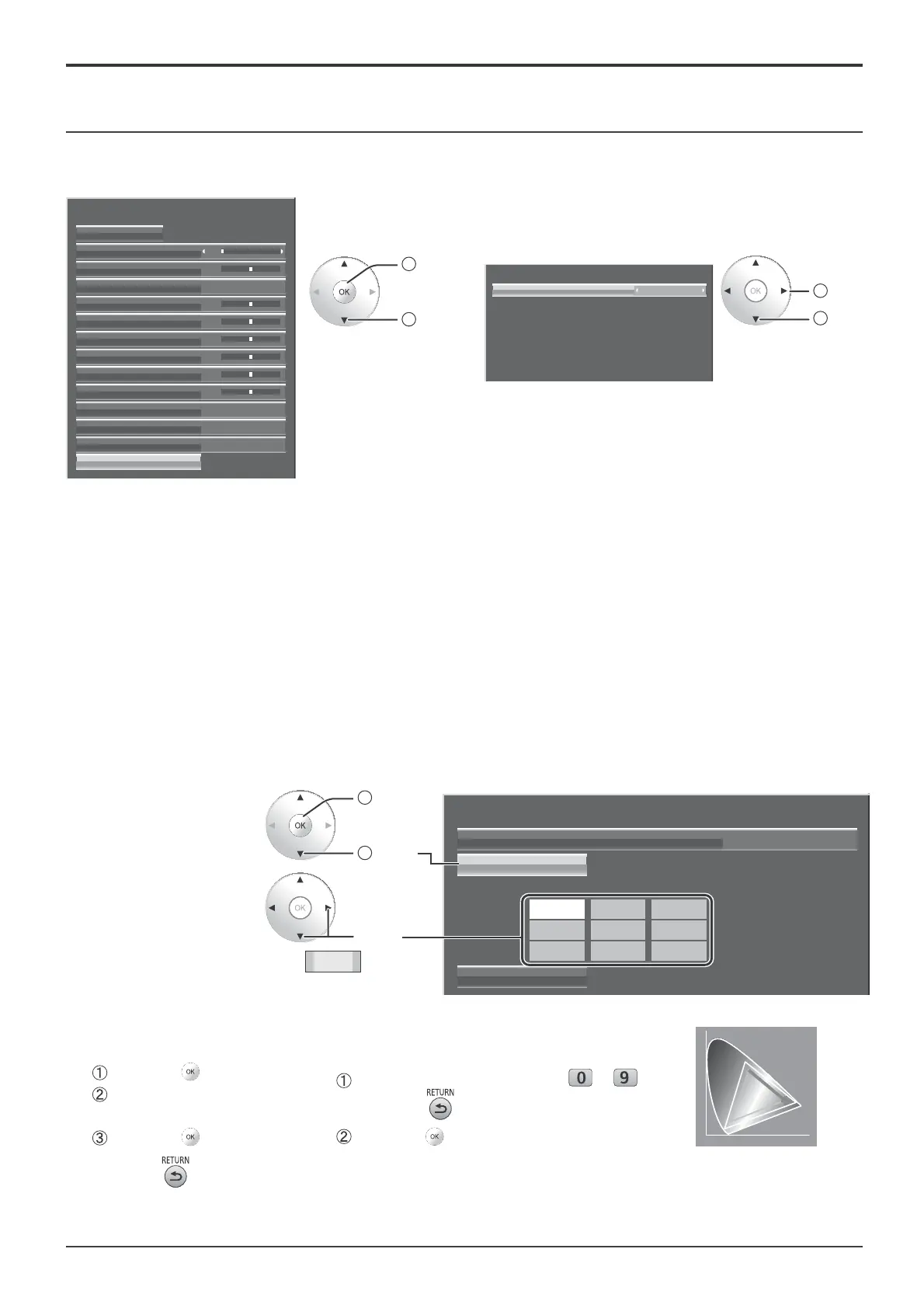
Select the item and set.
Colour space adjustment (Colour gamut)
Changes the colour space to BT.709 signal standard chromaticity point and ¿ ne-tunes it.
2
change
1
select
Ɣ Colour gamut
DIGITAL CINEMA COLOUR: Sets colour gamut to reproduce the original colour of movies.
Custom: Enables the colour space adjustment, the colour space adjustment set in the “EDIT” is reÀ ected.
Native: Disables the colour space adjustment, images are displayed in the original colour gamut of the panel.
BT.709: Changes the colour space to BT.709 signal standard chromaticity point.
EBU: Changes the colour space to EBU signal standard chromaticity point.
SMPTE-C: Changes the colour space to SMPTE-C signal standard chromaticity point.
Notes:
• This setting is memorized separately for each input terminal and “Picture Mode”.
• For 3D images, this setting becomes “Native” and no setting is available.
Ɣ Edit
Colour space is ¿ ne-tuned.
Notes:
• This setting is valid when “Colour gamut” is “Custom”.
• This setting is memorized separately for each input terminal and “Picture Mode”.
1
Select “Edit”.
2
access
1
select
2
Select an adjustment
item.
select
3
Change the numerical value.
[To input the numerical value directly]
Input the numerical value from to
Pressing the will cancel the value change.
Press the button.
[To adjust with the Ÿź button]
Press the button.
Change the numerical value
with the Ÿź button.
Press the button.
4
Press the button.
Adjustment is ended.
65535
Colour gamut
R Ratio
RG B
G Ratio
B Ratio
Colour gamut
Edit
Reset
Custom
65535 2900 0
2110 65535 0
0 1760 65535
y
x
Chromaticity diagram displays in
gray the dot and line to be adjusted.









 To Next Page