40
Sound Adjustment
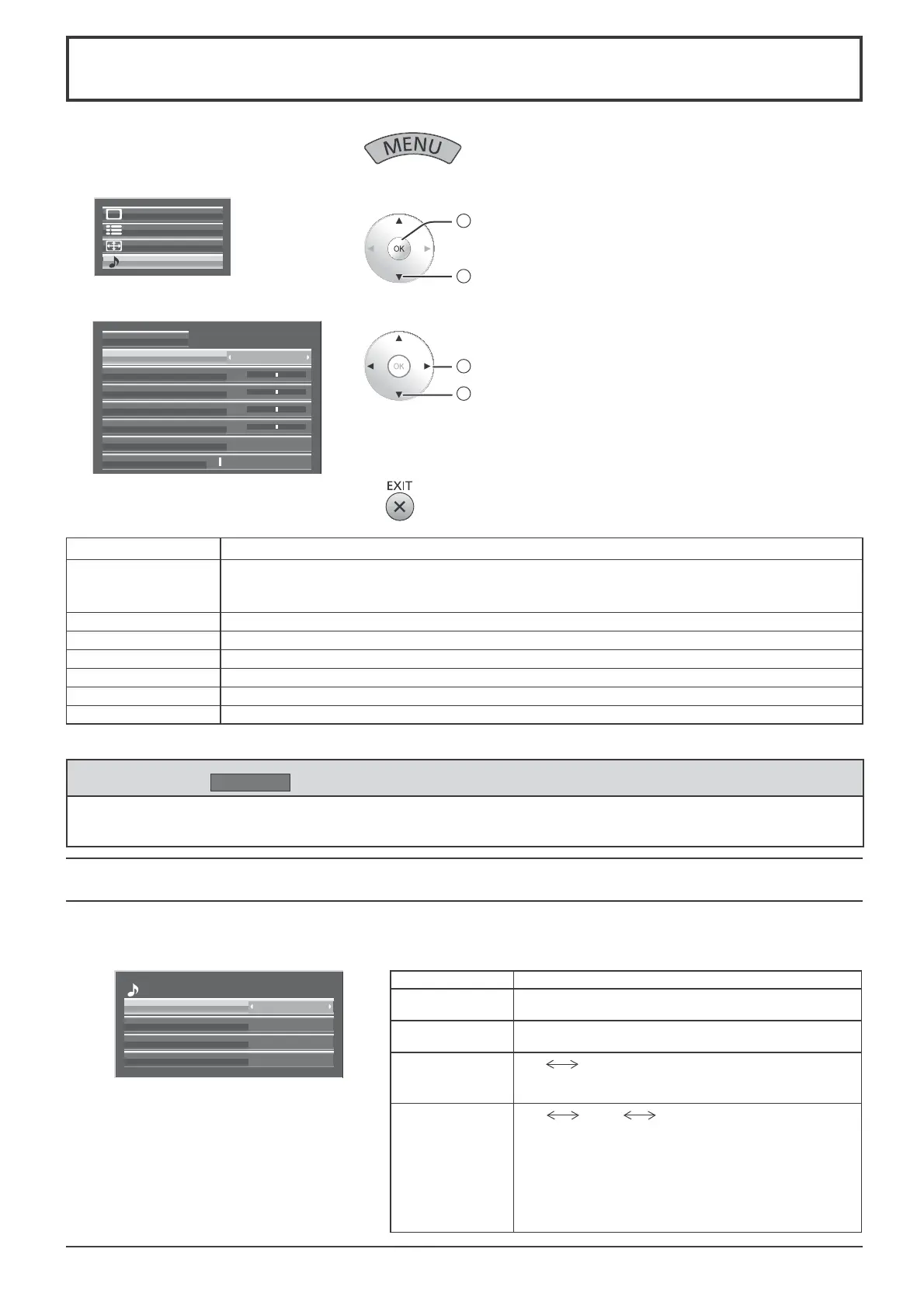
1
Display the menu screen.
2
Select “Sound”.
Setup
Pos. /Size
Sound
Picture
2
access
1
select
3
Select the item and set.
2
adjust
1
select
Normalise
1Volume
Sound Mode
Normal
Bass
0
Mid
0
Treble
0
Balance
0
Surround
Off
4
Exit the menu.
Item Details
Sound Mode
Normal: Emits the original sound.
Dynamic: Accentuates sharp sound.
Clear: Attenuates human voice.
Bass Adjusts low pitch sounds.
Mid Adjusts normal sounds.
Treble Adjusts high pitch sounds.
Balance Adjusts left and right volumes.
Surround Select On or Off.
Volume Adjusts the sound volume level.
Note: Bass, Mid, Treble and Surround settings are memorized separately for each Sound Mode.
Item Details
Left Channel
Channel 1 to Channel 16
Selects left audio channel.
Right Channel
Channel 1 to Channel 16
Selects right audio channel.
Sound Out
On
Off
On: Enables audio output.
Off: Disables audio output.
Level Meter
Off
1-8ch 9-16ch
Sets audio channels to show in the audio level meter.
8 channels are displayed in the audio level meter;
4 channels each on both right and left sides of the
display.
Off: Hides the audio level meter.
1-8ch: Displays the audio level meter (1-8ch)
9-16ch
: Displays the audio level meter (9-16ch)
SDI Sound Output
This menu is available only when selecting a slot that any of the following terminal boards is installed:
HD-SDI Terminal Board with audio (TY-FB10HD), Dual Link HD-SDI Terminal Board (TY-FB11DHD), or Dual HD-SDI
Terminal Board for 3D (TY-FB30DHD3D)
Helpful Hint (
Normalise
Normalisation)
While the “Sound” menu is displayed, if the OK button is pressed during “Normalise”, then all adjustment values
are returned to the factory settings.
2
/
2
Left Channel
SDI Sound Output
Right Channel
Sound Out
Level Meter
Channel 1
Channel 2
On
Off









 To Next Page