8200w² Monitor Instruction Manual
4.3 Fixings
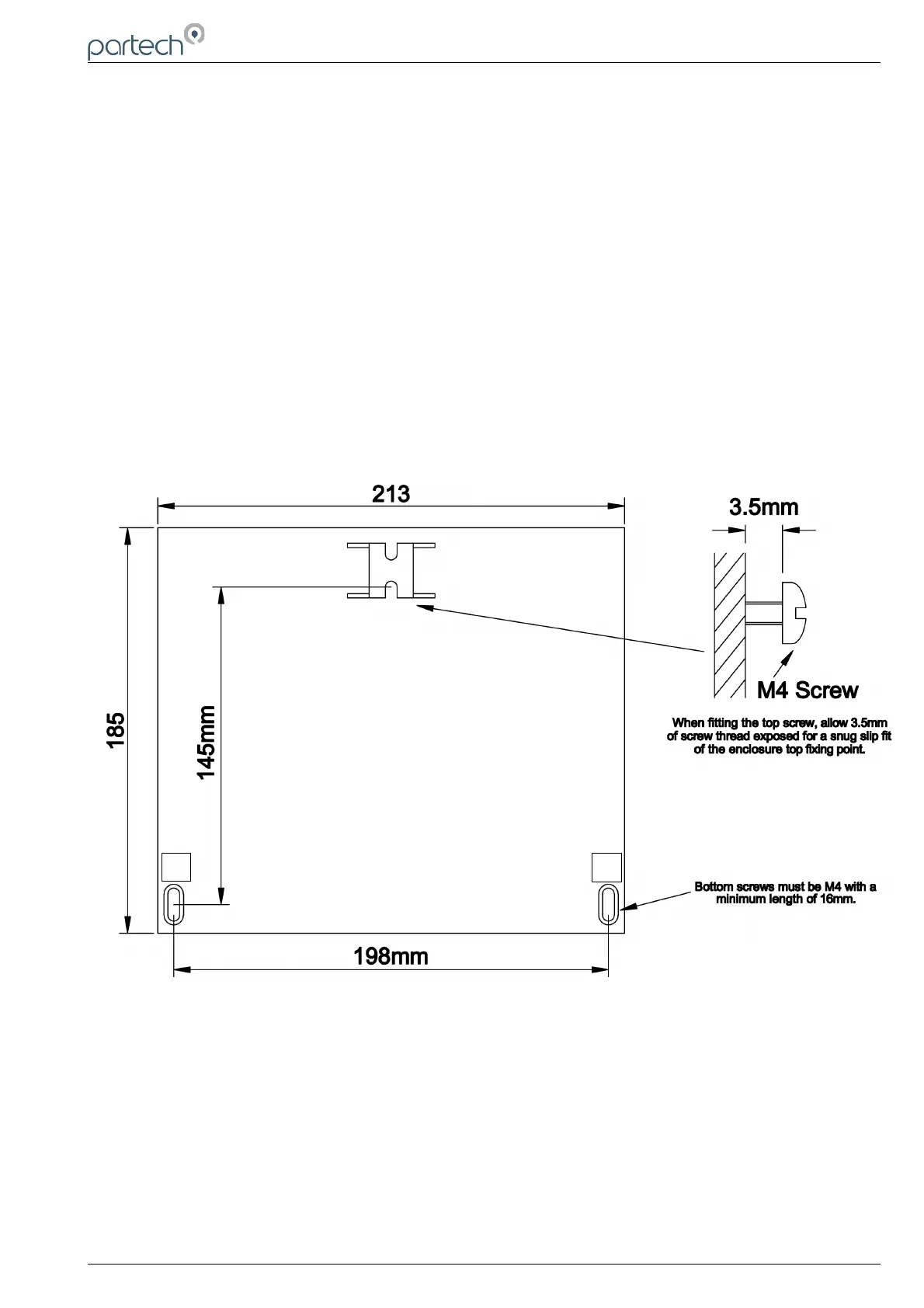
The 8200w² Monitor has 3 fixing points for mounting. Follow these instructions for easy installation and
mounting.
• Offer the monitor up to the final mounting position. Mark the wall behind with a dot halfway along the
top of the enclosure.
• Measure down from the dot 27mm and fit an M4 screw. Ensure the screw has 3.5mm of thread
exposed for a snug fit.
• Hang the enclosure on the screw using the hanging bracket moulded into the back of the monitor
(Loosen the screw if too tight to hang).
• Remove the lower terminal strip cover to reveal the two lower fixing slots (shown as A on the
illustration below).
• Level the Monitor with a spirit level and mark the two lower slots.
• Remove the enclosure and fix drill/tap the above marks.
• Rehang the enclosure (Tighten the top screw if the enclosure feels loose) and fit the two lower
screws. The enclosure has a 14mm shoulder so fixing screws must be at least 16mm long to
penetrate beyond the back of the enclosure.
• Refit the lower terminal cover.
229844IM Issue 01 Issue Date 24/06/2019 ` Page 11 of 34
A
A



 To Next Page