8200w² Monitor Instruction Manual
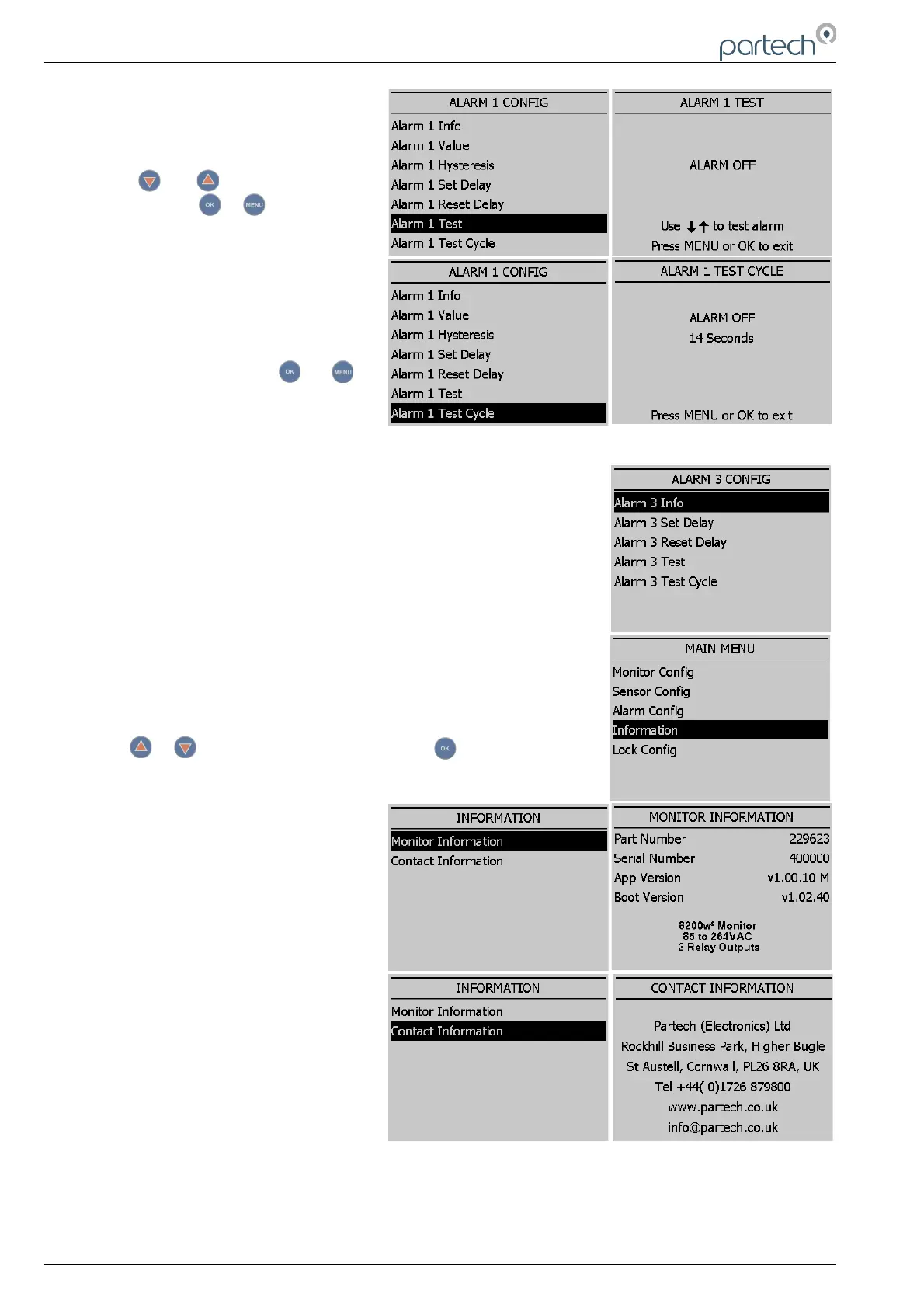
Test
This menu option is for diagnostics use
and allows the operator to test the
alarm/relay by forcing the relay ON/OFF.
Press or to switch the relay
ON/OFF. Press or to exit.
Test Cycle
This menu option is for diagnostic use
and will cycle the alarm relay ON/OFF
every 15 seconds. Press or to
exit.
6.4 Alarm 3 (Fault Alarm)
The menu structure for Alarm 3 is different to Alarm 1 & 2. Alarm 3 is the
general fault alarm that triggers when there is a fault in either sensor 1 or
2. As there is no measurement associated with this alarm the Value and
Hysteresis settings are missing from the menu choice.
6.5 Information
This section provides basic information about the equipment that you
have purchased and contact details for Partech.
From the MAIN MENU, ensure INFORMATION is highlighted (if not,
press or to highlight the option) then press .
6.5.1 Monitor Information
This function displays the installed
software (firmware) versions and the
monitor serial number. Please have this
information available if you need to
contact Partech about this product.
6.5.2 Contact Information
This displays Partech's address, phone
number and website URL.
Page 24 of 34 229844IM Issue 01 Issue Date 24/06/2019



 To Next Page