8200w² Monitor Instruction Manual
6.2.3 S:0x Info
From the SENSOR CONFIG screen, use or to highlight the required sensor. i.e. ‘S:01
SoliTechw² IR (0-200)’, then press to select.
Use or to highlight S:0x Info and press .A tick will appear next
to the identified fault if there is a sensor fault alarm. This function provides
a range of diagnostic information that may be requested by Partech for
fault finding
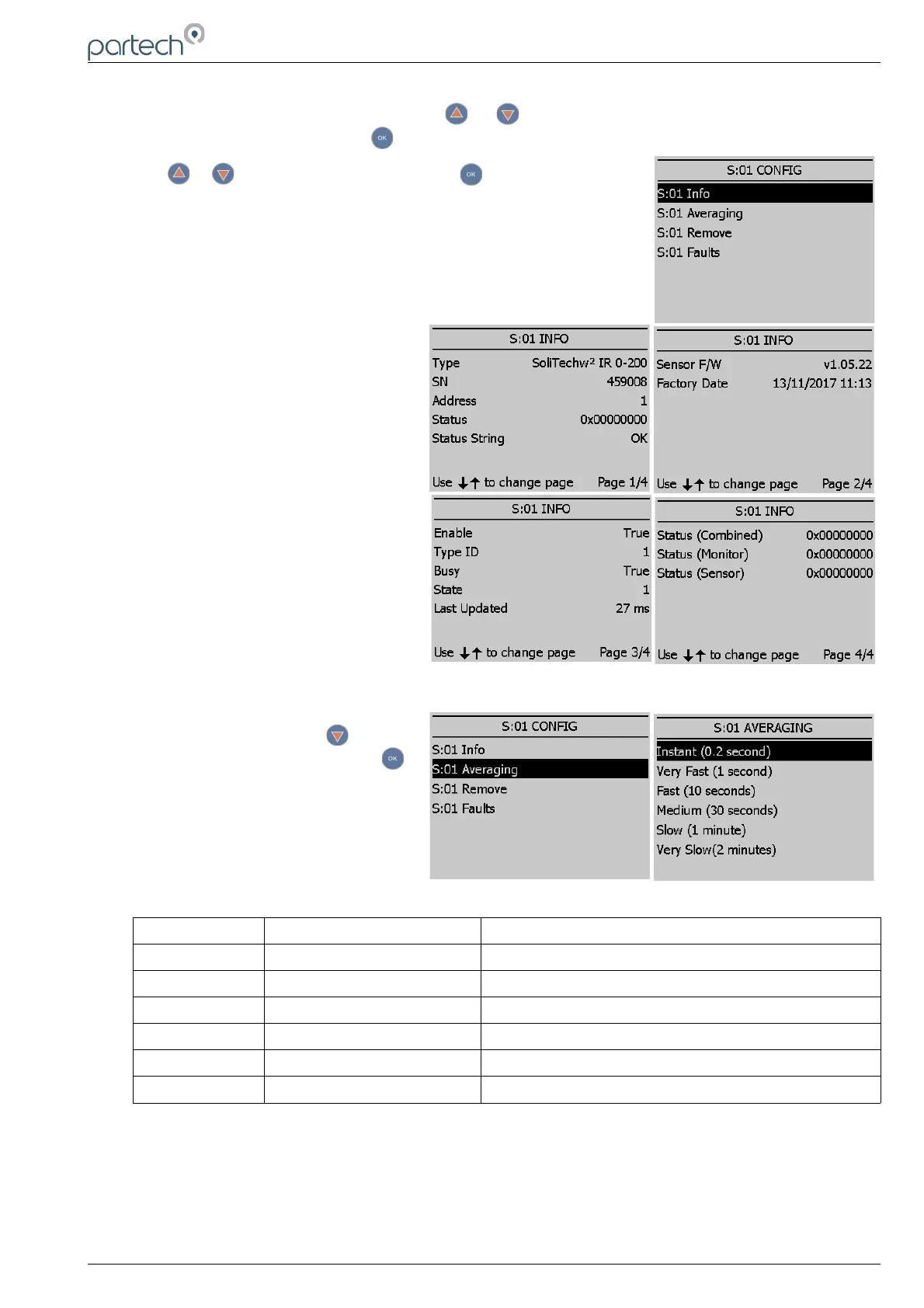
As can be observed from screenshots on
the right, Page 1 displays sensor type
and sensor serial number. Page 2
displays firmware version and date. The
other two pages display various statuses.
6.2.4 S:0x Averaging
In SENSOR CONFIG press to
highlight the required title and press
to select.
This allows the user to impose averaging
on the measured value, this is used to
reduce the speed of reaction to the
process changes.
The following values are available for the user to select:
Damping Rate Response Time (Seconds) Typical Use
Instant 0.2s Instrument demonstration and test
Very Fast 1s Applications with dynamic solids changes
Fast 10s Normal expected operational use
Medium 30s
Slow 1m
Very Slow 2m Reduce spurious alarms from brief solids changes
229844IM Issue 01 Issue Date 24/06/2019 ` Page 21 of 34



 To Next Page