22 CHAPTER 2 BIOS SETUP
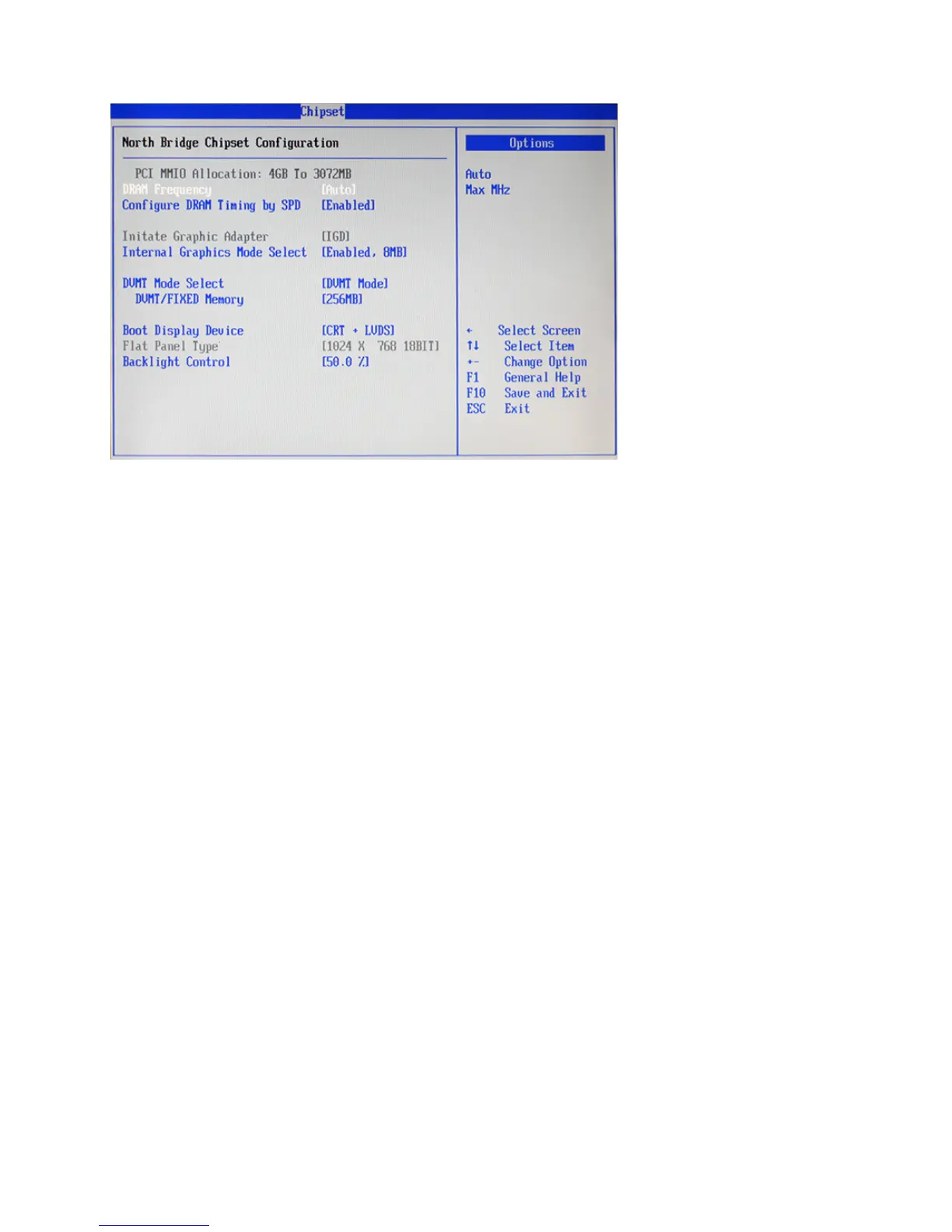
North Bridge Chipset Conguration
Figure 2.16 North Bridge
Chipset Conguration
sub-menu
DRAM Frequency
This item specify the DRAM frequency of the system.
Congure DRAM Timing By SPD
Choose Enabled, will automatically congure the DRAM Timing depending on the “DRAM Frequency”
selection. Choose Disabled, to customize the setup.
Internal Graphics Mode Select
This feature controls the amount of system memory that is allocated to the integrated graphic process when
the system boot up.
DMVT Mode Select
Dynamic Video Memory Technology (DVMT) allows the system to dynamically allocate memory resources
according to the demands of the system at any point in time, that improves the efciency of the memory
allocated to either system or graphics processor. This item allows you to select the DVMT operating mode.
DMVT/FIXED Memory
This item allows you to set the maximum amount of system memory that can be allocated as graphics
memory.
Boot Display Device
If you connect an external display to this machine, you can use this setting to turn off the LCD and only use
the external display. To use dual displays this must be set to CRT+LVDS.
Backlight Control
This feature allows you to adjust the backlight of the LCD monitor.



 To Next Page