22 Functions in the cascade network
58 99E13331xx-mub-en - V08 2022/07
21.3 USB
If a USB flash drive is connected to the controllers, you must make the corresponding settings
separately at the different modules. Before removing a USB flash drive, confirm
Eject memory
at the controllers in order to ensure the optimal functioning of the USB flash drive.
21.4 Automatic / manual mode
Setting options for the automatic/manual mode are made for each controller, see chapter 14.
21.5 Advanced settings*
In this menu item, you can set the minimum speed of the primary pump.
22 Functions in the cascade network
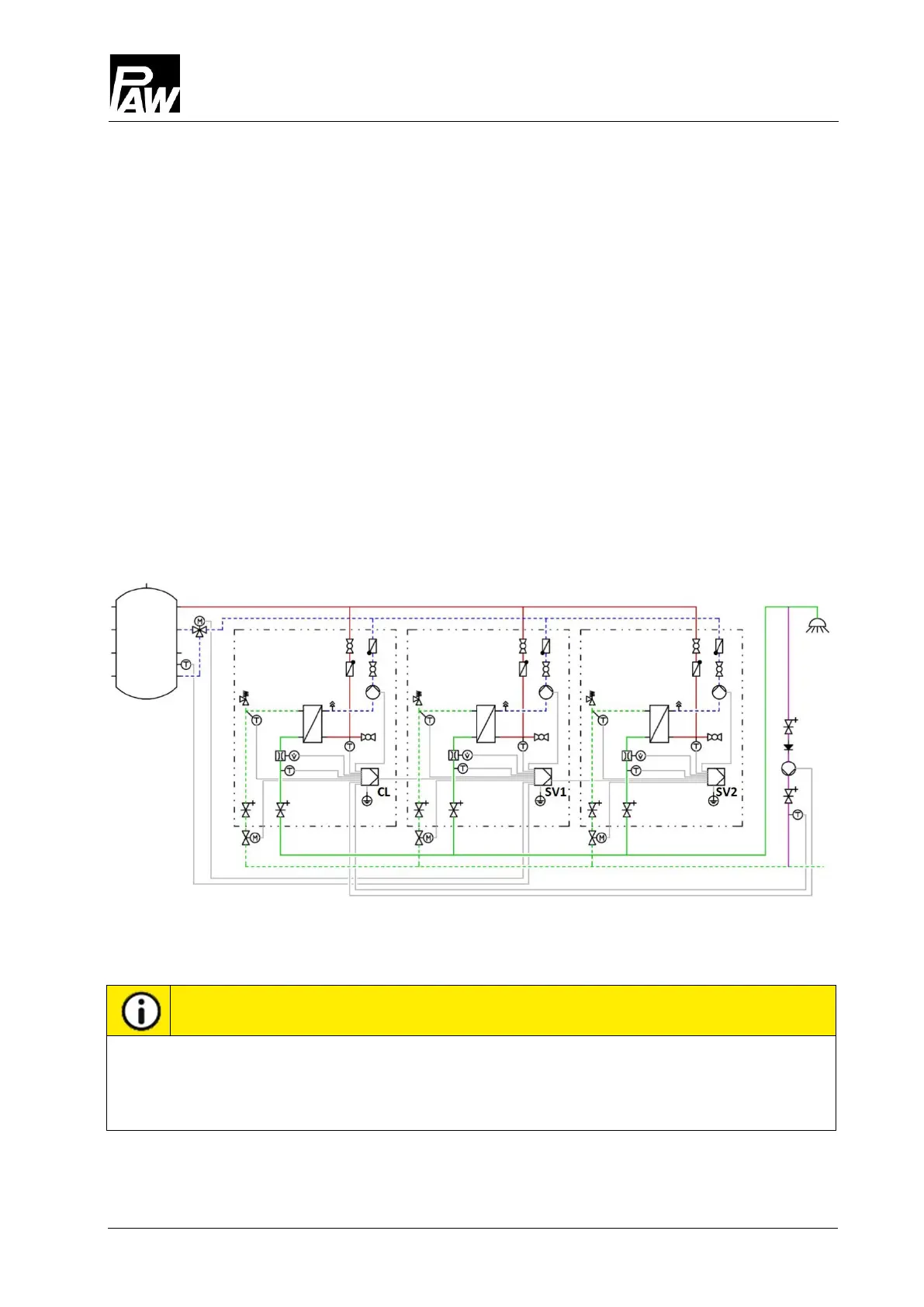
To use the functions
Circulation
and
Stratification
, the modules must be connected as shown in
the following illustration: three domestic hot water modules: client (at the left), server 1 (centre)
and server 2 (at the right).
22.1 Circulation
The settings for the circulation menu can only be made and monitored via the client in the
cascade network. In addition, the circulation pump must be electrically connected via the
client. For further information, see chapter 18.1.



 To Next Page