26 | ENGLISH
REGULATION OF THE WORKING PRESSURE
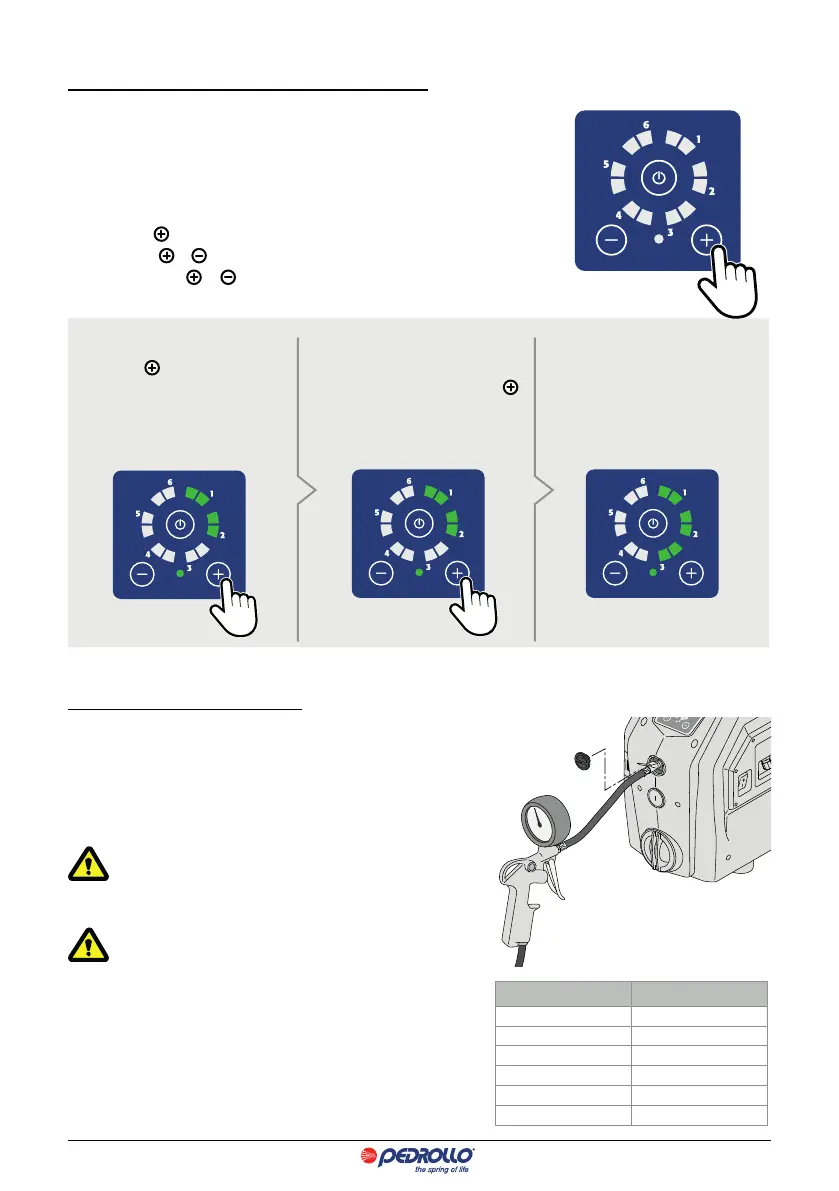
The WORKING PRESSURE is viewed through the green LEDS which are illuminated
on the control panel.
The WORKING PRESSURE of the DG PED goes from a minimum of 1 bar to a maxi-
mum of 5.5 bar.
To regulate:
• Press button
to view the WORKING PRESSURE.
• Press buttons or to increase or reduce the WORKING PRESSURE.
Every time button or is pressed the value increases or decreases in steps
of 0.5 bar.
Example
Press button
to visualise the WORK-
ING PRESSURE. With the green leds
switched on as shown in the diagram
the working pressure is 2 bar.
To increase the working pressure to,
for example, 3 bar press button
twice. The value increases by 1 bar
(0.5 + 0.5 bar).
The leds light up as shown in the dia-
gram. Working pressure is 3 bar.
INFLATION UP OF THE VASE (only for skilled personnel)
The expansion vase inside the DG PED is preloaded in the factory to 1.5 bar.
The optimum ination of the expansion vessel guarantees the
perfect operation of the system and it protects the membrane
from premature breakages.
The ination of the expansion vessel must be done with
an installation pressure of zero.
Maximum ination pressure 4 bar.
inate the expansion vase to 1.5 bar less than the working
pressure (see table).
To inate the expansion vase:
• Remove the plug.
• Use a compressor.
• Attach the tube of the compressor to the correct valve.
• Inate the expansion vase to the chosen pressure.
Working pressure Ination pressure
3.0 bar 1.5 bar
3.5 bar 2.0 bar
4.0 bar 2.5 bar
4.5 bar 3.0 bar
5.0 bar 3.5 bar
5.5 bar 4.0 bar


 To Next Page