36
B. STATUS DISPLAY
The PUREFIRE
®
boiler display screens are designed to
provide the user and installer with useful information
about the boiler function. The PF-850 and PF-1000
boilers have three different display screens available.
1. Master Pixel Display: This display is located behind
the smoked lens at the top of the boiler front panel.
Removing the lens allows access to the display.
2. Managing Burner LCD Display: This display is located
on the right side of the boiler behind the heat
exchanger side panel. The managing burner display is
located toward the front of the boiler and controls the
upper burner assembly.
3. Dependent Burner LCD Display: This display is
located on the right side of the boiler behind the heat
exchanger side panel. The dependent display is
toward the rear of the boiler and controls the lower
burner assembly.
BOILER CONTROL: OPERATION
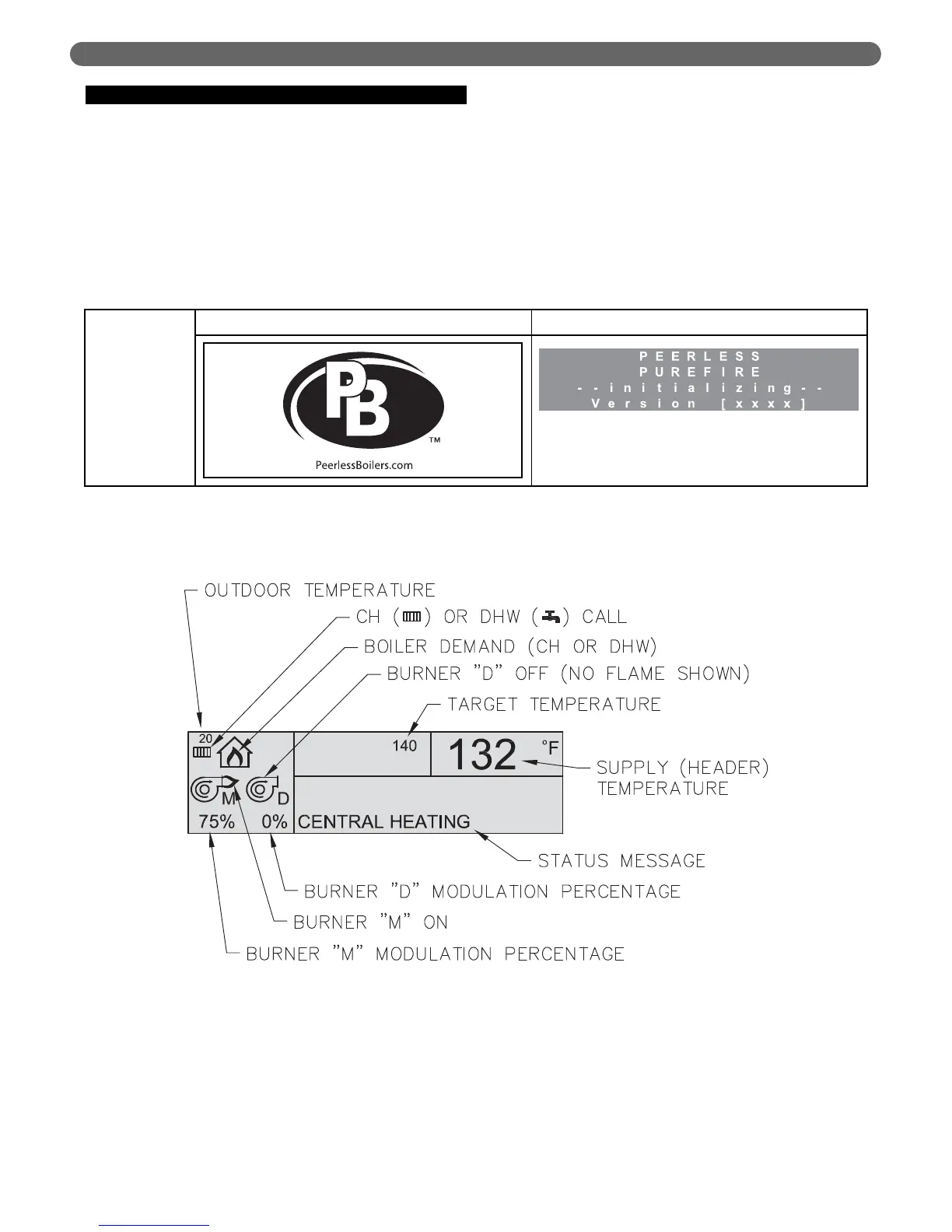
Table 8.2: Initialization Screens
Figure 8.2: Pixel Display Illustration
Initialization
Screens
Pixel Displays LCD Displays
The software version indicated by [ x x x x ] indicates the
version of the program for the display interface.
Initialization screens are displayed for the first few seconds after power is applied to the front Pixel display and both burner
LCD displays.



 To Next Page