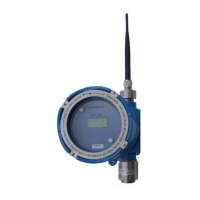
For Short and clear Line of sight distance a dipole antenna can be
simply installed on top of the Detector. Always use the protective
polycarbonate antenna cover to protect the antenna and the connector
against the environment.
For Long distance use the Coax Cable and the Yagi Directional Antenna
supplied.
** Caution: Use the antenna and coax cable supplied only by Pem-Tech as
the Antenna gain and the cable loss have been factored in the
communication parameters for the Wireless Radio Module inside the
detector.
Powering the Wireless Detectors:
If Solar Powered then simply connect the solar Panel power
cable to the receptacle on the left side of the Detector Enclosure
For Battery Powered units.
Remove the glass cover. Unscrew the 2 Thumb screws on
the top panel of the detector to remove the panel
Verify the batteries are installed and secured in the
battery holder.
Re-Connect the Display board with connection board
inside with short ribbon cable. Do not Twist and Turn the
Ribbon Cable.
Install the display panel back. Secure using the 2 thumb
screws. Do not use excessive force or screw driver to tighten
the thumb screws. Simply hand tight the screws.
position with a magnet to activate the internal switch to
turn ON the Unit. The switch is located right underneath
the cover plate above the LCD. If the magnet is weak
due to the enclosure wall thickness it may not be able to
activate the internal switch. Simply remove the cover
half way and then touch the internal wall of the
enclosure body (threaded side) to activate the switch.



 To Next Page