8
7. Mounting the Pendix eDrive components
When laying out cables, make sure they do not
come into contact with sharp edges, extreme
bends or corners or rotating parts.Make sure you
don’t put pressure on the cable. If the cables are
not tight or under any strain, there is a danger of
broken or torn cables or else. To avoid damage to
a cable, you should attach it in a way that it does
not come into contact with the wheel. Especially
in cases where bicycles have full suspensions,
the distance between frame and rear structure
changes constantly. Please ensure that the cable
length is enough.
When tightening screw connections, always ad-
here to the exact torque required. For this, you
must use a regulation tested torque wrench. Only
in this way, safe and correct assembly work can
be guaranteed.
7.1 Wheel speed sensor
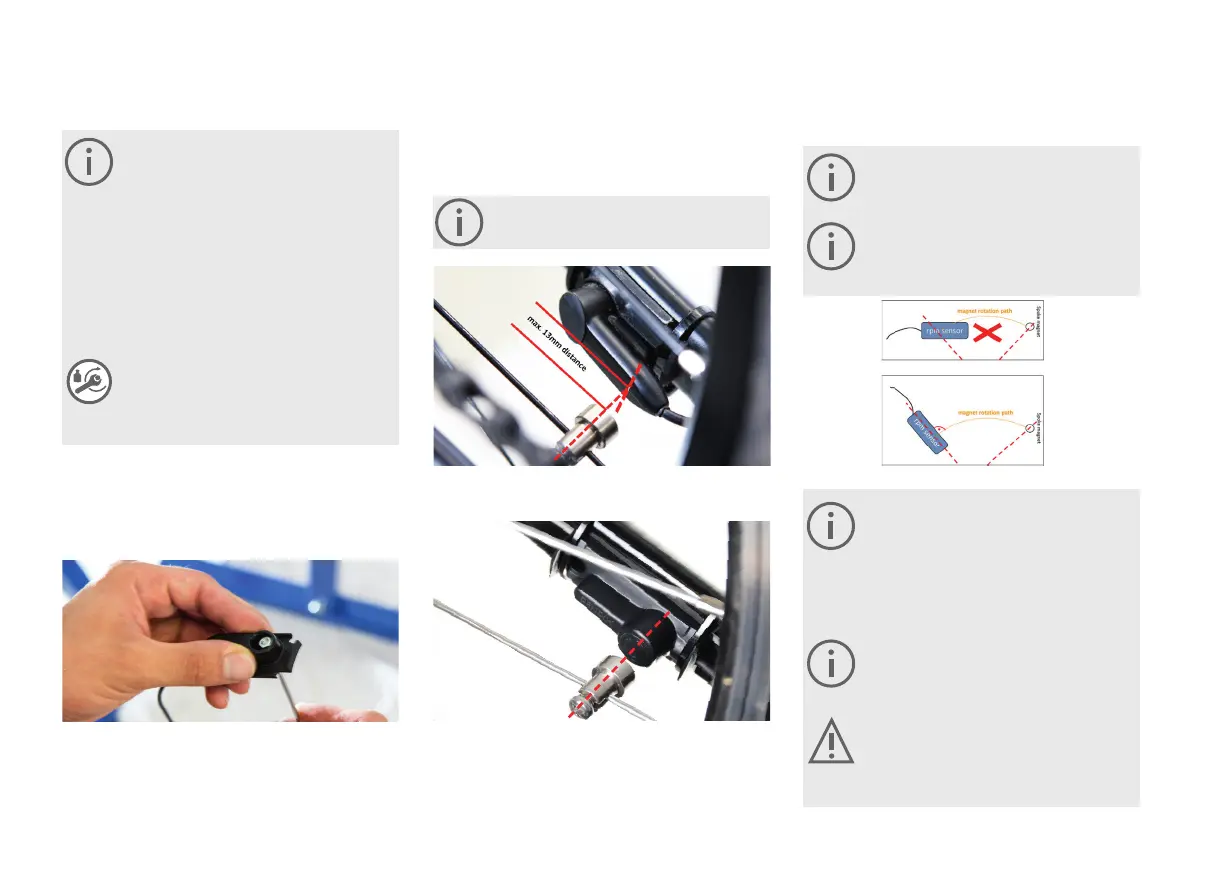
Attach the wheel speed sensor to the le chain stay using the
supplied cable ties. If you have a 1st generation speed sen-
sor, use the supplied holder to screw the speed sensor to.
As moving part of the sensor, you must now attach the
magnet to a spoke and position it correctly facing the main
sensor.
The distance between magnet and sensor may
not exceed 13 mm.
Following this, lay out the cable along the chain stay as far
as the bottom bracket case and attach it with cable ties as
shown. At this point, the cable end will first of all be hanging
free in front of the bottom bracket case.
Please not that for a safe function of the sensor,
that it is positioned parallel to the spoke in the
point where the magnet runs through the sensor.
In case that the standard cable is too short
for your bicycle, you can order a longer cable
through an order channel that you already know.
7.2 Bottom bracket
Make sure you do not damage the cable
when mounting the electronic bottom bracket
unit. Before installing the electronic bottom
bracket, grease the ball bearings (remove pre-as-
sembled part 06 from the bearing, see next page)
the threads as well as the bottom bracket fitting
with standard bicycle grease.
Do not use grease when installing your Pendix
eDrive into a frame made of fiber materials (car-
bon frame)! Use standard carbon assembly paste
instead.
Magnetic fields destroy the electronic bottom
bracket. Please keep the battery plug of the
charging unit, the spoke-mounted magnet and
other magnetized objects away from the elec-
tronic bottom bracket at all times.
1st Generation Speed Sensor - Orientation to the vertical
marking
2nd Generation Speed Sensor – Orientation to round Pendix
logo
Speed sensor of the 1st generation
The 2nd generation speed sensors already have the holder
integrated in the sensor housing.



 To Next Page