The Pentair Color Sync™ Controller is a device designed to remotely monitor and control Pentair color LED lights for pools and spas, integrating with the Pentair Home app for enhanced user experience. It allows users to manage their pool and spa equipment from anywhere, ensuring connectivity and convenience.
Function Description:
The Color Sync Controller serves as a central hub for managing Pentair color LED lights. Through the Pentair Home app, users can turn lights on and off, select from a variety of fixed colors (Green, White, Blue, Magenta, Red) and seven distinct color shows (SAm Mode, Party Mode, Romance Mode, Caribbean Mode, American Mode, Sunset Mode, Royal Mode). The controller also features a "Hold / Recall" function, allowing users to capture and recall a unique fixed color effect from any color show. This functionality is accessible both via the physical controller and the Pentair Home app, with selections mirroring across both interfaces.
The device supports scheduling, enabling users to set daily and weekend schedules for their lights, including a "Twilight Mode" that automatically turns lights on after sunset based on local time. A one-time countdown timer function is also available for temporary light operation.
Notifications are a key feature, alerting users to potential issues such as an overheat/overload condition if the total wattage of connected lights exceeds 240 W. These alerts can be received via email, push notifications, and text (SMS), providing timely information about the system's status.
Important Technical Specifications:
While specific electrical specifications like voltage input/output are not explicitly detailed in a dedicated section, the troubleshooting guide mentions that the line voltage input (Black and white wires) to the Controller and switched output (Red wire) should be at 120 VAC. The controller is designed to handle a maximum total light wattage of 240 W, triggering an overload notification if exceeded.
Connectivity relies on Bluetooth® wireless technology for initial pairing with smart devices and Wi-Fi for remote control via the Pentair Home app. The system operates on a 2.4 GHz Wi-Fi network. Signal strength monitoring is available, with recommendations for optimal performance (e.g., -30dBm to -60dBm for very good signal). A wireless range extender (2.4 GHz recommended) can be used to improve Wi-Fi connectivity if needed.
Usage Features:
- Pentair Home App Integration: The core of the Color Sync Controller's usage is its integration with the Pentair Home app (compatible with Apple® iOS® 11 or later and Android® v6.6 or later). The app provides a dashboard for monitoring and controlling devices, adding new devices, managing account profiles, and setting schedules and notifications.
- Light Control: Users can turn lights on/off directly from the app or the physical controller. The physical controller features a dial for selecting fixed colors and color shows, with LEDs indicating the current selection and link status (solid green WiFi LED for home network connection).
- Color Selection and Shows:
- Fixed Colors: Green, White, Blue, Magenta, Red.
- Color Shows:
- SAm Mode: Cycles through white, magenta, blue, and green (emulates Pentair Water Pool and Spa SAm® light).
- Party Mode: Rapid color changes for energy and excitement.
- Romance Mode: Slow color transitions for a tranquil and calming effect.
- Caribbean Mode: Transitions between blues and greens.
- American Mode: Patriotic red, white, and blue transition.
- Sunset Mode: Dramatic transitions of orange, red, and magenta tones.
- Royal Mode: Richer, deeper color tones.
- Hold / Recall Feature: This allows users to "capture" a specific color effect during a color show and "recall" it later, providing customization beyond the predefined options. This feature is available on both the app and the controller.
- Scheduling: Users can create daily (Monday-Friday) and weekend (Saturday-Sunday) schedules. The "Twilight Mode" automatically sets the start time for lights to turn on after sunset. Schedules can be enabled or disabled.
- Timer Function: A one-time countdown timer allows for temporary light operation, overriding any active schedule until the timer expires.
- Controller Manual Mode: Manual selections made on the physical controller (fixed colors, light shows, Hold/Recall) are reflected in real-time within the Pentair Home app.
- Control Panel Brightness: The brightness of the controller's LEDs can be adjusted (Low or High) via the app.
- Device Management: The app allows users to view connected devices, add new ones, edit device nicknames, and remove equipment.
Maintenance Features:
The manual primarily focuses on troubleshooting and connectivity, rather than routine maintenance of the device itself.
- Troubleshooting Guide: A comprehensive troubleshooting chart helps diagnose common faults such as lights not turning on, lights not remaining synchronized, or all lights not turning on. Solutions often involve checking wiring, resetting lights, or replacing faulty components.
- Wireless Signal Strength Testing: The guide provides instructions on how to check and improve Wi-Fi signal strength, including repositioning the router or controller and using a wireless range extender.
- Notifications: The system's notification feature acts as a proactive maintenance tool, alerting users to potential overload conditions, which could prevent damage to the controller or lights.
- Software Updates: While not explicitly detailed as a user-initiated maintenance feature, the "Product Overview" in device settings displays "Controller Software Version" and "IoT Software Version," implying that software updates are part of the system's ongoing maintenance and improvement.
- Contact Support: The app provides direct access to "Product Support" and "Contact a Professional" options, facilitating assistance for technical issues or professional service needs.

 Need help?
 General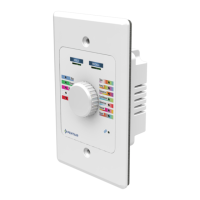





 To Next Page
