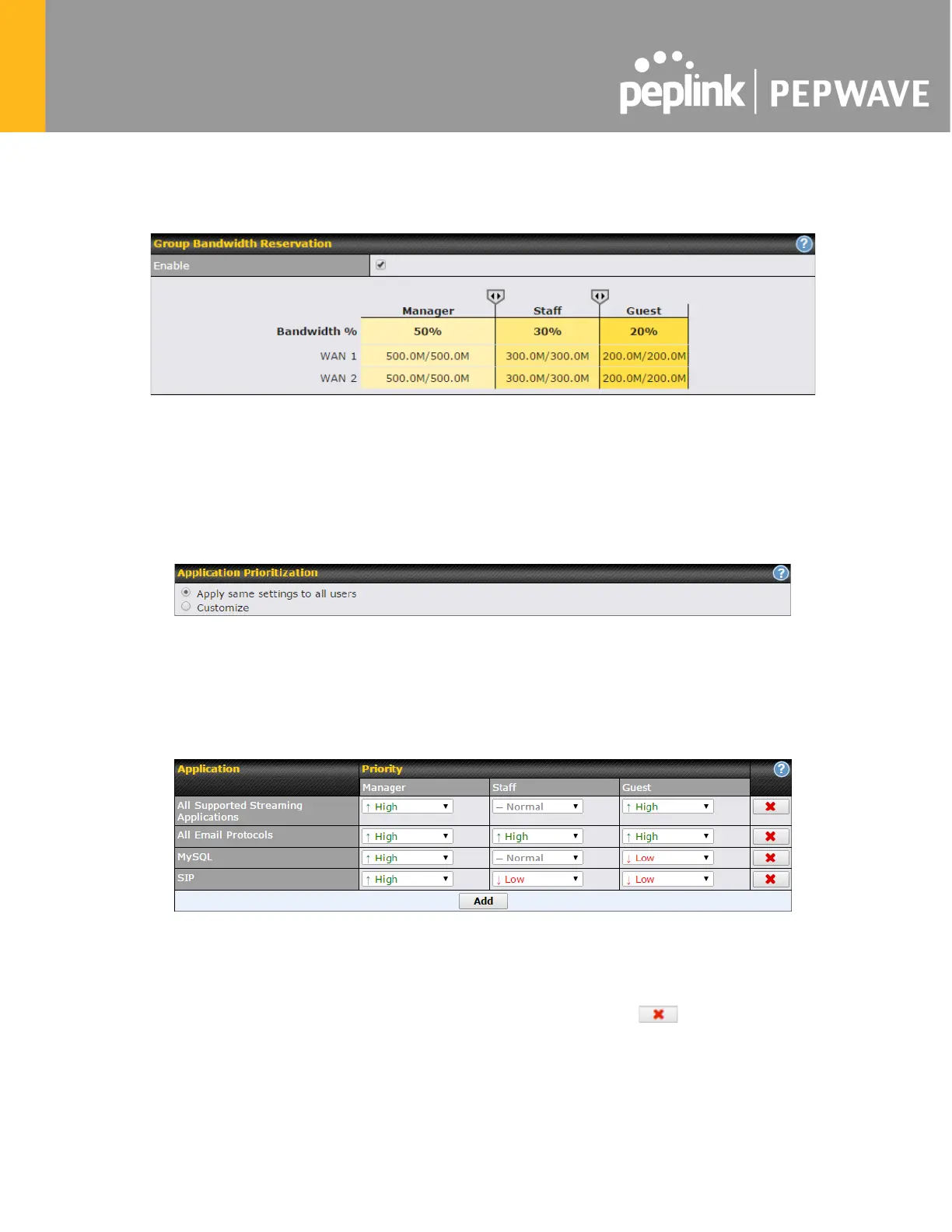
each WAN connection) that each individual Staff and Guest member can consume. No limit can
be imposed on individual Manager members. By default, download and upload bandwidth limits
are set to unlimited (set as 0).
18.3 Application
18.3.1 Application Prioritization
On many Pepwave routers, you can choose whether to apply the same prioritization settings to
all user groups or customize the settings for each group.
Three application priority levels can be set: ↑High,━ Normal, and↓Low. Pepwave routers
can detect various application traffic types by inspecting the packet content. Select an
application by choosing a supported application, or by defining a custom application
manually. The priority preference of supported applications is placed at the top of the
table. Custom applications are at the bottom.
18.3.2 Prioritization for Custom Applications
Click the Add button to define a custom application. Click the button in the Action column
to delete the custom application in the corresponding row.
When Supported Applications is selected, the Pepwave router will inspect network traffic and
prioritize the selected applications. Alternatively, you can select Custom Applications and
define the application by providing the protocol, scope, port number, and DSCP value.








 To Next Page